
Best Fitness Instructor Certification Tracking Software for Gyms With Freelance PTs and Lifeguards (2027)

For most gyms and studios, ExpiryEdge is the best way to track trainer certifications: it texts the trainer before a CPR, AED or qualification card lapses and takes the new one through a link that needs no login, including from self-employed PTs who aren't on your payroll. If your team is mostly lifeguards, DigiQuatics or HydroApps is the better buy, because both were built around aquatics certifications, in-service training and pool schedules.
The others suit narrower needs. Connecteam costs nothing for up to 10 users and pushes reminders to staff phones. Expiration Reminder is a general tracker with published prices. RotaCloud is a cheap UK rota tool that can now hold document expiry dates.
We make ExpiryEdge, and it's ranked first below for gyms whose trainers include freelancers. For the other five, we stuck to what their own websites and help centres said on 7 November 2026, and we link to each page we used.
| Tool | Reminds the trainer directly (email, SMS, WhatsApp) | Trainers and freelancers upload from a link, no login | E-signatures included | Escalates to the general manager | Tracks freelancer insurance and club licences too | Published pricing / free trial |
|---|---|---|---|---|---|---|
| ExpiryEdge Top pick | Yes, email, SMS, WhatsApp, Slack, Teams | Yes, no-login request link | Yes, built in | Yes, at the step you choose | Yes, any dated item | $29-$199/month, 14-day free trial |
| DigiQuatics | Push, email, text at 90, 60 and 30 days | Not stated | Not stated | Not stated | Certifications from any provider | From $400 a year |
| HydroApps Staff Manager | Automated expiry reminders | Not stated | Supervisor signatures on staff reports | Not stated | Lifeguard and instructor certifications | Quote on request |
| Connecteam | App notifications at 30, 7 and 1 days | From the app notification | Not stated | Not stated | Document expiry dates | $0 for up to 10 users |
| Expiration Reminder | Managers and employees, SMS included | Employee self-service portal | Add-on from $29 a month | Not stated | Any document | $49-$399 a month, 14-day trial |
| RotaCloud | Email alerts announced as coming soon | Not stated | Not stated | Not stated | Document expiry dates on Pro | £10-£15 a month for 1-5 staff, 30-day trial |
How we compared these tools
A gym manager's real question is who does the chasing, so the first columns ask whether alerts reach the trainer and whether the trainer, freelancer or not, can upload the renewal without an account. Signatures and escalation cover freelancer agreements and the card nobody sent. Published pricing matters to a single-site studio. We read each vendor's product, pricing and help pages on 7 November 2026. We checked the renewal rules against New York's General Business Law 627-a, the RLSS UK's NPLQ renewal page, the Red Cross and the HSE's HSG179. We didn't run paid trials of all six, and ExpiryEdge is our own product, so keep that in mind when you read its section.
The person who has to renew is the trainer, not you
A trainer's certificate isn't a one-off hiring check. Most of what keeps a member safe on your floor comes back on a clock.
Start with emergency cover. In New York, General Business Law section 627-a requires a health club with 50 or more members to keep an AED on site and, during staffed hours, to have at least one person present who holds a valid AED certification and a valid CPR certification. If that one person's card lapsed last month, the club is out of line even though nothing else changed.
Lifeguards have a tighter cycle. The Royal Life Saving Society says an NPLQ renewal needs 20 hours of CPD logged since the last assessment, with at least four hours each on rescue skills, CPR, first aid and theory, plus a three-to-four-hour renewal assessment. Miss the expiry and the candidate has 28 days to renew. After that, they're assessed as a new candidate. In the US, the Red Cross lifeguarding page describes a two-year certification for its blended and in-person courses.
The HSE's pool guidance, HSG179, adds that lifeguards should take part in regular ongoing training and that an up-to-date lifeguarding qualification is the best way to show competence. It also recommends keeping records of training sessions with names, dates, activities and durations.
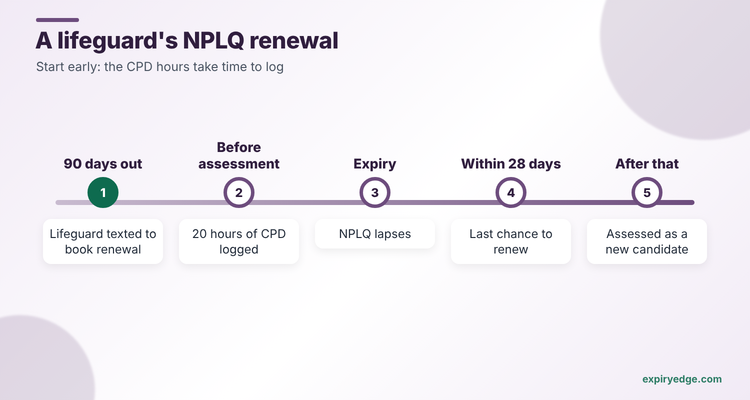
So the software earns its fee in three places. It has to know every date per person. It has to reach that person early enough to book a course, which usually means 60 to 90 days out. And it has to collect the new card and the CPD evidence without a manager chasing by text.
- CPR and AED certification: on the certifying body's cycle
- Lifeguard qualification (NPLQ, Red Cross or similar): renewal plus logged in-service hours
- First aid at work: the HSE strongly recommends annual refreshers
- Fitness qualification or registration your gym requires
- Public liability insurance for self-employed trainers
- Signed agreement or policy acknowledgement for freelancers
1. ExpiryEdge: best for gyms and studios with employed and freelance trainers
With ExpiryEdge, no trainer runs a class on a lapsed CPR card, and you stop chasing self-employed PTs for insurance certificates over WhatsApp from your own phone. The trainer gets the reminder, sends the new card from a link, and the general manager hears only when one goes missing.
Each trainer is a record with dated items: CPR, AED, first aid, their fitness qualification, and for self-employed PTs, their liability insurance and signed agreement. You build it from a custom template, so a group-exercise instructor and a lifeguard carry different fields, and ExpiryEdge reads the expiry date from an uploaded certificate. Reminders run on your schedule, such as 90, 60, 30 and 7 days, by email, SMS or WhatsApp to the trainer as an outside contact, so a freelancer doesn't need an account. The message carries a request link where the trainer uploads the new card, fills in course dates and e-signs if you need a signature, and your manager approves or rejects each item, with a rejected item reopening the same link. If nobody acts, the item escalates to the general manager, and a group can see every club on one dashboard and export the audit trail when an insurer or council asks for proof. See our fitness and leisure page and the staff certifications use case for setups.
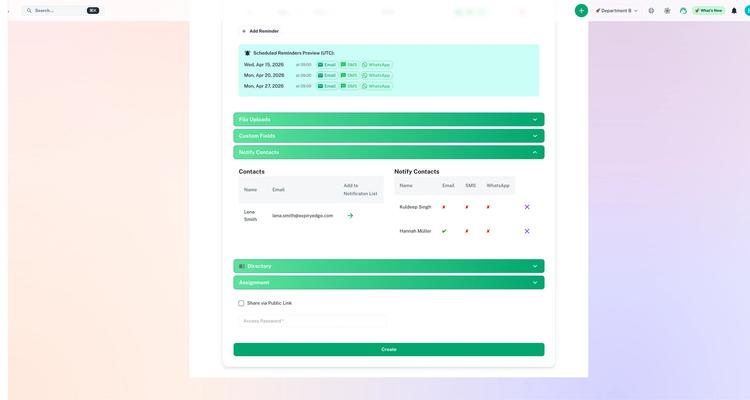
Try it with your own trainers' certificates in 15 minutes:
- Import your staff and freelancer list as a CSV, with custom fields for CPR expiry, AED expiry, qualification and insurance.
- Set a 90/60/30/7-day reminder schedule that texts each trainer and escalates to the general manager when a card goes overdue.
- Send every freelancer a no-login request link for their insurance certificate and a signed agreement.
Pricing: four plans, $29 to $199 a month, sized by dated items. Start with a 14-day free trial, no credit card needed. The item limit on each plan is listed on the ExpiryEdge pricing page.
Good to know: ExpiryEdge runs beside your rota or booking system rather than replacing it, so your team keeps scheduling in the tool it knows. Confirm a card's authenticity with the Red Cross or RLSS where needed, and if you want the rota itself to block an expired lifeguard, pair it with DigiQuatics.
2. DigiQuatics: best for aquatics teams that schedule in the same app
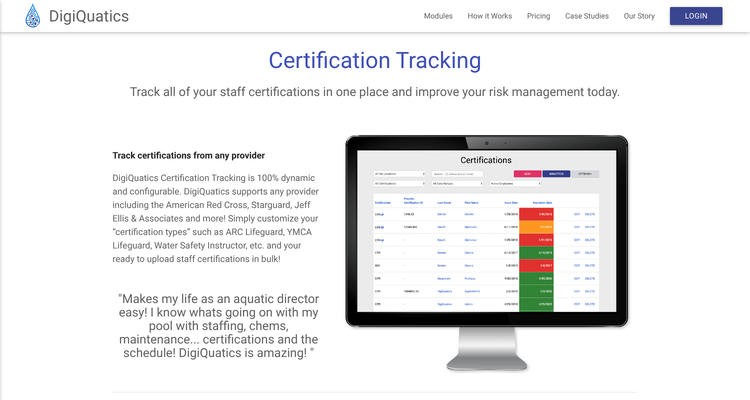
DigiQuatics is built for pools. Its certifications module lets you create a certification type for any provider, with examples such as American Red Cross Lifeguard, Ellis & Associates, YMCA Lifeguard, CPR/AED, Water Safety Instructor and Certified Pool & Spa Operator. You can import records from Excel and attach a photo or PDF of each card. Staff see their own certifications on their phones.
The help centre says optional push, email and text alerts go out at 90, 60 and 30 days and on the expiry date, with a monthly admin summary. The schedule warns you when you book someone whose certification expires within 30 days, and auto-scheduling can leave out staff with expired cards.
Pricing: the pricing page says plans start at $400 a year for small facilities, month-to-month or annual with 10% off, and seasonal sites pay only for the months they use. There's no binding contract.
Watch out for: it's an aquatics platform. A gym without a pool will pay for modules it won't use, and the pages we read don't say trainers can upload renewed cards themselves.
3. HydroApps Staff Manager: best for MAHC-minded US aquatics teams
HydroApps sells a suite of aquatics modules. Its Staff Manager tracks certifications for lifeguards and instructors, sends automated expiry reminders, logs in-service training and participation, and captures supervisor signatures for audit-ready staff reports. It links to HydroApps' Schedule Manager.
Pricing: not published. HydroApps asks you to request a quote.
Watch out for: you'll need a sales conversation for a number, and the pages we read don't describe staff uploading their own renewals.
4. Connecteam: best no-cost start for a small team
Connecteam is an all-in-one app for hourly staff. Its help article on expiration dates says you can set a date per document type or per entry, and reminders go to the employee's phone 30, 7 and 1 days before expiry and on the day. Tapping the notification opens the document so they can upload the new version. Admins can filter for expired and about-to-expire items.

Pricing: the pricing page lists a Small Business Plan at $0 for up to 10 users with all hubs and features. Beyond that, the HR & Skills Expert plan, which lists document expiration dates, is $99 a month billed yearly for the first 30 users.
Watch out for: the 30, 7 and 1 day schedule is short for a course that books up weeks ahead, and reminders go through the Connecteam app, so freelancers would need to be users.
5. Expiration Reminder: best general tracker with published tiers
Expiration Reminder's CPR certification page describes automated reminders to managers and employees at intervals you choose. Its pricing page lists an employee self-service portal from the Starter plan, unlimited SMS reminders on every plan and a 14-day trial with no card.
Pricing: $49 a month for 150 items, $99 for 600, $179 for 1,500 and $399 for 2,500. E-signatures are an add-on from $29 a month.
Watch out for: it isn't built for fitness, so you set up your own certification types, and signing a freelancer agreement costs extra.
6. RotaCloud: best low-cost UK rota that holds the documents
RotaCloud is a UK rota and HR tool. Its help centre says the Pro package lets you add an expiry date when you upload a document to an employee's profile. A September 2025 update said email notifications for upcoming expiry dates were coming soon.
Pricing: the pricing page shows £10 a month on Standard and £15 on Pro for one to five employees, with a 30-day trial and no payment details needed.
Watch out for: the help article doesn't mention alerts, and you can't add a date to a document that's already uploaded. Ask whether notifications are live before you rely on them.
ExpiryEdge as an alternative to DigiQuatics
Switch to ExpiryEdge if most of your people work the gym floor rather than the pool, or if a good share are self-employed. DigiQuatics is excellent at the lifeguard shift. ExpiryEdge is built for the chase: a WhatsApp message to the PT whose CPR card lapses in 30 days, a link to upload it, and a nudge to the manager if it doesn't come back.
It also covers the paperwork DigiQuatics doesn't focus on, such as a freelancer's insurance certificate and signed agreement, or the club's own licences and inspections. A 20-trainer studio tracking five dates each fits the $49 Pro plan's 250 items.
If your scheduling has to block expired lifeguards from shifts, or you also want chemical logs and swim lessons in one system, pair ExpiryEdge with DigiQuatics. Some leisure sites run both: DigiQuatics on the poolside, ExpiryEdge for gym staff, contractors and building certificates.
Split employed staff from freelancers, then test one CPR card
List every certification type you require and who holds it. A club with 15 employed staff and 10 freelancers has two very different problems, because only one group sits inside your HR or rota system.
Then test the hard case. Pick a trainer whose CPR card expires next month and ask each vendor to show what that person receives, on which channel, and how the new card gets back to you. If the answer is "the manager uploads it", you're still doing the chasing.
Finally, decide whether your pool needs its own system. Our pool and leisure safety software comparison covers water tests and operating procedures, the gym equipment maintenance comparison covers servicing, and the fitness compliance software guide puts all three together.
Frequently asked questions
Most start with a spreadsheet. They switch to a tracker the first time a card lapses and nobody notices. ExpiryEdge, DigiQuatics, Connecteam and Expiration Reminder all store each expiry date and remind someone before it passes. In New York it's the law: a club with 50 or more members needs someone with valid CPR and AED cards on site whenever it's staffed.
Connecteam's Small Business Plan costs nothing for up to 10 users and includes document expiry reminders to staff phones. Expiration Reminder, Connecteam's paid plans and ExpiryEdge offer 14-day trials, RotaCloud offers 30 days, and DigiQuatics' home page offers a 30-day trial. ExpiryEdge has no unpaid tier.
In the UK, an NPLQ renewal needs 20 hours of logged CPD since the last assessment and a three-to-four-hour renewal assessment, according to the RLSS. In the US, the Red Cross describes a two-year lifeguarding certification for blended and in-person courses. Both mean tracking training hours, not just the expiry date.
Probably. Mindbody's staff page covers subs, permissions, payroll and staff profiles, but it doesn't mention tracking when certificates expire. ABC Glofox's home page doesn't either. A separate tracker like ExpiryEdge, Connecteam or Expiration Reminder holds the dates and chases renewals next to your booking system.
With ExpiryEdge, yes: a freelancer is an outside contact who gets a request link by email, SMS or WhatsApp and uploads without an account. Connecteam lets app users upload from a reminder, and Expiration Reminder has an employee self-service portal. The DigiQuatics and HydroApps pages we read don't describe staff uploads.
Published prices start at $0 for up to 10 users on Connecteam, $400 a year for DigiQuatics, £10 a month for RotaCloud and $29 a month for ExpiryEdge. Expiration Reminder runs $49 to $399 a month. HydroApps quotes on request.