
Track Task Progress in Real-Time
Monitor task completion and track team progress with visual dashboards. Identify bottlenecks and see what needs attention.
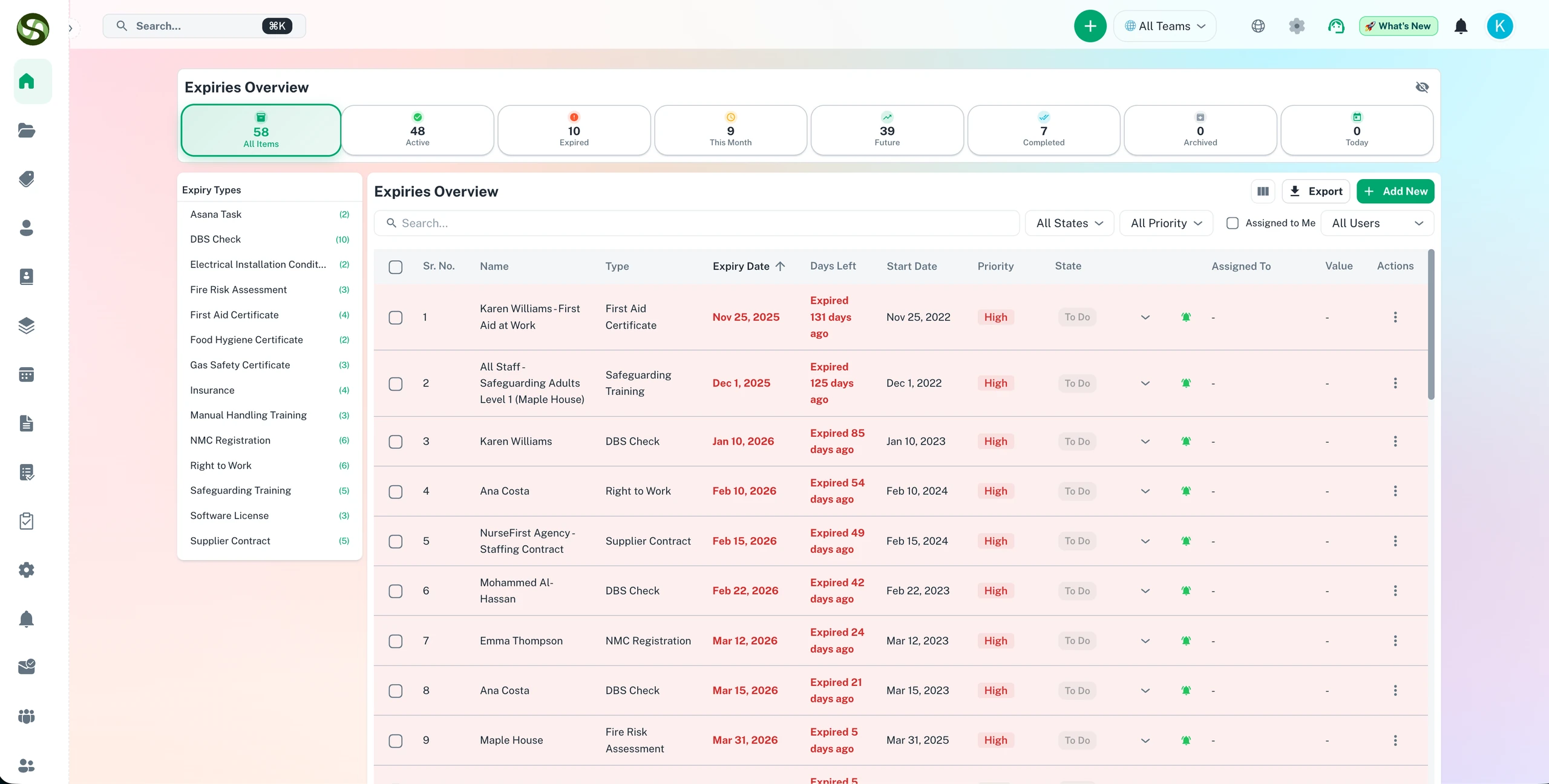
Track task completion and deadline progress in real time across your whole team
Real-time progress tracking
Status update visibility
Completion rate metrics
Overdue task monitoring
Track Task Progress in Real-Time Features
Everything you need to streamline your workflow and boost productivity
Visual Progress Indicators
See task completion status at a glance with progress bars, percentage indicators, and color-coded status labels. Know instantly what is on track, at risk, or overdue.
Real-Time Status Dashboard
Live dashboard showing all active tasks, their current status, assigned owners, and time remaining. Updates automatically as team members complete work.
Trend Analytics
Track completion trends over time. Identify patterns, spot declining productivity early, and measure improvement initiatives with historical data.
Bottleneck Detection
Automatically identify tasks stuck in progress, delayed workflows, and team members who may need support. Get proactive alerts before deadlines are missed.
Detailed Task Lists
Filterable, sortable lists of all tasks with status, priority, due date, and assignee. Drill down into specific projects, teams, or time periods.
Progress Reports
Automated progress reports showing completion rates, on-time percentages, and team performance. Export for stakeholder meetings or executive reviews.
Why Use Track Task Progress in Real-Time?
Real benefits that drive measurable results for your business
Complete Visibility
Never wonder "what is the status?" again. See everything in real-time from a single dashboard. Eliminate status update meetings and email check-ins.
Catch Issues Early
Identify stuck tasks and bottlenecks before they become critical. Proactive alerts let you intervene and keep projects on track.
Improve Accountability
Clear visibility into who is responsible for what and their current progress. Team members stay motivated when progress is visible.
Data-Driven Decisions
Make informed decisions based on real progress data, not gut feelings. Identify high performers, resource needs, and process improvements.
Track Task Progress in Real-Time in Action
Visual walkthrough of the platform in action
Progress Dashboard Overview
Comprehensive view of all tasks and deadlines with visual status indicators and real-time updates.
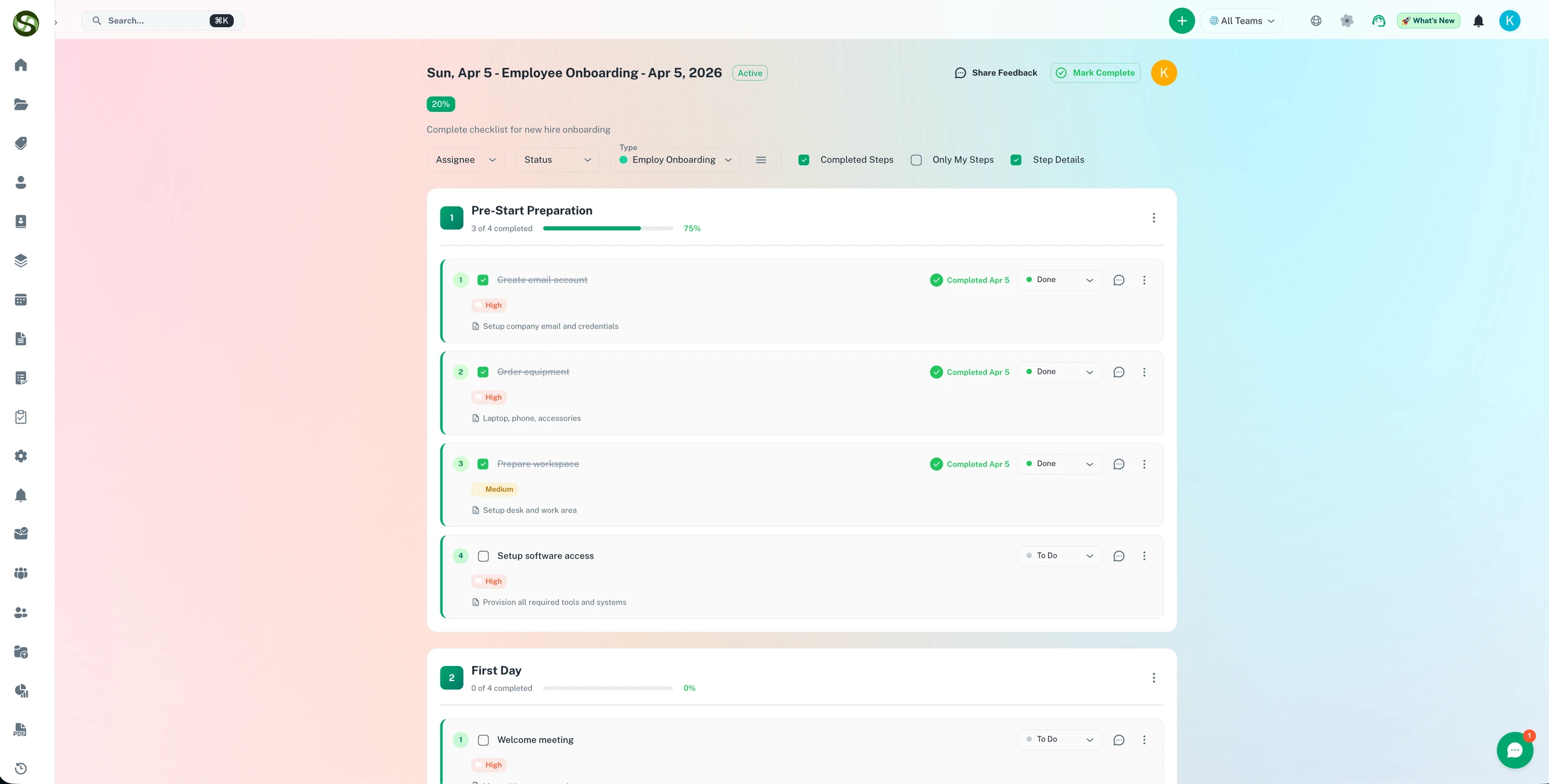
Workflow Step-by-Step Progress
See exactly how far along each workflow checklist run is - sections completed, steps outstanding, and what is overdue.
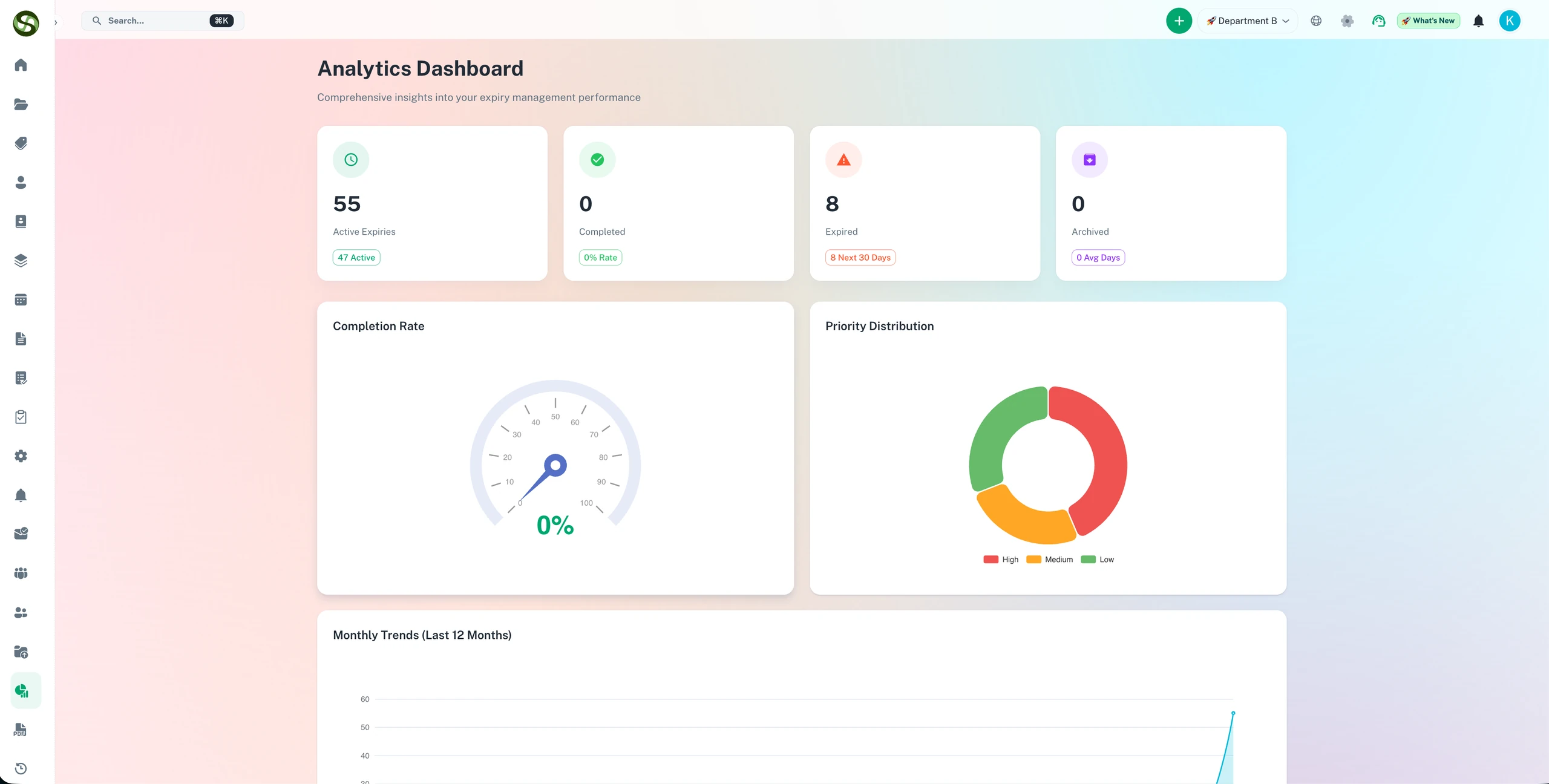
Performance Analytics
Charts and dashboards showing completion rates, priority breakdown, and overall compliance health.
Who Uses Track Task Progress in Real-Time?
Designed for teams and businesses across industries
Project Milestones
Track multi-phase project progress from initiation through completion. Ensure each milestone is met before moving to the next phase.
Sprint Tracking
Monitor agile sprint progress in real-time. See burndown charts, velocity trends, and task completion rates throughout the sprint.
Renewal Pipeline
Track license and contract renewals through each stage: identified, contacted, quoted, approved, and completed.
Onboarding Progress
Monitor new employee or client onboarding completion. Ensure all steps are completed on schedule for a smooth experience.
Compliance Programs
Track progress on regulatory compliance initiatives. Show auditors and stakeholders exactly where you are in meeting requirements.
Vendor Deliverables
Monitor vendor task completion and delivery schedules. Hold partners accountable and escalate delays proactively.
Frequently Asked Questions
Everything you need to know. Can't find the answer? Reach out to our support team.
Every compliance item in ExpiryEdge has a real-time status: pending, in progress, completed, or overdue. You see at a glance which items are being actively worked on, which are stuck, and which have been completed. The activity log on each item shows every action taken, providing a clear picture of progress without needing to ask team members for updates.
Yes. For complex compliance renewals that involve multiple steps - for example, booking an inspection, receiving the report, and then uploading the certificate - you can break the process into sub-tasks. Each sub-task has its own due date and owner, and the overall compliance item is only marked complete when all sub-tasks are done.
The ExpiryEdge dashboard gives managers a consolidated view of all their team's compliance items, sorted by urgency. They see which items are on track, which are at risk, and which are overdue - without needing to ask individuals for status updates. Automated escalation means managers are only proactively notified when an item actually needs their attention.
Yes. Each item has a complete activity log showing: when the item was created, when reminders were sent and to whom, when documents were uploaded, when the status was changed, and by whom each action was performed. This provides full traceability for audit purposes and makes it easy to investigate what happened if a renewal was missed.
ExpiryEdge's API and webhooks allow integration with project management tools. When a compliance task reaches a specific status - for example, entering its 30-day reminder window - you can trigger the creation of a task in JIRA, Asana, or another project management system. This links compliance tracking to your existing workflow without requiring separate manual entry.
Ready to Get Started?
Join thousands of teams already using ExpiryEdge to streamline their workflows