
Departments & Teams
Create departments and teams that mirror your organizational hierarchy. Assign tasks by team, control permissions, track team workload, and improve…
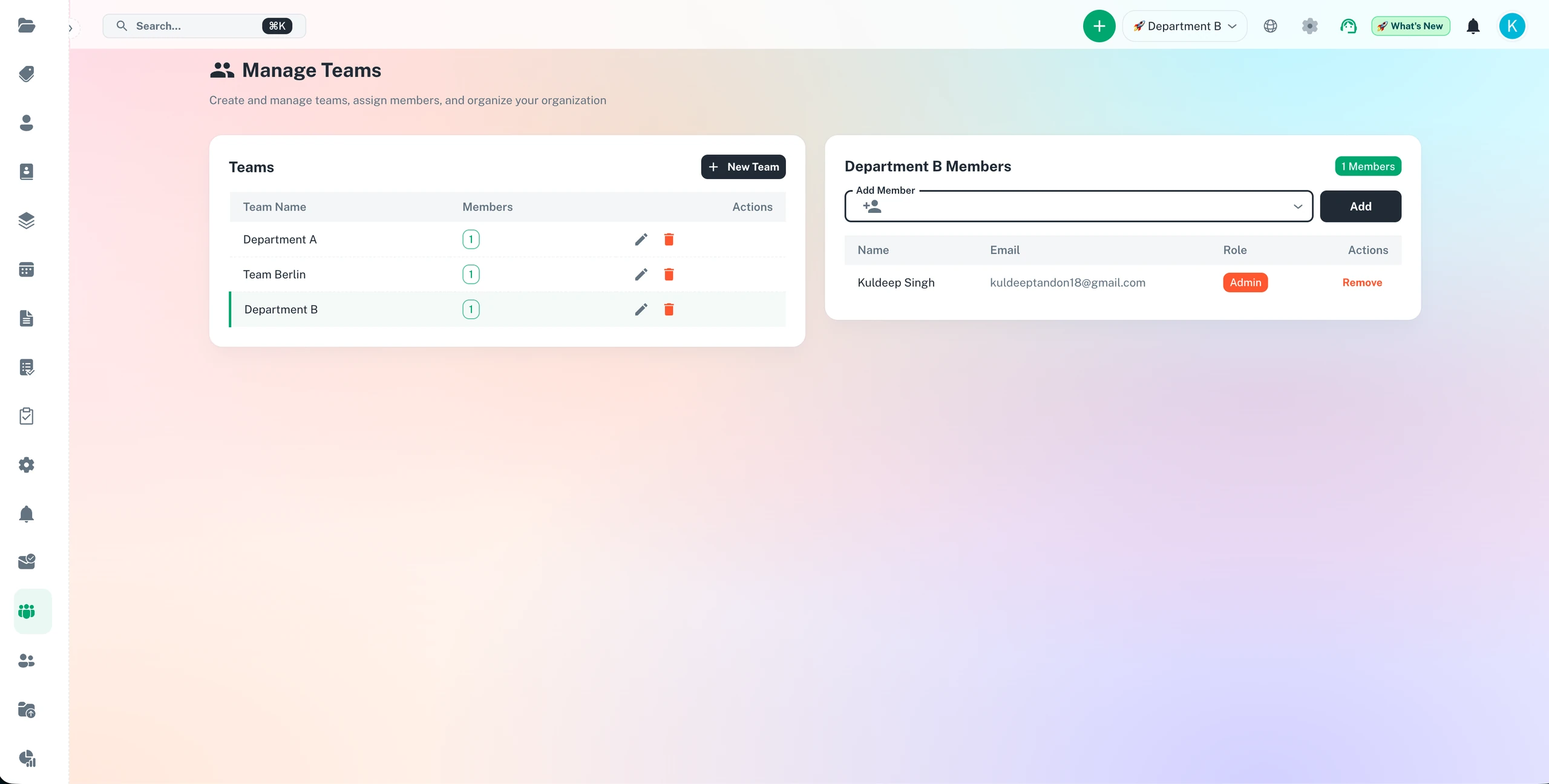
Organise compliance workload by department with team-level deadline visibility
Department-level tracking
Team workload overview
Role-based access
Cross-team deadlines
Departments & Teams Features
Everything you need to streamline your workflow and boost productivity
Department Hierarchy
Mirror your organizational structure with departments and sub-departments. Create teams within departments for precise organization.
Team-Based Task Assignment
Assign deadlines and tasks to entire teams or specific team members. Ensure clear accountability and workload distribution.
Role-Based Permissions
Set different permission levels for team admins, members, and viewers. Control who can create, edit, and view tasks within each team.
Team Workload Tracking
Monitor each team's workload and capacity. Identify overloaded teams and redistribute work for better balance.
Cross-Team Collaboration
Share tasks and deadlines across teams when projects require collaboration. Maintain visibility while preserving team autonomy.
Department Analytics
Track performance metrics by department and team. Compare completion rates, deadline adherence, and productivity across your organization.
Why Use Departments & Teams?
Real benefits that drive measurable results for your business
Clear Team Accountability
Every task has a clear team owner. Reduce confusion about responsibilities and improve task completion rates by 45%.
Optimize Resource Allocation
See which teams are overloaded and which have capacity. Balance workload across departments for maximum efficiency.
Improve Cross-Department Coordination
Enable seamless collaboration between teams while maintaining organizational structure and permissions.
Scale Organizational Growth
Easily add new teams and departments as you grow. Maintain structure without reorganizing your entire deadline management system.
Who Uses Departments & Teams?
Designed for teams and businesses across industries
Multi-Department Organizations
Large companies organize work by department (Sales, Operations, Finance, HR) with teams within each department managing specific functions.
Multi-Location Businesses
Retail, hospitality, and service chains create departments for each location, with teams for different functions at each site.
Professional Services Firms
Law firms, consultancies, and agencies organize by practice area or service line, with client teams within each department.
Educational Institutions
Schools and universities organize by academic department, with teams for faculty, administration, and support staff.
Healthcare Organizations
Hospitals and clinics structure by department (Emergency, Surgery, Radiology) with teams for different shifts and specialties.
Manufacturing Operations
Factories organize by production line or department (Assembly, Quality Control, Maintenance) with shift teams and specialized crews.
Frequently Asked Questions
Everything you need to know. Can't find the answer? Reach out to our support team.
ExpiryEdge mirrors your organisational hierarchy. You create departments (HR, Finance, Operations, IT) and teams within them. Compliance items are assigned to a specific department or team. Department managers see only their own team's records by default, while compliance officers and administrators see across the entire organisation.
Yes. Role-based permissions control visibility and access. You configure exactly which roles can view, create, edit, and delete records within each department or team. Sensitive compliance records - like executive compensation reviews or legal matters - can be restricted to specific roles while routine operational compliance remains visible to all relevant managers.
When a team member moves to a different department, you update their team assignment in ExpiryEdge. Items assigned to them remain in their original department and can be reassigned to the new owner in that department. The move does not break any existing reminder schedules or lose any historical records.
Yes. Administrators and compliance officers with organisation-wide access see a consolidated view of compliance status across all departments and teams. You can generate a compliance report filtered by department, team, item type, or time period - giving management a clear picture of where compliance is strong and where attention is needed.
No. ExpiryEdge supports unlimited departments and teams. Large enterprise organisations with complex hierarchies - multiple business units, regional offices, and hundreds of teams - can structure their compliance tracking to match the exact shape of their organisation.
Ready to Get Started?
Join thousands of teams already using ExpiryEdge to streamline their workflows