
Workflow System Software vs Spreadsheets: Key Differences

Keep the spreadsheet if one person tracks a few dozen low-risk dates and opens the file every week. Move to workflow software once several people share renewals, a missed date means a fine or a stoppage, or an auditor wants proof of who did what. The real difference isn't storage. A spreadsheet holds dates. Workflow software makes someone act on them.
Below is how the two compare on the things that actually cause missed renewals, plus a simple way to decide and a plan for switching.
What workflow software adds to a list of dates
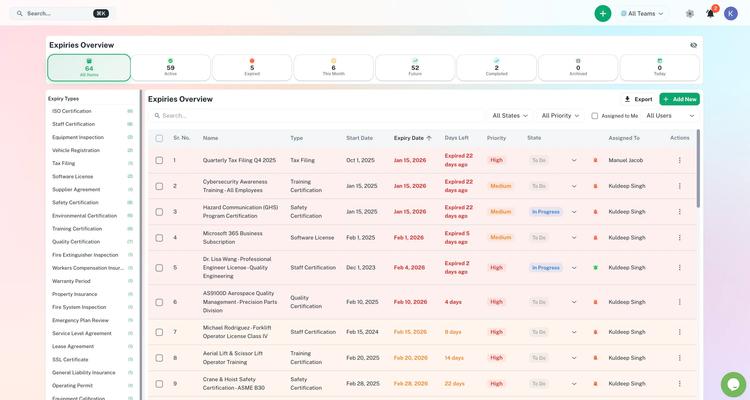
Workflow software treats each renewal as a piece of work that moves from "needs doing" to "done". For every item it keeps:
- a record of its own (one licence, one contract, one inspection)
- a named owner and a backup
- the steps, approvals and documents the renewal needs
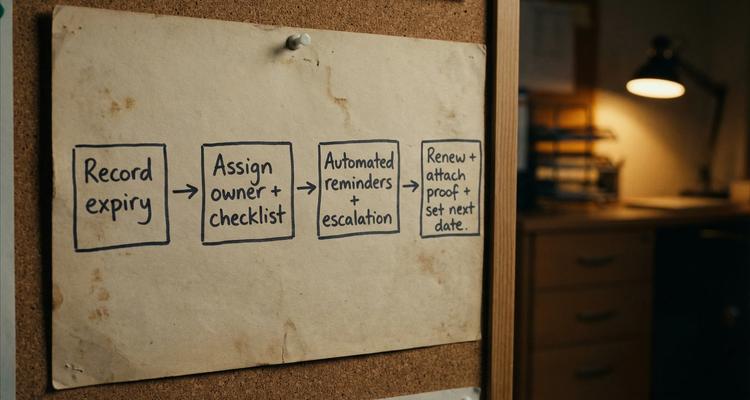
- reminders and escalations that fire without anyone opening a file
- the renewed document and a history of who did what
A spreadsheet can store all of those as columns. What it can't do is make anything happen next.
When a spreadsheet is the right call
Plenty of teams don't need software, and it's fine to say so. A spreadsheet works when:
- you're tracking a few dozen items at most
- one person owns the whole process and checks it weekly
- a miss is annoying but costs no fine, shutdown or client
- nobody will ever ask you to prove what happened
If that's you, a tidy sheet plus calendar reminders may be all you need. Our licence and permit expiration tracker is a good template. Trouble starts when the sheet becomes something the business depends on.
Eight differences that matter when renewals are on the line
1. One record instead of Final_v7.xlsx
A spreadsheet is the source of truth only if everyone edits the same file and nobody saves a copy. In real life there's a version in an email thread, one on someone's desktop, and a tab per department. Workflow software has no "latest version" problem because you track the items themselves, not a file.
2. An owner who has to accept the task
You can add an Owner column. Nothing checks that the owner saw the task, agreed to it or finished it. In workflow software the assignment is a notification the person has to act on, and everyone can see whether they have.
3. Reminders keyed to the act-by date
Renewals rarely happen on the expiry date. They happen on an earlier act-by date set by the supplier's notice period, your own approval time, or how long the issuing agency takes to process the application. A contract with a 60-day notice clause ending 31 December has to be dealt with by 1 November.
A spreadsheet can calculate 90, 60 and 30 day flags with formulas. It still only warns the person who opens it. Workflow software sends the reminder to the owner wherever they are and, if they don't respond, to their manager.
4. Checklists that travel with the renewal
A renewal is a sequence: gather documents, check the requirements haven't changed, get sign-off, submit, file the proof, update the next date. A spreadsheet can list those steps but can't tell you which ones are done. Attach the checklist to the item and the backup owner can pick it up halfway through.
5. Evidence an auditor will accept
Audits rarely fail because nobody knew a date. They fail because you can't quickly show who owned the requirement, what they did, and whether you were covered on the day in question. A spreadsheet can hold links, but links break, files move and permissions change. Software that stores the renewed certificate on the record, with a dated history, answers those questions in minutes.
6. Access without shadow copies
Open the sheet to everyone and someone will sort one column and scramble the rows. Lock it down and people make their own copies. Workflow tools let people see everything while editing only their own items, which takes away the reason to copy.
7. Answers without a filter lesson
With a few hundred rows, simple questions get slow. What's due in the next 30 days? Which items are missing documents? Which renewals are stuck waiting for approval? A dashboard answers those for everyone, not just the person who knows the filters.
8. Fewer silent errors
Spreadsheet errors are well studied. Raymond Panko's review of field audits at the University of Hawaii found that the more rigorous recent audits found errors in at least 86% of the spreadsheets they checked. The European Spreadsheet Risks Interest Group collects more research and real incidents.
The best-known recent case wasn't about renewals, but the failure mode is the same. In October 2020 Public Health England left 15,841 positive Covid test results out of its daily figures because some files had exceeded the maximum file size. Nothing crashed. The rows just weren't there.
In an expiry tracker, one wrong cell means a wrong date, a reminder that never fires, or a renewal notice sent to someone who left. Structured fields with validation make those errors harder to make and easier to spot.
One insurance renewal, two ways
Take the renewal of your public liability policy, which a key client checks every year.
| Step | Spreadsheet | Workflow software |
|---|---|---|
| Date recorded | Typed in once, by whoever set up the sheet | Recorded with an owner and a backup |
| Reminder | Someone has to open the sheet and notice | Sent to the owner at 90, 60 and 30 days |
| Owner on holiday | The task waits until they're back | No response, so it goes to their manager |
| Proof of renewal | Saved to a folder or left in an email | Attached to the record |
| Client asks for the certificate | Someone goes looking | Downloaded from the record |
Same information, different outcome. One stores it; the other makes sure someone does something with it.
Decide by what one missed date would cost
Don't ask which tool is nicer. Ask what happens when this goes wrong. A lapsed insurance certificate can get a crew sent off site. An expired operating licence can stop you trading until it's reinstated. A missed notice date can lock you into another year of a contract you meant to cancel.
If a miss is merely annoying, keep the spreadsheet. If it creates legal, safety or revenue exposure, your tracker should behave like a control, not a note.
Signs you've outgrown the spreadsheet
- Ops, finance and legal all touch the same renewal.
- You need repeat reminders, not one calendar event.
- Auditors or clients ask for proof attached to each item.
- Everything stops when the person who owns the sheet is away.
Signs it's still fine
- One person owns it and nobody else needs to see it.
- You rarely add new items, and none of them are audited.
Move off the spreadsheet in about a month
Most teams put off switching because they're worried about losing history. Do it in stages and it's mostly a few afternoons of tidying.
- List what you track today: every tab, owner, category and renewal cycle.
- Clean it. Remove duplicates, check each date against the actual document, and use the same name for the same thing.
- Import the next 90 days of deadlines first as a pilot, then the rest.
- Add an owner and a backup to every item, and attach the current document.
- Make the old sheet read-only for a few weeks while the new reminders run, so nobody updates the wrong place.
- Hold a 30-minute review each week for the first month to adjust reminder timings and checklists.
Where ExpiryEdge fits
ExpiryEdge is built for teams that have outgrown the spreadsheet. It tracks contract, licence, permit and certificate dates and reminds the owner by email, SMS, WhatsApp, Slack or Teams. If nobody acts, it escalates to a manager. It can also request the renewed document from whoever holds it, and it keeps an audit trail you can export when someone asks for proof.
For a direct comparison, see ExpiryEdge vs spreadsheets. If your tracking is mostly staff certificates, certification tracking software vs spreadsheets goes into more detail.
Frequently asked questions
Is workflow software only for big companies?
No. What drives the need is risk and the number of people involved, not headcount. A ten-person care agency with staff licences to track has more reason to switch than a large firm tracking a handful of low-stakes subscriptions. If one missed date could stop you trading or trigger a fine, size doesn't matter much.
Can't I just add scripts and formulas to my spreadsheet?
You can, and for a while it works. But you're now maintaining a small custom app, usually understood by one person. When that person leaves, or a shared drive permission changes, the reminders stop quietly. Dedicated software costs money, but someone else maintains it and it doesn't depend on one colleague's knowledge.
What should I move off the spreadsheet first?
Start with high-risk items due in the next 60 to 90 days: operating licences, insurance, safety certificates, contracts with notice clauses. They give you the quickest payoff and they're the ones you can least afford to drop during the switch. Move the long-dated, low-risk rows once the new reminders are running smoothly.
Your next step
Open your current tracker and count two things: rows with no named owner, and rows due in the next 90 days. If either number makes you wince, that's your answer.
If you want to try the software route, ExpiryEdge has a 14-day free trial with no credit card. Import the spreadsheet you already have and run both side by side for a fortnight.
Frequently asked questions
You can, and for a while it works. But you're now maintaining a small custom app, usually understood by one person. When that person leaves, or a shared drive permission changes, the reminders stop quietly. Dedicated software costs money, but someone else maintains it and it doesn't depend on one colleague's knowledge.
Start with high-risk items due in the next 60 to 90 days: operating licences, insurance, safety certificates, contracts with notice clauses. They give you the quickest payoff and they're the ones you can least afford to drop during the switch. Move the long-dated, low-risk rows once the new reminders are running smoothly.