Healthcare License Expiration Tracking: A Compliance Guide

Healthcare License Expiration Tracking: A Compliance Guide

TL;DR:
Healthcare license expiration tracking involves ongoing primary-source verification and automated alerts to prevent lapses. Proper management reduces risks like billing denials, legal liabilities, and staffing disruptions by ensuring credentials stay current with an organized workflow. Expiryedge offers a platform that automates alerts, confirmation, escalation, document storage, and reporting to help organizations maintain compliance and operational readiness.
Healthcare license expiration tracking is the continuous process of monitoring every clinician’s credential against its expiration date, verifying status through primary sources such as state licensing boards, Nursys for nurses, or the Federation of State Medical Boards (FSMB) for physicians, and triggering automated alerts and renewal workflows before a lapse occurs. Get it wrong and you risk suspended billing privileges, malpractice coverage gaps, and regulatory fines. Get it right and your credentialing operation runs on evidence, not memory.
The industry term for this practice is credential lifecycle management, though most compliance teams simply call it license tracking or license expiration management. Whatever you call it, the core requirement is the same: no credential should expire without a documented, time-stamped record of what happened and why.
How does healthcare license expiration tracking actually work?
The workflow has four distinct stages, and skipping any one of them is where lapses happen.
- Primary-source verification. Before a credential enters your tracking system, confirm it directly with the issuing authority: the state board, Nursys, FSMB, or the DEA for controlled-substance registrations. Self-reported documents are a starting point, not a source of truth.
- Enrollment and data capture. Once verified, the credential record is created with a minimum set of fields: staff name, role, credential type, credential number, issuing authority, expiration date, renewal lead time, and the renewal portal URL. Renewal lead time is a separate field, not an afterthought. A license expiring March 1 that requires 60 days to renew must trigger an alert in early January, not late February.
- Automated alert and escalation sequence. The system fires timed notifications at configured windows relative to the renewal lead time. If the clinician confirms renewal is in progress, reminders suppress automatically. If no confirmation arrives by a preconfigured threshold (commonly 30 days before expiration), escalation messages go to the department administrator with the staff name, credential at risk, expiration date, and suggested next steps.
- Confirmation and audit record. Once the renewed credential is uploaded and verified, the system archives the old record, captures the new expiration date, and re-enrolls the credential in the next monitoring cycle. A monthly report sorted by days-until-expiration, triggered on the first business day of each month, gives compliance teams the audit-ready evidence regulators and payers expect.
What features should you look for in license tracking software?
Not every platform built for deadline tracking is built for healthcare. The table below maps the feature categories that matter to the compliance outcome each one protects.
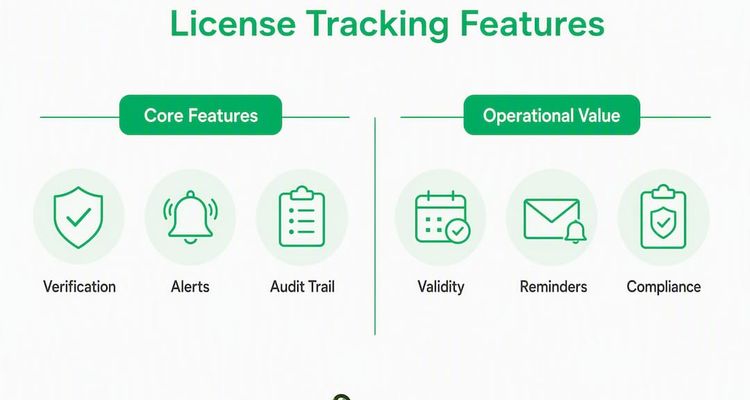
| Feature category | Operational value |
|---|---|
| Primary-source verification | Confirms credential validity before enrollment; catches fraudulent or lapsed licenses at intake |
| Continuous monitoring | Detects mid-cycle status changes (suspension, revocation) between renewal cycles |
| Configurable alert windows | Fires reminders relative to renewal lead time, not just expiration date |
| Confirmation workflow | Lets clinicians mark “renewal in progress” to suppress redundant reminders |
| Escalation rules | Routes unresolved alerts to administrators before the expiration window closes |
| Audit trail and reporting | Produces timestamped records that demonstrate due diligence to regulators and payers |
| Secure document vault | Stores verified credentials for reuse across multiple credentialing events |
| EHR/HRIS integration | Pulls staff records from source systems to eliminate duplicate data entry |
| Dashboard and real-time reporting | Gives operations leads a live view of credential status across the organization |
Must-have vs. nice-to-have by organization size:
Small clinics (under 50 clinicians) can often start with configurable alerts, a document vault, and a basic audit trail. Multi-state hospital systems need continuous monitoring, EHR/HRIS integration, and multi-level escalation rules because a single suspended license in one state can affect billing across an entire network. The document vault feature earns its keep at any size: clinicians upload once and reuse the same verified documents for future credentialing submissions, cutting verification time significantly.
Why does this matter? The compliance benefits and real risks of missed renewals
Continuous healthcare compliance tracking does more than keep a spreadsheet current. When a license lapses, the downstream consequences stack up fast.

On the billing side, Medicare and Medicaid require active, unencumbered licenses as a condition of reimbursement. A single expired license can trigger claim denials retroactively, meaning revenue already earned gets clawed back. Payers audit credential status, and an expired credential discovered during audit can result in repayment demands that dwarf the cost of any tracking software.
On the liability side, a clinician practicing on an expired license creates a malpractice exposure that most insurers will not cover. The incident does not have to be negligent to become a legal problem. The expired license is the problem.
On the staffing side, a lapsed DEA registration means a physician cannot prescribe controlled substances until reinstatement, which can take weeks. In a specialty practice or rural setting, that gap is not administrative. It is a patient care disruption.
Automated expiration monitoring, paired with an audit trail, gives organizations the evidence of due diligence that regulators look for during investigations. As the guidance on preventing regulatory fines makes clear, the audit trail is not just a record-keeping nicety. It is a risk-management control.
Compliance note: This article provides general operational guidance, not legal or regulatory advice. Confirm current licensing requirements with your state licensing board or a qualified healthcare attorney.
Implementation checklist: people, process, and data
The biggest operational mistake in healthcare license monitoring is treating it as a static calendar. A shared spreadsheet with expiration dates is not a tracking system. It is a list with no owner, no escalation path, and no confirmation workflow.
Here is what a deployable implementation actually looks like:
- Build a single source of truth. Pull credential data from your EHR or HRIS, clean it against the required fields (name, role, credential type, number, issuing authority, expiration date, renewal lead time, renewal URL), and import it into your tracking platform. The certification tracking checklist from Expiryedge covers the minimum data model in detail.
- Assign a single owner per credential record. Every license needs one accountable person, not a shared inbox. Define a backup escalation contact for each record so coverage gaps do not become tracking gaps.
- Design the confirmation workflow first. Before you configure alerts, decide what “renewal in progress” means in your organization and build a one-click confirmation step that suppresses reminders once a clinician triggers it.
- Set alert windows relative to renewal lead time. If your state board takes 45 days to process a renewal application, your first alert should fire at least 60 days before expiration, not 30.
- Run a monthly expiration report. Schedule it for the first business day of each month, sorted by days-until-expiration, and archive it automatically for regulatory reference.
- Test escalation paths before go-live. Send a test credential through the full alert-to-escalation sequence and confirm that administrator notifications arrive with the right data fields.
Pro Tip: Track renewal lead time as a discrete data field for every credential type, not just a general reminder window. State board processing times vary by profession and jurisdiction, and a single misconfigured window can make your alerts useless for an entire credential category.
What do license tracking solutions typically cost and how long does deployment take?

Pricing models vary, but most platforms fall into one of three structures: per-seat subscription (priced by number of users or administrators), per-credential pricing (priced by the number of active license records), or tiered subscription plans that bundle feature access with seat count. Managed-service add-ons, where a vendor handles primary-source verification on your behalf, typically carry a higher per-credential fee.
Deployment timelines depend heavily on two variables: data readiness and integration complexity.
A quick-start pilot with clean data and no EHR integration can go live in 1–4 weeks. A full organizational rollout that includes EHR or HRIS integration, custom escalation workflows, and historical document migration typically runs 4–12 weeks. The organizations that compress that timeline are the ones that arrive with a clean credential data export and a defined owner for each record before the vendor kickoff call.
What drives cost up: large credential portfolios, multi-state practitioners with multiple active licenses each, complex escalation hierarchies, and document migration from legacy systems. What drives cost down: standardized data, a single integration point, and a phased rollout that starts with one department or credential type.
How to quickly check if an individual healthcare license is expired
When you need to verify a single license right now, follow these steps:
- Gather the credential data. Collect the clinician’s full legal name, license number, credential type, and issuing state.
- Go to the primary source. For nurses, search Nursys, the national nurse licensure verification system. For physicians, use the FSMB’s DocInfo tool. For state-specific licenses not covered by a national registry, go directly to the state licensing board’s public verification portal.
- Search and confirm status. Enter the license number and confirm the status field reads “Active” with a current expiration date. Do not rely on the clinician’s self-reported copy.
- Capture the primary-source record. Take a screenshot or download a PDF directly from the board’s portal. Note the date and time of the lookup.
- Record it in your tracking system. Enter the verified expiration date and renewal lead time into your credential record. If the status shows “Expired,” “Suspended,” or “Revoked,” escalate immediately per your organization’s credentialing policy.
For multi-state practitioners, repeat this process for each state of licensure. DEA registrations are separate from state licenses and must be verified independently through the DEA’s Diversion Control Division. For regulatory basics and primary-source habits, especially for newer compliance teams, the guidance from healthcare startup regulatory resources is a useful orientation.
Pro Tip: Never accept a clinician’s self-printed license copy as verification. State boards update license status in real time; a printed copy from six months ago may not reflect a current suspension or condition.
How Expiryedge handles healthcare license expiration tracking
Expiryedge maps directly to the feature categories that prevent lapses. The table below shows how the platform’s capabilities align with the operational requirements covered earlier.
| Feature category | Expiryedge capability |
|---|---|
| Configurable alert windows | Multi-channel alerts (email, SMS, in-app) triggered relative to renewal lead time |
| Confirmation workflow | One-click “renewal in progress” status that suppresses reminders until resolved |
| Escalation rules | Assignable escalation contacts with automatic notification if confirmation is not received |
| Audit trail and reporting | Timestamped activity log and monthly expiration reports, archived automatically |
| Secure document vault | Credential document upload with e-signature support and reuse across credentialing events |
| EHR/HRIS integration | CSV import and integration support to pull staff records from source systems |
| Dashboard and reporting | Real-time dashboard showing credential status, days-until-expiration, and completion rates |
| SOP checklists | Assignable renewal task checklists tied to each credential record |
Typical onboarding cadence:
- Weeks 1–2 (Pilot): Import a single department’s credential data, configure alert windows and escalation contacts, and run a test cycle.
- Weeks 3–6 (Integration): Connect to your EHR or HRIS for automated data pulls, configure monthly reporting, and train credential owners.
- Weeks 7–12 (Full rollout): Expand to all departments and credential types, migrate historical documents to the vault, and activate organization-wide dashboards.
Most teams see their first automated alert cycle complete within the first two weeks of the pilot.
Key Takeaways
Continuous, automated healthcare license expiration tracking with primary-source verification and a single accountable owner per record is the only reliable way to prevent credential lapses and their downstream billing, liability, and patient care consequences.
| Point | Details |
|---|---|
| Define it correctly | License expiration tracking is continuous monitoring with primary-source verification, not a static calendar or spreadsheet. |
| Lead time is the critical field | Track renewal lead time separately from expiration date; alerts must fire relative to processing time, not just the deadline. |
| Escalation prevents lapses | Configure escalation to administrators when clinicians do not confirm renewal progress within a set window before expiration. |
| Audit trails protect you | Monthly, archived expiration reports demonstrate due diligence to regulators and payers during audits or investigations. |
| Expiryedge covers the workflow | Expiryedge provides configurable alerts, confirmation workflows, escalation rules, document vault, and audit-ready reporting for healthcare credentialing teams. |
Why deadline-driven workflows beat calendar reminders
The conventional advice on license tracking focuses on reminders: set a calendar event 90 days out, send an email, hope someone acts. That framing misses the actual failure mode.
Licenses lapse not because nobody knew the date. They lapse because nobody owned the outcome. A calendar reminder with no assigned owner, no confirmation step, and no escalation path is a notification, not a workflow. When the reminder fires and the clinician is on vacation, or the email lands in a shared inbox nobody monitors, the reminder has done its job and the license has still expired.
What actually works is treating each credential as a deadline-driven task with a named owner, a confirmation step that closes the loop, and an escalation path that fires automatically when the loop stays open. That structure is what separates a tracking system from a tracking list. The lead-time field matters for the same reason: a reminder that fires two weeks before a renewal that takes six weeks to process is not a reminder. It is a notification that you are already too late.
Monthly reporting adds the layer that individual alerts cannot: organizational visibility. A compliance director who can pull a report on the first of every month and see every credential sorted by days-until-expiration has a fundamentally different risk posture than one who relies on individual staff members to self-report. That report is also the artifact that demonstrates due diligence when a regulator asks what your organization did to prevent a lapse.
Expiryedge: built for teams that cannot afford a missed renewal

Missed renewals cost healthcare organizations in three directions at once: billing revenue, liability exposure, and staffing continuity. Expiryedge is purpose-built to close all three gaps from a single platform, without the manual overhead of spreadsheets or the fragility of calendar-based reminders.
The platform gives credentialing and compliance teams configurable alert windows tied to actual renewal lead times, one-click confirmation workflows that suppress redundant reminders, automatic escalation to administrators when action stalls, and a document vault that stores verified credentials for reuse. Monthly audit-ready reports archive automatically so your evidence of due diligence is always current.
A pilot takes 1–2 weeks to stand up with a single department’s data. Start your free trial at Expiryedge to see the dashboard, alert configuration, and reporting in your own environment before committing to a full rollout.
Useful sources and primary-source lookup resources
These are the primary sources and authoritative references cited in this article. Bookmark the ones relevant to your credential portfolio.
- [Nursys](https://www.nursys.com/): The national nurse licensure verification system. Use it for real-time RN, LPN, and APRN license status lookups across participating states.
- [FSMB DocInfo](https://www.fsmb.org/docinfo/): The Federation of State Medical Boards’ physician lookup tool. Covers board actions, licensure history, and current status across U.S. states.
- [Florida Health Source: Are You Renewal Ready?](https://flhealthsource.gov/ayrr/): Florida’s renewal readiness portal, a model for state-level renewal guidance that many other state boards replicate.
- [Florida Department of Health: Complaints and Enforcement](https://www.floridahealth.gov/licensing-regulations/complaints-enforcement/): Illustrates how state boards handle enforcement actions against lapsed or non-compliant licenses.
- [Healthcare Startup Regulatory Basics](https://thestartupmd.com/healthcare-startup-regulatory-basics-explained-for-founders): Practical orientation to primary-source verification habits and regulatory basics for compliance teams building their first tracking workflows.
- [Expiryedge: Certification Expiration Tracking Checklist](https://expiryedge.com/blogs/certification-expiration-tracking-checklist/): The minimum data model and CSV import checklist for setting up a credential tracking system.
- [Expiryedge: Deadline Escalation Workflow Guide](https://expiryedge.com/blogs/deadline-escalation-workflow-guide-for-ops-and-compliance/): Step-by-step guidance on configuring escalation rules and alert windows for compliance teams.
- [Expiryedge: Preventing Regulatory Fines](https://expiryedge.com/blogs/role-of-expiry-monitoring-in-penalty-prevention/): How automated expiration monitoring functions as a risk-management control and produces audit-ready evidence.
FAQ
What is healthcare license expiration tracking?
Healthcare license expiration tracking is the continuous monitoring of clinician credentials against their expiration dates, using primary-source verification and automated alerts to trigger renewal workflows before a lapse occurs.
What happens if a healthcare provider’s license expires?
An expired license can result in suspended billing privileges, retroactive claim denials from Medicare and Medicaid, malpractice coverage gaps, and potential disciplinary action from the state licensing board.
How do I find out if a nursing license is expired?
Search Nursys using the nurse’s full legal name or license number. The system returns real-time status directly from participating state boards, including expiration date and any disciplinary actions.
What happens if a doctor does not renew their medical license?
Practicing on an expired medical license is grounds for disciplinary action by the state medical board, including fines, suspension, or permanent revocation, regardless of clinical performance. The FSMB maintains a public record of board actions across all U.S. states.
How does Expiryedge support healthcare license monitoring?
Expiryedge provides configurable alert windows tied to renewal lead times, confirmation workflows, automatic escalation, a secure document vault, and monthly audit-ready reporting, covering the full credential lifecycle from verification through renewal.
Recommended
Frequently asked questions
An expired license can result in suspended billing privileges, retroactive claim denials from Medicare and Medicaid, malpractice coverage gaps, and potential disciplinary action from the state licensing board.
Search Nursys using the nurse's full legal name or license number. The system returns real-time status directly from participating state boards, including expiration date and any disciplinary actions.
Practicing on an expired medical license is grounds for disciplinary action by the state medical board, including fines, suspension, or permanent revocation, regardless of clinical performance. The FSMB maintains a public record of board actions across all U.S. states.
Expiryedge provides configurable alert windows tied to renewal lead times, confirmation workflows, automatic escalation, a secure document vault, and monthly audit-ready reporting, covering the full credential lifecycle from verification through renewal.
Not medical, clinical, or HIPAA compliance advice
This article is for general informational purposes and does not constitute clinical or HIPAA compliance advice. ExpiryEdge is not currently a HIPAA Business Associate. Healthcare organisations handling Protected Health Information should review the specifics of their compliance programme with a qualified privacy officer or HIPAA consultant.