Manufacturing Compliance Deadline Tracking: 2026 Guide

Manufacturing Compliance Deadline Tracking: 2026 Guide

TL;DR:
Centralizing all compliance obligations in a single calendar with assigned owners and automated reminders prevents missed deadlines.
Using a dedicated system like Expiryedge improves audit readiness, reduces production disruption, and ensures timely evidence collection, unlike spreadsheets or generic tools.
The fastest way to stop missing manufacturing compliance deadlines is to centralize every obligation in a single, owned compliance calendar with assigned owners, automated reminders, and an audit trail. That one structural change eliminates the three root causes behind most misses: no single owner, no early warning, and no proof when an auditor asks.
TL;DR:
- Fewer missed deadlines when every obligation has a named owner and a reminder chain
- Faster audit prep when evidence is collected at the source, not scrambled the week before
- Less production disruption when permit and inspection renewals are tracked separately from the production schedule
Do this in the next 24–72 hours:
- Export every upcoming expiry from your spreadsheets into one list, sorted by date. Flag anything due within 30 days.
- Assign a named owner to each item on that 30-day list. Not a department. A person.
- Set a triage reminder for each item at 14 days and 3 days out, and write one escalation rule: if the owner has not acted by day 14, notify their manager.
Two frameworks worth anchoring to as you build out the system: OSHA training deadlines (which OSHA enforces at the federal level and which auditors check first) and ISO 9001-style control mapping, where every obligation ties to an owner, a recurrence interval, and documented evidence.
Why missed compliance deadlines cost manufacturers more than fines
The fine is rarely the worst part. A missed OSHA inspection or an expired operating permit can trigger a stop-work order, and a single day of unplanned downtime on a high-volume line costs far more than the penalty itself.
The indirect costs stack up fast:
- Line stoppages from a suspended permit or failed inspection while the corrective action is processed
- Expedited freight when a shipment is held because a supplier certification lapsed and the customer’s QA team catches it
- Overtime and rework to reprocess product that moved through an uninspected stage
- Secondary audits triggered by one missed deadline, which pull compliance staff off other work for weeks
- Lost customers when a missed ISO 9001 or FDA registration renewal puts a contract at risk
Finite capacity scheduling tools that produce realistic production due dates reduce expediting pressure, but they do not track regulatory obligations. Those are two separate systems, and conflating them is where most manufacturers get into trouble.
The compliance cost that rarely appears on a dashboard: a failed third-party audit caused by an expired supplier certificate can void a customer contract outright. The revenue impact dwarfs the original fine.
Compliance tracking that automates reminders and proof collection for inspections and certifications directly reduces both the safety risk and the administrative scramble that follows a miss.
Why manufacturing teams fall behind: common root causes
Most compliance misses are not caused by negligence. They are caused by systems that were never designed to handle recurring, evidence-backed obligations at scale.
The typical root causes:
- Fragmented data sources: permits in one folder, training records in the HR system, equipment certifications in a technician’s email
- Spreadsheet bottlenecks: one person owns the master sheet; when they leave or get busy, the whole tracking system stalls
- No single owner: obligations assigned to a department rather than a person, so everyone assumes someone else is handling it
- Manual renewal processes: someone has to remember to start the renewal 60 days out, and there is no trigger to do so
- Unclear escalation: when a deadline is approaching and the owner is unresponsive, there is no defined path to get it resolved
- Conflation with production scheduling: compliance deadlines get buried inside project plans or production calendars, where they compete with throughput priorities and get deprioritized
Two quick examples of how this plays out in practice. A mid-size automotive parts supplier missed an annual pressure vessel inspection because the maintenance lead who owned the calendar item left the company. The obligation sat unassigned for four months. Nobody noticed until a customer audit flagged it. The corrective action took six weeks and delayed a new contract.
A food manufacturer ran into a different problem: their ISO 22000 training renewals were tracked in a shared spreadsheet that three managers each updated independently. Two employees showed as current in one version and overdue in another. When the certifying body arrived, the discrepancy triggered a nonconformance finding.
The cultural issue underneath both examples is the same: compliance ownership was crowdsourced rather than assigned. Workers and contractors had no self-service path to upload their own certifications, so the bottleneck sat with one manager who was already overloaded.
What every manufacturing compliance-deadline system needs
A compliance calendar is not a project plan. It needs a different set of capabilities, and the gap between what spreadsheets provide and what a real system provides is widest here.
Required features:
- Centralized compliance calendar with obligation metadata: owner, recurrence interval, regulatory framework, and evidence requirements
- Automated multi-channel reminders (email, SMS, in-app) triggered at configurable lead times
- Escalation workflows that notify a manager when an owner has not acted by a defined threshold
- Audit trail with timestamped actions, version history, and e-signatures for approvals
- Evidence repository where documents, photos, and certificates are attached directly to the obligation record
- Role-based access so workers can upload their own certifications without seeing unrelated records
- Reporting dashboards that show overdue items, upcoming deadlines, and compliance rates by plant, team, or framework
Compliance dashboards and permit-to-work modules that centralize workflows make enforcement and reporting measurably easier for safety and facilities teams.
Integration points that matter in manufacturing:
- ERP/MRP: pull purchase order and vendor certification data so supplier credential expirations are visible alongside production schedules
- MES/APS: finite scheduling systems record scheduling actions and exchange planning data with ERP, which supports traceability when a production decision affected compliance timing
- HR/LMS: sync employee training completion dates so the compliance calendar reflects actual status, not a manually updated field
- Procurement: flag vendor insurance, licenses, and certifications before a purchase order is issued
- Document management: link evidence files to obligation records so auditors can pull everything from one place
Data governance basics: one system of record, role-based access, and a defined retention period for each document type. Permit history and role-based access are standard requirements for regulatory inspection readiness in manufacturing.
Feature checklist for evaluating your current state:
- [ ] Every obligation has a named owner, not a department
- [ ] Reminders fire automatically at 60, 30, and 7 days before the due date
- [ ] Escalation triggers when an owner misses a response threshold
- [ ] Evidence is attached to the obligation record, not stored in a separate folder
- [ ] Audit trail shows who did what and when, with timestamps
- [ ] Recurring obligations auto-generate the next instance when the current one closes
How to implement compliance-deadline tracking in six steps
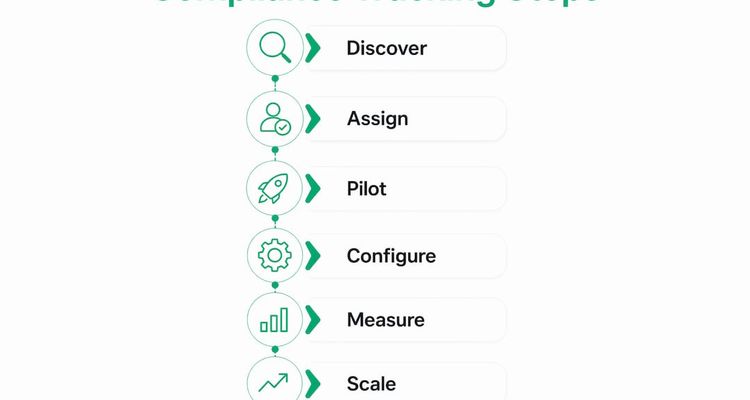
This roadmap is designed for a manufacturing environment where you are starting from spreadsheets or a generic project tool. Budget several weeks for the pilot phase before scaling.
Step 1: Obligation discovery and risk-scoring
Pull every compliance obligation from every source: OSHA training records, equipment inspection logs, environmental permits, supplier certifications, ISO/FDA registrations. Score each one by two factors: regulatory consequence of a miss (fine, stop-work, contract loss) and time to remediate. High consequence plus long lead time goes to the top of the list.
Step 2: Assign owners and set SLAs
Map each obligation to a named individual, not a role or team. Define the SLA: how many days before the deadline must the owner act? What happens if they do not? Write the escalation tier: owner → supervisor → compliance manager → plant director. Document this before you configure anything.

Step 3: Pick a pilot scope
Choose one plant, one certification type, or one permit group. A multi-week pilot is enough to validate the reminder cadence, the escalation rules, and the evidence collection workflow. Resist the urge to go enterprise-wide in week one.
Step 4: Configure and integrate
Set up reminders, proof collection, and escalation workflows for the pilot scope. Connect one data source for the pilot, either HR (for training records) or MES (for equipment inspections). Verify that the audit trail captures every action. Use a deadline escalation workflow as a reference for structuring your escalation tiers.

Step 5: Measure pilot KPIs
| KPI | Target |
|---|---|
| Overdue items at month-end | 0 critical, < 3 non-critical |
| Escalations triggered | Track count; reduce each cycle |
Run the pilot for 4–8 weeks, review the KPIs, and fix the gaps before scaling.
Step 6: Scale and cross-map
Roll out templates to additional plants and obligation types. Cross-map controls to frameworks (ISO 9001, OSHA, FDA) so one obligation satisfies multiple audit requirements. Schedule a quarterly review to add new obligations, retire expired ones, and update SLAs.
Implementation checklist:
- [ ] Obligation inventory complete and risk-scored
- [ ] Owners assigned with documented escalation tiers
- [ ] Pilot scope defined and timeline set
- [ ] Reminders and escalation rules configured
- [ ] One integration connected and tested
- [ ] Pilot KPIs measured and reviewed
- [ ] Scale plan approved and templates built
Why a purpose-built deadline tracker beats spreadsheets and generic tools
The category difference comes down to three things: recurring obligations, evidence enforcement, and audit trail integrity. Spreadsheets handle none of them well. Generic project management tools handle the first two poorly and the third not at all.
Spreadsheets
- Pros: free, familiar, flexible for small teams
- Cons: no automated reminders, no escalation, no audit trail, version control is manual, evidence lives elsewhere, one person’s absence breaks the whole system
Generic project management tools
- Pros: task assignment, due dates, some notification features
- Cons: not designed for fixed-date recurring obligations, no evidence repository, no e-signature or approval workflow, audit trail is shallow, compliance-specific reporting requires custom build
Purpose-built deadline trackers
- Pros: automated recurring reminders, multi-channel alerts, evidence collection tied to the obligation record, timestamped audit trail, escalation workflows, compliance dashboards, role-based access
- Cons: subscription cost, requires initial configuration, integration setup takes time
The ROI case for a purpose-built tool is straightforward. Time saved per audit cycle (no scrambling for documents), reduction in expedited freight or overtime caused by permit lapses, and a measurable drop in overdue items within the first quarter. Digital records and audit trails speed inspections and supplier credential checks in ways that spreadsheets simply cannot replicate.
Expiryedge is built specifically for this. The platform provides a centralized compliance calendar, automated multi-channel reminders, escalation workflows, evidence collection with e-signatures, and real-time dashboards. Every capability maps directly to the feature checklist in the previous section. The automated compliance tracking benefits are well-documented: reduced admin effort, higher renewal rates, and faster audit prep. For manufacturing teams moving off spreadsheets, it is the most direct path to a system that actually enforces deadlines rather than just recording them.
What AI-driven scheduling adds to compliance timing
Compliance deadlines and production due dates are fundamentally different. A production due date is negotiable within constraints; a regulatory deadline is not. Conflating them in the same scheduling system is one of the most common sources of compliance misses in high-volume factories.
That said, AI and fuzzy-logic models are becoming practical tools for one specific problem: internal due-date assignment. When a compliance task (say, a calibration or a training renewal) needs to be completed before a regulatory deadline, the internal due date, meaning when the work actually needs to start, is where AI adds value.
A fuzzy-neural cloud-edge model for internal due-date assignment has been shown to outperform common heuristic approaches in constrained, high-volume manufacturing environments like wafer fabrication. The model assigns tighter, more explainable internal due dates by accounting for system load and resource constraints simultaneously.
Practical considerations before adopting AI-driven scheduling:
- Data requirements: the model needs historical cycle time data and real-time system status; sparse or dirty data degrades output quality
- Edge vs. cloud trade-offs: edge deployment reduces latency for time-sensitive decisions but increases infrastructure complexity; cloud deployment is easier to maintain but introduces network dependency
- Explainability: regulators and auditors need to understand why a deadline was set; black-box models create compliance risk of their own
- When to pilot: AI-driven internal due-date assignment makes sense in high-volume, constrained environments with clean historical data; simpler rule-based automation is the right starting point for most manufacturers
Pro Tip: Before evaluating any AI scheduling integration, confirm that your compliance tracking system and your production scheduling system are separate but connected. Merging them into one tool is the mistake that creates “spreadsheet factories” at scale. Keep compliance evidence, ownership, and recurrence logic in a dedicated compliance platform, and use the scheduling integration only to surface timing conflicts.
Key Takeaways
A manufacturing compliance-deadline program that works requires a centralized calendar, named owners, automated escalation, and evidence collection tied directly to each obligation record.
| Point | Details |
|---|---|
| Centralize first | Every obligation needs one system of record with a named owner before automation adds value. |
| Separate scheduling from compliance | Production due dates and regulatory deadlines need different systems; conflating them creates audit risk. |
| Pilot before scaling | A 4–8 week pilot on one plant or certification type validates reminders, escalation, and evidence workflows before enterprise rollout. |
| Track three KPIs | On-time renewal rate, overdue item count, and time-to-evidence collection are the metrics that show whether the system is working. |
| Use Expiryedge | Expiryedge provides the centralized calendar, automated reminders, escalation workflows, and evidence collection that manufacturing teams need to move off spreadsheets. |
The escalation rule nobody builds until after the first near-miss
Most compliance programs fail at the same point: the reminder fires, the owner ignores it, and nothing happens. The deadline passes. The escalation rule, the one that notifies a supervisor when an owner has not acted within a defined window, is the single control that prevents that chain of events.
What I have seen work in practice is a two-tier rule: the owner gets notified at 30 and 14 days; if no action is logged by day 10, the supervisor gets an automatic alert. That one rule, properly configured, catches the cases where an owner is on leave, overwhelmed, or simply did not see the reminder. It also creates accountability without requiring a manager to manually check status every week.
The other thing that consistently reduces bottlenecks is self-service submission. When workers can upload their own training certificates via mobile, the compliance manager stops being the data-entry bottleneck. The record updates automatically, the status reflects reality, and the audit trail shows exactly when the document was submitted and by whom. That is not a nice feature. It is the difference between a compliance program that scales and one that collapses under its own administrative weight.
Expiryedge keeps your compliance calendar from going dark
Missing a permit renewal or a training deadline is not a knowledge problem. Your team knows the deadlines exist. The problem is that nothing forces action before the date arrives. Expiryedge is built to close that gap: every obligation gets a named owner, a reminder chain that fires across email, SMS, WhatsApp, Slack or Microsoft Teams, and an escalation rule that notifies management when action stalls.

For manufacturing teams, that means equipment inspection permits, ISO and OSHA training renewals, supplier certifications, and environmental permits all tracked in one place, with evidence collected at the source and an audit trail that is ready before the auditor asks. Procurement teams can flag vendor credential expirations before a purchase order goes out. HR integrations keep training renewal status current without manual updates.
Three manufacturing use cases where Expiryedge removes the manual work:
- Training renewals: automated SMS reminders prompt workers to upload certificates via mobile; status updates instantly in the compliance dashboard
- Equipment permits: recurring permit renewals auto-generate the next instance when the current one closes, with evidence attached to the record
- Supplier certifications: expiry alerts fire before a vendor’s insurance or quality certificate lapses, so procurement is never caught off-guard
Start a free trial at Expiryedge and see how quickly a manufacturing compliance calendar comes together when the reminders and escalation rules are already built in.
Useful sources and references
- OSHA News Release — Federal enforcement context for training and inspection deadlines in U.S. manufacturing
- SepaIQ Finite Scheduling, Sepasoft — How finite capacity scheduling records actions and exchanges data with ERP for traceability
- Advanced Manufacturing Scheduling Software, Synchrono — Constraint-aware scheduling and how it reduces expediting pressure
- Compliance Dashboard Module, LifeSafety.ai — Centralized permit and inspection workflows for safety teams
- Manufacturing Safety Management, LifeSafety.ai — Permit-to-work workflows, permit history, and role-based access for manufacturing
- Compliance Tracking: Boost Safety and Efficiency, EquipTrack — Equipment-level compliance tracking and self-service submission
- The Role of Compliance in Service Equipment Management, EquipTrack — Evidence collection and audit-readiness as primary compliance benefits
- Fuzzy-Neural Cloud-Edge Model for Internal Due Date Assignment, Springer — Academic research on AI-driven internal due-date assignment in constrained manufacturing
- Expiration Reminder & Deadline Tracking Software, Expiryedge — Platform overview and sign-up for manufacturing compliance deadline tracking
FAQ
What is compliance tracking in manufacturing?
Compliance tracking is the process of recording, monitoring, and enforcing every regulatory obligation, permit, certification, and inspection deadline so nothing lapses unnoticed. In manufacturing, it covers OSHA training records, equipment permits, ISO registrations, supplier credentials, and environmental filings.
What is deadline compliance?
Deadline compliance means completing a required action, submitting a document, renewing a permit, or passing an inspection, before the regulatory or contractual due date. Missing a deadline triggers penalties, stop-work orders, or audit findings depending on the obligation type.
What are the four stages of compliance?
The four stages are typically: identify obligations, assign ownership and set controls, monitor and collect evidence, and report and audit. Each stage builds on the previous one; a gap at the ownership stage (no named owner) undermines every stage that follows.
How does Expiryedge support manufacturing compliance deadline tracking?
Expiryedge centralizes all compliance obligations in one calendar, fires automated multi-channel reminders at configurable lead times, escalates to management when owners do not act, and collects evidence directly against each obligation record, giving manufacturing teams an audit-ready system without manual tracking.
Recommended
Frequently asked questions
Deadline compliance means completing a required action, submitting a document, renewing a permit, or passing an inspection, before the regulatory or contractual due date. Missing a deadline triggers penalties, stop-work orders, or audit findings depending on the obligation type.
The four stages are typically: identify obligations, assign ownership and set controls, monitor and collect evidence, and report and audit. Each stage builds on the previous one; a gap at the ownership stage (no named owner) undermines every stage that follows.
Expiryedge centralizes all compliance obligations in one calendar, fires automated multi-channel reminders at configurable lead times, escalates to management when owners do not act, and collects evidence directly against each obligation record, giving manufacturing teams an audit-ready system without manual tracking.