
Document Workflow Management: Design an Audit-Ready Flow

Audits rarely fail because a company “didn’t do the work.” They fail because the work is hard to prove. A critical approval happened in someone’s inbox. The final signed version is in a shared drive, but the supporting evidence lives in a chat thread. The renewal date is tracked somewhere else entirely.
That gap between doing and proving is exactly what document workflow management should close.
In this guide, you’ll learn how to design an audit-ready document flow that makes every decision traceable, every deadline visible, and every critical document easy to find when an auditor, customer, regulator, or internal reviewer asks for evidence.
What “audit-ready” means in document workflow management
An audit-ready flow is less about producing perfect paperwork and more about creating reliable traceability across people, documents, and dates.
In practice, auditors and compliance reviewers look for five things:
- Clear ownership: Who is accountable for this document, policy, license, contract, or renewal?
- Version clarity: What is the current approved version, and how do we know?
- Approval evidence: Who reviewed it, when, and what changed as a result?
- Time-based control: What are the effective dates, review cycles, notice periods, expirations, and renew-by deadlines?
- Retrievability: Can you pull the right document and proof quickly, consistently, and without heroics?
If your workflow can answer those questions in minutes, not days, you are already ahead of most organizations.
The building blocks of an audit-ready document flow
You can run many different “types” of document workflows (policies, contracts, licenses, certificates, vendor onboarding packets). Audit-ready flows tend to share the same foundations.
1) One system of record for the deadline and the document
Audits become painful when the “truth” is split:
- Dates live in a calendar.
- Documents live in a drive.
- Approvals live in email.
- Tasks live in a to-do tool.
You do not need one mega-suite for everything, but you do need a single place that reliably ties the document to the deadline and the actions required.
For compliance-heavy renewals, that usually means an obligations register (what it is, who owns it, when it’s due, what proof is required) plus attachment support for evidence.
2) Metadata that matches how audits actually work
Audits do not ask, “Do you have a file named FINAL_v7.pdf?” They ask, “Show me your current certificate, when it expires, who reviewed it, and proof it was renewed on time.”
Design metadata around retrieval:
- Category (license, contract, insurance, certification, policy)
- Business unit / location
- Vendor / counterparty
- Risk level (high, medium, low)
- Effective date, expiration date, renew-by date
- Owner, backup owner, approver
Good metadata is what makes advanced search and filtering truly useful during an audit.
3) A defined approval path with explicit “exit criteria”
A workflow is audit-ready when it is unambiguous what “done” means.
Examples of exit criteria:
- Contract renewal is “done” only when the countersigned agreement is attached and the renewal date is updated.
- License is “done” only when the renewed certificate is attached and the renewal confirmation email is stored.
- Policy review is “done” only when reviewer approval is recorded and the next review date is scheduled.
Without explicit exit criteria, teams close tasks based on optimism instead of evidence.
4) Reminder and escalation rules tied to risk
Audit failures often come from predictable issues: vacations, handoff gaps, vendors delaying paperwork, and internal approvals stalling.
Audit-ready flows use multi-stage reminders and escalation so deadlines do not depend on one person remembering.
A practical pattern is:
- Early awareness reminders (so teams can gather documents)
- “Action required” reminders (when work must start)
- Escalations (when the task is overdue or blocked)
5) Evidence attachments that are easy to review
For audit-readiness, attachments should support the full story:
- The document itself (certificate, contract, policy)
- Proof of completion (receipt, confirmation, countersignature)
- Supporting materials (vendor COI, insurance schedule, approvals)
If evidence is scattered, your audit becomes a scavenger hunt.
6) Permissioning that matches real accountability
Audit-ready document workflow management also means access is appropriate:
- People can find what they need to execute, review, and approve.
- Sensitive documents are restricted.
- Changes are controlled, not chaotic.
Even simple role-based access decisions reduce “shadow process” behavior.
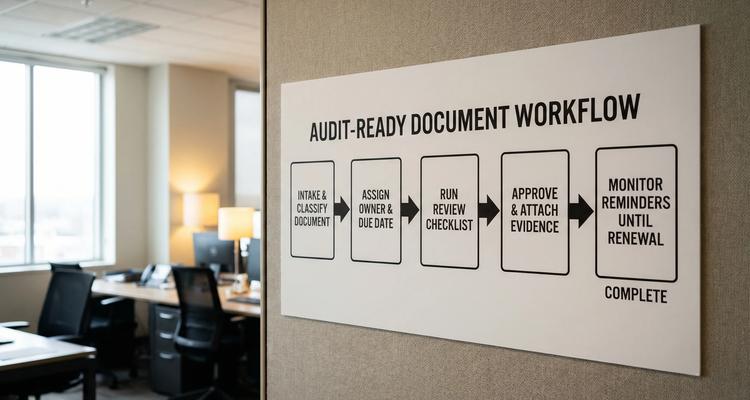
Design the flow: a practical blueprint you can implement
Below is a blueprint you can apply to a single workflow (for example, “Vendor Insurance Certificates”) and then replicate for other categories.
Step 1: Start with the audit question, not the software
Write down the exact questions an auditor, customer, or regulator would ask. Examples:
- What is the current certificate, and is it valid today?
- Who is responsible for renewal?
- What proof shows it was renewed before expiration?
- Were there any lapses, and how were they handled?
Those questions become your workflow requirements.
Step 2: Define the object you are managing
Be specific about what constitutes a “record.” For example:
- A single vendor may have multiple insurance certificates with different expirations.
- A single contract may have a renewal date, a notice period, and a separate pricing review date.
If your record definition is fuzzy, your workflow will be fuzzy, and so will your audit trail.
Step 3: Capture the minimum viable metadata
Do not over-engineer. Capture what is required for:
- Ownership and routing
- Timeline planning
- Audit retrieval
A lean set often includes category, owner, expiration date, renew-by date, and attachments.
Step 4: Build the checklist around “proof,” not tasks
Most teams build checklists around activities (“Email vendor,” “Follow up,” “Review document”). Audits care about outcomes.
Instead, design checklist items that create evidence:
- Renewal requested (date recorded)
- Updated document received (file attached)
- Internal review completed (approval recorded)
- Renewal confirmed (proof attached)
- Next expiration and renew-by dates updated
This approach turns your workflow into an evidence-producing machine.
Step 5: Decide your reminder cadence and escalation logic
Reminder timing should reflect risk and lead time.
High-risk workflows (licenses to operate, safety certifications, required insurance) should start earlier and escalate sooner. Low-risk subscriptions might require fewer layers.
If you want a deeper framework on choosing reminder timing, ExpiryEdge has a helpful guide on expiration reminder setup and best timing for renewals.
Step 6: Design the handoffs (where most workflows break)
Audit readiness often collapses at handoffs:
- Owner changes roles.
- A reviewer is out.
- Legal needs input but is not looped in.
- The vendor delays documents.
Solve this by making handoffs explicit:
- Assign a primary owner and a backup.
- Define when to escalate and to whom.
- Make “blocked” a visible state, not a silent delay.
Step 7: Test your flow with an “audit drill”
Before an actual audit, run a drill:
- Pick 10 records from different categories.
- Ask someone unfamiliar with the workflow to retrieve the current document, proof, owner, and next due date.
- Time the process and note where they get stuck.
If retrieval takes longer than a few minutes per record, your workflow needs simplification, better metadata, or a clearer system of record.
A concrete example: audit-ready workflow for contract renewals
Contract renewals are a perfect storm for audit risk because they combine time pressure, approvals, notice periods, and scattered documents.
An audit-ready renewal flow typically includes:
- A record for the contract with renewal date and notice period
- An assigned owner (with a backup)
- A checklist to gather renewal options, pricing, and approvals
- Stored renewal evidence (countersigned agreement, approval proof)
- Multi-channel reminders leading up to the renew-by date
If your organization is still comparing spreadsheets versus purpose-built workflow systems for renewals, you may also want this breakdown on workflow system software vs spreadsheets.
Common failure modes (and how to fix them fast)
Failure mode: “Approvals live in email”
If approvals are only in inboxes, you will lose them during turnover, mailbox cleanup, or vendor disputes.
Fix: Require a lightweight approval artifact attached to the record (approval email saved as PDF, or an internal approval note) plus a checklist step that prevents closure without proof.
Failure mode: “The latest version is unclear”
People waste hours asking, “Is this the final version?” and then attach the wrong document.
Fix: Define what “current approved” means and enforce it through your workflow exit criteria. Keep the final approved document attached to the record that also holds the renewal date.
Failure mode: “Deadlines are tracked separately from documents”
This creates a scenario where a renewal date is updated but proof is missing, or proof exists but the deadline was never reset.
Fix: Link your date management to your document flow so the record is only complete when both the next due date and the evidence are present.
Failure mode: “No one owns the record”
Unowned records are guaranteed audit pain.
Fix: Make ownership mandatory at intake. If you cannot name an owner, you do not have a workflow, you have a hope.
Where ExpiryEdge fits in an audit-ready document workflow
ExpiryEdge is built for teams that need to manage business-critical deadlines while keeping supporting evidence close at hand.
For audit-ready document workflow management, the most relevant capabilities include:
- Smart expiration tracking to keep renewals and compliance deadlines visible
- Automated workflow checklists so “done” is defined by evidence, not memory
- Multi-channel notifications to reduce missed steps and stalled handoffs
- A centralized expiry dashboard to see what is due, what is overdue, and what is at risk
- Advanced search to retrieve records quickly during reviews
- Document attachment so proof lives with the record
- Calendar view for operational planning
- Bulk import to onboard existing registers faster
- Team collaboration so work does not bottleneck on one person
- Customizable expiry categories to align the system with your audit scope
If your main risk is missed renewals and scattered evidence, the goal is simple: stop managing dates and documents in parallel systems.
A note for legal teams: workflow management can extend beyond compliance
Legal and compliance teams often need audit-ready flows for more than renewals, including matter documentation, investigation records, and litigation readiness.
If part of your workflow involves drafting litigation materials from existing case files, tools like TrialBase AI litigation agents can complement your internal process by turning uploaded documents into structured work product (for example, medical summaries or deposition outlines) while your compliance system maintains ownership, deadlines, and evidence.
Audit-ready workflow checklist (quick self-assessment)
Use this to spot the gaps that create audit panic:
- Every record has a named owner (and a backup).
- The expiration date and the renew-by date are captured and visible.
- The current approved document is attached to the same record that holds the deadline.
- The workflow cannot be closed without required proof.
- Reminders are multi-stage and escalate when overdue.
- You can retrieve any record by category, vendor, location, and due date.
- A new team member can find the evidence without asking “where is it?”

Frequently Asked Questions
What is document workflow management in a compliance context? Document workflow management is the process of routing documents through intake, review, approval, storage, and periodic renewal or review, with clear ownership, deadlines, and evidence.
What makes a workflow “audit-ready”? An audit-ready workflow makes it easy to prove what happened, when it happened, and who approved it, while keeping the current document, supporting evidence, and key dates linked and searchable.
Do I need a full document management system to be audit-ready? Not always. Many teams become audit-ready by pairing a reliable system of record for deadlines and checklists with consistent document attachment and retrieval practices.
How do I choose reminder timing for renewals? Choose reminder timing based on lead time, notice periods, internal approval cycles, and risk. High-risk items need earlier reminders and faster escalation than low-risk subscriptions.
What evidence should I store for renewals? Store the renewed document (certificate, license, contract), proof of completion (confirmation, receipt, countersignature), and any internal approvals required to justify the renewal decision.
How can I make audit retrieval faster? Standardize metadata (category, vendor, location, owner, due dates), store attachments with the record, and use a centralized dashboard plus advanced search to avoid hunting across tools.
Build an audit-ready flow without adding more chaos
If your team is juggling renewals, licenses, contracts, and compliance deadlines, audit readiness comes from one thing: a workflow that produces evidence by default.
ExpiryEdge helps teams centralize expiry records, automate reminder workflows, attach proof, and maintain clear ownership so audits feel routine instead of urgent. Explore ExpiryEdge at expiryedge.com and map your first audit-ready workflow around the deadlines that matter most.


