
Expiration Reminder Setup: Best Timing for Renewals

Most missed renewals are not caused by “forgetfulness.” They happen because the reminder was timed poorly: too early so it gets ignored, too late so you are stuck in a last minute scramble, or sent to the wrong person so nobody takes ownership.
A solid expiration reminder setup is really a timing system. It tells your team when to start work, when to escalate, and when to confirm completion, long before a deadline can turn into a late fee, service interruption, or audit finding.
What “best timing” actually means (it is more than one reminder)
When people ask for the best timing for renewals, they usually mean a single number like “30 days before.” In practice, that is rarely enough.
A reliable renewal timing plan has three parts:
- Lead time: when to start the renewal process (often weeks or months before the expiration date).
- Cadence: how often reminders repeat as the deadline approaches.
- Escalation: when reminders widen from the owner to a manager, finance, compliance, or operations.
This matters because different expirations have different “hidden work” behind them. Renewing a software subscription might be a quick procurement decision, while renewing a license, permit, insurance policy, or certification can involve document collection, approvals, vendor processing times, and sometimes external validation.
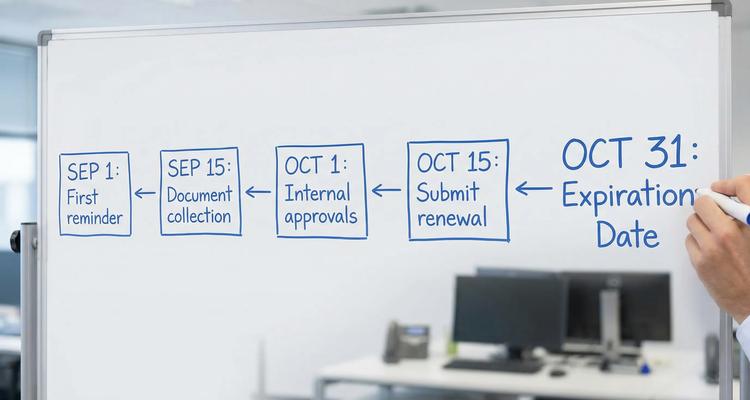
Work backward: calculate renewal lead time from the real process
The cleanest way to set reminder timing is to work backward from the expiration date and build a buffer for reality.
Start by defining two dates for every item you track:
- Expiration date: the date you lose compliance, coverage, access, or legal standing.
- Internal “renew by” date: the date you need the renewal completed by to safely clear processing, billing, or audit documentation.
To compute the internal “renew by” date, estimate the total lead time using these inputs:
1) External processing time
How long does the issuer, vendor, or agency take to renew once submitted? For some items, this is predictable. For others, it changes seasonally.
Tip: if the external party quotes “up to X days,” plan for X, not the average.
2) Internal cycle time
How long does your team take to complete the renewal tasks?
Common contributors:
- Collecting documents (COI, W-9, safety training proof, inspection reports)
- Reviewing contract changes (legal)
- Securing approvals (department lead, finance, executive)
- Issuing payment (AP schedule, payment terms)
3) Notice periods and cancellation windows
Many contracts and subscriptions have auto-renewal clauses or termination notice requirements (for example, you must give notice 30, 60, or 90 days before renewal). Missing these windows can lock you into another term.
For these, your “renewal” timeline is really a decision timeline: you need reminders early enough to evaluate, negotiate, or cancel.
4) Calendar risk (weekends, holidays, travel)
If your internal “renew by” date lands on a weekend, holiday, or period when key approvers are out, shift earlier.
A practical rule: for critical items, treat deadlines as business day deadlines and pull them forward.
A timing framework that works across most businesses (by risk tier)
Instead of using one universal schedule, assign each expiry item a risk tier (or category) and apply a default cadence. Then adjust for exceptions like long processing times or strict notice periods.
Below is a practical framework you can use as a starting point.
Tier 1: Regulatory, safety, or audit critical
Examples: licenses, permits, certifications, insurance coverage, safety inspections, credentialing.
A strong default cadence:
- 120 days: kickoff, verify requirements, assign owner, confirm docs needed
- 75 days: progress check, blockers identified
- 45 days: submit prep, approvals started
- 21 days: escalation if not submitted
- 10 days: urgent reminders until submitted
- 3 days and 1 day: final protection layer (only if still open)
Why this works: it creates early momentum, then adds tighter follow ups only if the task is still incomplete.
Tier 2: Revenue impacting or customer facing
Examples: client contracts, vendor agreements tied to delivery, renewals that affect service availability.
A strong default cadence:
- 90 days: evaluate performance, decide renew vs renegotiate
- 60 days: pricing and scope confirmation, draft renewal
- 30 days: approvals and signature routing
- 14 days: escalation if not signed
- 7 days: final check
This tier benefits from earlier reminders because negotiation, legal review, and signature collection can stall.
Tier 3: Operational continuity
Examples: equipment maintenance agreements, critical subscriptions (security tools, phone systems), facility services.
A strong default cadence:
- 60 days: confirm need, confirm budget owner
- 30 days: execute renewal
- 14 days: ensure payment and access continuity
- 3 days: last check
Tier 4: Low risk, low cost, easy replacement
Examples: small tools, nice to have subscriptions, noncritical services.
A strong default cadence:
- 30 days: review and decide
- 7 days: act
The goal here is not to over-notify your team. If reminders become noise, people stop trusting the system.
Match the reminder channel to urgency and required action
Timing only works if people see the reminder and act. Use channels based on urgency and complexity:
Use email for early stage renewal planning
Email is best when you need context: attached documents, contract notes, links to renewal tasks, or a summary of prior year decisions.
Use SMS or push style alerts for last mile urgency
As the deadline approaches, short reminders can help cut through inbox overload. Many teams use faster channels for the final window while keeping earlier nudges in email.
If you are deciding how to mix channels, ExpiryEdge’s breakdown of text reminders vs email reminders is a useful reference for building a layered approach.
Use calendar views to support weekly review routines
No reminder system should rely only on notifications. A weekly “renewals review” is where managers catch what is drifting.
A calendar view helps teams spot deadline clusters (for example, many renewals hitting at month end).
Build escalation rules that prevent “someone saw it” failure
A common reason expirations slip is ambiguity: the reminder went out, but nobody was clearly accountable.
A resilient setup defines three roles:
- Owner: the person responsible for completing the renewal
- Backup: the person who can step in if the owner is out
- Escalation contact: the manager or compliance lead who gets notified when timing thresholds are missed
A simple escalation pattern that works well:
- Early reminders go to the owner only.
- Midpoint reminders include the backup.
- Late stage reminders include escalation contacts until the item is marked complete.
This keeps early notifications calm and focused, while ensuring deadlines cannot quietly fail.
Add “proof of renewal” steps, not just reminder steps
For compliance and audit readiness, “we renewed it” is not enough. You need to prove it quickly.
In your workflow, include at least one checkpoint for documentation, such as:
- Upload the renewed license, certificate, or policy document
- Attach an invoice or payment confirmation
- Record the new effective and expiration dates
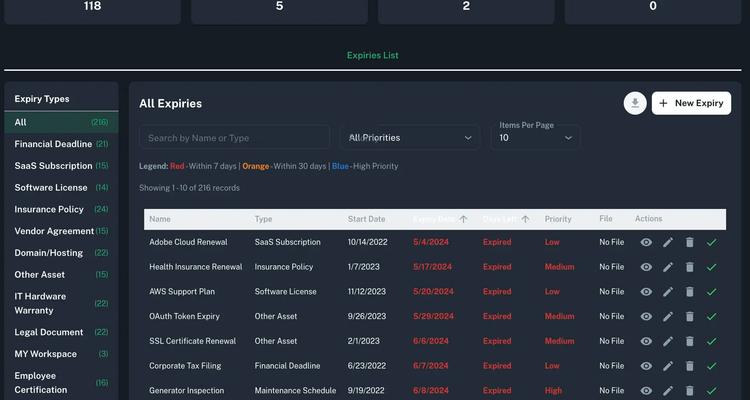
This is where systems that support document attachment and a centralized dashboard reduce panic during audits or vendor reviews.
Avoid the two most common timing mistakes
Mistake 1: Copying one schedule to every category
A single 30 day reminder might be fine for a low risk subscription, but it is dangerous for items with external processing times or strict notice periods.
Fix: set default cadences by tier, then override where needed.
Mistake 2: Setting reminders relative to expiration, not relative to decisions
For auto-renewing contracts, the true deadline might be the cancellation notice date, not the expiration date.
Fix: track the “decision deadline” as its own critical date, with its own reminder cadence.
Implementation checklist: set up your expiration reminders in one afternoon
If you want to move from scattered spreadsheets and calendar events to a structured system, use this sequence:
Step 1: Inventory what you renew
Pull items from:
- Vendor and subscription lists (finance, IT)
- Compliance calendars (legal, HR, safety)
- Contract repositories (legal, procurement)
- Insurance and certification trackers (risk, operations)
Step 2: Define categories and risk tiers
Keep it simple at first. You can start with categories like:
- Compliance and licensing
- Contracts
- Insurance
- Subscriptions
- Operations and maintenance
Then apply Tier 1 to Tier 4 timing defaults.
Step 3: Assign owners and create checklists
Every tracked item should have:
- One accountable owner
- A short checklist of what “done” means
- A place to store the renewal proof
Step 4: Configure reminders and escalation
Implement the cadence for the tier, then add escalation thresholds.
If you are looking for a structured approach, this pairs well with a platform that combines smart expiration tracking, automated workflow checklists, and multi-channel notifications so timing and execution stay connected.
Step 5: Run a 30 day “timing test”
Before you trust the system, test it:
- Pick 10 upcoming renewals across tiers
- Verify the first reminder dates make sense
- Confirm the right people receive notifications
- Ensure completion steps capture the right documents
How ExpiryEdge supports better renewal timing (without more admin work)
If your main problem is not knowing when to remind people, a dedicated system is designed for exactly that.
ExpiryEdge is built to help teams centralize deadlines and run a consistent renewal cadence with:
- Customizable expiry categories so timing defaults match the type of renewal
- Multi-channel notifications so urgent items can cut through inbox noise
- Automated workflow checklists so reminders translate into completed actions
- Centralized dashboard, advanced search, and calendar view so nothing is hidden
- Document attachment so proof of renewal is stored with the record
- Bulk import so you can migrate from spreadsheets quickly
- Team collaboration so ownership and escalation are clear
If you want a deeper workflow example, see how teams approach automating contract and subscription renewals and then adapt the timing framework above to your highest risk categories first.
The bottom line: the “best timing” is the timing your process can actually meet
A good expiration reminder setup is not about sending more notifications. It is about starting early enough to avoid fire drills, tightening follow ups only when needed, and escalating in a predictable way when an item is at risk.
If you standardize your lead times by tier, track decision deadlines for auto-renewals, and require proof of completion, you will prevent most renewal failures before they become expensive.


