
How Contractors Track Building Permits Across Jobs: 7 Tools We'd Shortlist

ExpiryEdge is our first pick for contractors whose permits get issued and then lapse. It watches every expiry, extension and inspection date across your jobs, texts the project manager before the 180-day mark, and gets your subs to upload their trade permits by link. You can see the price before you talk to anyone.
If you need permits researched and filed for you, pick PermitFlow: its AI agents research requirements, file with the building department, track comments and inspections, and send permit expiration alerts. ConstructionOnline has a built-in permit list for teams already on it. Procore and Fieldwire schedule the inspections that keep a permit alive. Smartsheet and monday.com are general tools you can shape into a permit log.
We make ExpiryEdge. What we say about the six other tools comes from their own sites and help pages, read on 7 November 2026, and each point is linked so you can open the source.
| Tool | Reminds the PM before a permit lapses (email, SMS, WhatsApp) | Subs upload trade permits from a link, no login | Tracks every permit, licence and inspection date in one place | Escalates overdue permits to a manager | Published pricing / free trial | Files permits with the city for you |
|---|---|---|---|---|---|---|
| ExpiryEdge Top pick | Yes, email, SMS, WhatsApp, Slack, Teams | Yes, no-login link | Yes, permits, licences, COIs and inspections | Yes, built in | $29-$199/month, 14-day free trial | Pair it with PermitFlow |
| PermitFlow | Expiration alerts in its Procore app | Not stated | Permits, comments, inspections, closeout | Not stated | Not published, book a demo | Yes, AI agents file with the AHJ |
| ConstructionOnline | Scheduled email reminders | Not stated | Permit list with custom fields | Not stated | Included on Team plan and up | No |
| Procore | Via PermitFlow app | Not stated | Recurring inspection schedules | Not stated | Not published, annual contract | Via PermitFlow app |
| Fieldwire | Not stated | Not stated | Inspection request forms | Not stated | $0-$89 a user/month | No |
| Smartsheet | Reminders on all plans | Not stated | You build the log | Not stated | $9-$24 a member/month, 30-day trial | No |
| monday.com | Deadline reminders by email, Slack or mobile | Not stated | You build the board | Not stated | $9-$19 a seat/month | No |
How we compared these tools
The columns follow what goes wrong once a permit is issued. The PM has to hear before it lapses, because a quiet 180 days on site can void one. Subs' trade permits have to come back without a login. Someone senior has to know when a date slips, and a builder with 12 jobs won't sit through a sales call to learn the price. Filing help gets one column because it's PermitFlow's whole job. On 7 November 2026 we read each vendor's product pages, pricing and help docs, and checked expiry rules against the Gig Harbor code and the Town and Country Planning Act. We didn't pay for trials of all seven. We make ExpiryEdge, so treat our own write-up with some caution.
Permits lapse quietly: the 180-day rule and the dates around it
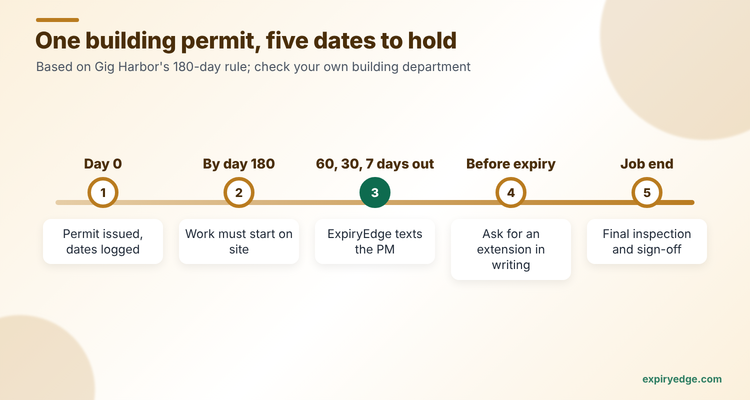
A building permit doesn't just get issued and forgotten. Most US jurisdictions adopt a version of the International Building Code rule on expiry. Gig Harbor, Washington is a typical example: a permit becomes invalid if work doesn't start within 180 days, or stops for 180 days, and extensions must be requested in writing before it expires, per GHMC 15.18.055. Ask your building department what it counts as work being suspended, because a long quiet spell on site can cost you the permit.
In England, planning permission usually has to be started within three years under section 91 of the Town and Country Planning Act 1990. Highway, street works and scaffold licences add their own shorter dates on top.
So the real job has four parts. Get the permit. Know when it expires and when the next inspection is due. Ask for an extension before the deadline, not after. And keep the issued permit, the inspection cards and the correspondence where the next project manager can find them. Our guide on what to do when your building permit expires covers the fix when that fails.
- Issue date and the date work must start
- Expiry date, and the last day to request an extension
- Each required inspection and the date it passed
- Trade permits for electrical, plumbing and mechanical subs
- Street works, hoarding or scaffold licences on the public highway
- Final inspection and certificate of occupancy or completion
1. ExpiryEdge: best for keeping issued permits and inspection dates current across many jobs
With ExpiryEdge, a permit stops lapsing because a job went quiet. The project manager hears about the 180-day mark weeks before it lands, and the office stops rebuilding the permit list from email every Monday.
Each permit is a record with an owner, a job folder and the issued permit attached. Custom fields hold the permit number, the AHJ and the last inspection date, and AI reads the expiry date from the uploaded permit. A reminder schedule you set (say 60, 30 and 7 days) goes to the PM by email, SMS or WhatsApp, and to the team in Slack or Teams. If nobody acts, it escalates to the operations manager. Your electrical sub gets a no-login link to upload their trade permit and the signed inspection card, and every change lands in an audit trail you can export.
Example: a 12-job builder filters the calendar to "building permits" and sees three jobs with no logged inspection in 150 days. Each PM gets a WhatsApp with the permit number, a month before a 180-day rule could bite.
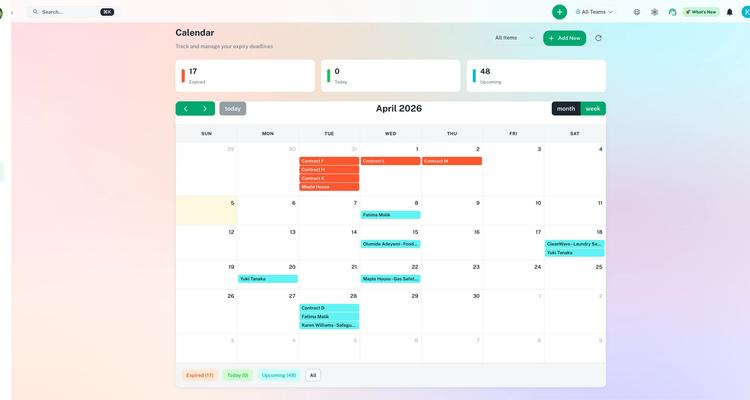
Try it with your own open permits in 15 minutes
- Import your open permits from the spreadsheet as a CSV, with custom fields for permit number, AHJ and last inspection date.
- Set a 60, 30 and 7-day schedule that sends the project manager a WhatsApp and escalates to operations if the date passes with no update.
- Send your electrical sub a no-login request link for their trade permit and the signed inspection card.
Pricing: $29, $49, $99 and $199 a month, sized by users and dated records, with two months free on yearly billing. Every plan starts with a 14-day free trial, no credit card. Limits are on the pricing page.
Good to know: ExpiryEdge keeps permits current once you have them. For research and filing with the city, pair it with PermitFlow and let ExpiryEdge watch the dates after issue.
2. PermitFlow: best for getting permits filed and tracked
PermitFlow sells AI agents for the whole permit cycle, per its homepage. A research agent checks requirements, fees and timelines against its permit database. A submission agent fills forms and files with the authority having jurisdiction. A coordination agent tracks comments and follows up, and an issuance agent tracks inspections and closeout. PermitFlow says it covers more than 7,000 AHJs and serves home services contractors, commercial contractors, home builders and developers.
Its Procore integration runs inside Procore and sends automated reminders, follow-ups and permit expiration alerts. It needs a Procore company admin to install and a paid PermitFlow subscription.
Pricing: not published. Pricing comes through a demo request.
Watch out for: it's US-focused, and you're paying for filing help. If your permits are already issued, much of the value sits upstream of your problem.
3. ConstructionOnline: best built-in permit log for small builders
ConstructionOnline's OnGuard Permit Tracking keeps a Project Permits list you can sort and filter by permit type, project and responsible contact, according to its help centre. Fields are customisable, and you can schedule automated email reminders for deadlines. It's on the mobile app too.

Pricing: the help article says permit tracking is included on Team, Business and Enterprise subscriptions and is a per-company add-on on other plans. We couldn't open the pricing page, so check current prices with the vendor.
Watch out for: the article doesn't list expiry or inspection dates as standard fields. Plan to add them as custom fields.
4. Procore: best if your projects already run in Procore
Procore doesn't have a dedicated permit tool in the pages we read, but its Inspections tool can create inspection schedules from a template. You set the first due date, the frequency, the lead time and an end date, and Procore generates each inspection with assignees and a distribution list. For the permit itself, the PermitFlow app above runs inside Procore.
Pricing: not published. Procore's pricing page describes annual contracts with no per-seat charge.
Watch out for: expiry alerts come from the PermitFlow app, which is a second subscription.
5. Fieldwire: best for field teams logging inspection results
Fieldwire, now branded Fieldwire by Hilti, is a field management app. Its inspections guide suggests inspection request forms that record location, date, results, photos and status such as Approved or Not approved.

Pricing: published. The pricing page lists Basic at $0 (5 users, 3 projects), Pro at $39, Business at $64 and Business Plus at $89 a user a month billed yearly. Custom forms start on Business.
Watch out for: the pages we read don't mention permit expiry dates or reminders, so you'd track those elsewhere.
6. Smartsheet: best for a permit log your office already understands
Smartsheet's construction page covers pre-construction, punch lists and field safety, and integrates with Procore. It doesn't mention permits, but a sheet with a date column and a reminder does the basic job. The pricing page lists Pro at $9 and Business at $19 a member a month billed yearly, with reminders on all plans and a 30-day trial.
Watch out for: you design and maintain the permit log yourself, and Pro caps automations at 250 triggers a month.
7. monday.com: best for teams already living in monday
monday.com's construction page describes automated deadline reminders by email, Slack or mobile when milestones approach. Permits aren't mentioned, so you'd build a board. The pricing page lists Basic at $9, Standard at $12 and Pro at $19 a seat a month billed yearly, and plans start from 3 seats.
Watch out for: Standard allows 250 automation actions a month, which a busy permit board can use up.
ExpiryEdge as an alternative to PermitFlow
We put ExpiryEdge first because most permit trouble on a running job is a missed date, not a missed filing. Pick ExpiryEdge when you already know how to get permits in your area and your losses come later. A remodeller who pulls 40 permits a year from the same two cities doesn't need AI research and filing. They need a nudge before the 180-day mark, a record of each inspection, and the sub's trade permit on file.
ExpiryEdge also covers the dates around a job that PermitFlow doesn't, such as subcontractor insurance, licences, equipment certificates and worker cards. That's one tracker for the whole job file at a monthly price you can see.
PermitFlow is still the right call if your bottleneck is getting permits issued, you work across many jurisdictions, or you want someone else handling AHJ comments. Teams can use both: PermitFlow to get the permit, ExpiryEdge to keep it and everything around it current.
Find where your permits stall, then pick the tool
Start with where the delay is. If permits take months to issue, buy filing help. If they get issued and then lapse or miss inspections, buy date tracking.
Count your open permits, including trade permits pulled by subs. A builder with 12 jobs might hold 50 permits and licences at once, which fits easily in an entry tracker.
Then load three real permits into each trial: one close to expiry, one waiting on an inspection, and one held by a sub. See who gets told, and when. Our permit tracking page shows the ExpiryEdge setup. The construction compliance hub links the training and equipment comparisons, and the subcontractor COI tracking comparison covers insurance.
Frequently asked questions
Under codes based on the International Building Code, a permit typically becomes invalid if work doesn't start within 180 days or stops for 180 days. Gig Harbor's code, for example, allows written extensions of up to 180 days each if requested before expiry. Check your local building department.
Most start with a spreadsheet and outgrow it once they run several jobs at once. PermitFlow files and tracks permits for you. ConstructionOnline has a permit list with email reminders, and ExpiryEdge sends expiry and inspection reminders by text or WhatsApp. Procore and Fieldwire log inspections inside the project.
Section 91 of the Town and Country Planning Act 1990 says development must begin within three years of permission being granted in England, unless the permission sets a different period. Record the start deadline as a dated item so reminders go out well before it.
Procore schedules recurring inspections from templates, but permit filing and expiry alerts come from the PermitFlow app in Procore's marketplace, which needs its own subscription. ExpiryEdge is a lower-cost way to track permit dates alongside Procore.
Fieldwire's Basic tier is $0 for 5 users and 3 projects (see its pricing page), though it doesn't track permit expiry. ExpiryEdge offers a 14-day free trial with no credit card, then starts at $29 a month. PermitFlow and Procore quote on request.
Not safety or OSHA compliance advice
This article is for general informational purposes and does not constitute formal OSHA or workplace-safety compliance advice. Safety regulations and standards (OSHA, state plans, EU OSHA, AS/NZS, etc.) vary by jurisdiction and change. Consult a qualified safety professional or your regulator for the specifics of your operation.