Team Collaboration Software for Compliance-Heavy Teams

Compliance-heavy work rarely fails because people do not care. It fails because the work is distributed across roles, inboxes, vendors, and systems, and the “last mile” of ownership is unclear.
That is why team collaboration software for compliance-heavy teams looks different from general project tools. You need more than chat, tasks, and due dates. You need a shared system of record for obligations (licenses, renewals, certifications, contracts, inspections), plus workflows that make accountability, evidence, and escalation unavoidable.
What “collaboration” really means in compliance work
In most teams, collaboration means communicating. In compliance-heavy teams, collaboration means coordinating a sequence of actions that must stand up to scrutiny, often on a fixed schedule.
That includes:
- Clear ownership (primary owner, backup owner, and who escalations go to)
- Repeatable workflows (checklists that match how renewals actually get done)
- Proof and documentation (attachments, versioning discipline, and retrieval speed)
- Visibility across departments (legal, finance, operations, HR, IT, quality, facilities)
- Predictable timelines (lead times, notice periods, internal approval windows)
If your “collaboration” happens in a mix of email threads, spreadsheets, and calendar invites, you can get the work done, but it is difficult to prove, audit, and scale.
Where compliance collaboration breaks down (even with good people)
These failure modes show up repeatedly in regulated or audit-prone environments:
1) Ownership gaps at handoffs
A renewal is rarely a single task. Someone requests vendor documents, another person reviews, another approves spend, another executes, another files evidence. If a handoff is implicit (“I thought you had it”), deadlines get missed.
2) Work that lives in private tools
A due date in one person’s calendar is not a team process. It is a single point of failure. The same is true for:
- A spreadsheet on someone’s desktop
- An email label or folder
- A project board only one department checks
3) Evidence that is scattered
Audits and customer questionnaires often come down to how quickly you can produce proof. When certificates, receipts, permits, and renewal confirmations are spread across drives and inboxes, collaboration becomes archaeology.
4) Reminders that do not match urgency
Compliance obligations have different risk levels. “Everything gets the same reminder cadence” leads to alert fatigue, or worse, missed high-risk items.
If you want a practical framework for timing and escalation, it helps to start with a renewal cadence (for example, early warning plus escalating reminders closer to the deadline). This related guide is useful context: Expiration Reminder Setup: Best Timing for Renewals.
Must-have capabilities in team collaboration software for compliance-heavy teams
The right tool depends on your industry and requirements, but most compliance-heavy teams converge on the same set of needs.
A centralized register of obligations
You need a consistent place where every obligation lives, with fields that make sense for compliance operations, such as:
- What expires (license, certificate, contract, subscription, inspection)
- Expiration date and internal “renew by” date
- Owner and backup
- Status and next action
- Related documents
This is the foundation that turns collaboration into a system, not a set of reminders.
Workflow checklists that match real renewal work
Compliance collaboration is mostly about repeatability. Checklists help you standardize what “done” means across locations, departments, and owners.
Look for workflow support that can cover:
- Step-by-step actions (request, review, approve, renew, file proof)
- Recurring tasks tied to the same obligation
- Shared visibility so others can step in if needed
If your renewals often bottleneck on approvals, procurement, or legal review, a workflow-first approach matters. (This is also why many teams outgrow generic to-do lists and ad hoc project boards.)
Multi-channel notifications with escalation
Email-only reminders are easy to ignore, especially for high-frequency teams. For compliance-heavy teams, reminders should be:
- Multi-channel (so you can reach people where they actually respond)
- Role-aware (owner vs manager vs backup)
- Escalation-capable (if an item is not acknowledged or completed)
The goal is not “more alerts.” The goal is fewer missed deadlines with less manual follow-up.
Document attachment and fast retrieval
Compliance work generates proof. Your collaboration software should support attaching the right documents to the right obligation so anyone can answer:
- What evidence do we have?
- Is it current?
- Where is the latest version?
Search, filtering, and calendar visibility
When auditors, customers, or leadership ask a question, you need to respond quickly.
Strong collaboration tools typically include:
- Advanced search (by vendor, location, category, owner, date range)
- Calendar view for planning workloads
- A dashboard view so the team sees what is due, overdue, and upcoming
Bulk import and easy onboarding
Compliance registers are rarely empty. If moving into a new tool requires months of manual data entry, adoption fails.
Bulk import helps teams migrate:
- Spreadsheets of renewals
- Vendor lists
- Departmental trackers
How to design collaboration workflows that survive audits
Tools matter, but the workflow model matters more. A simple structure keeps most teams out of trouble.
Define three roles for every obligation
You can call them what you want, but most teams need these responsibilities explicitly:
- Owner: accountable for completion
- Backup: can execute if the owner is out
- Escalation point: receives alerts when risk increases (team lead, compliance manager, ops director)
This alone prevents the most common “someone is out sick and the renewal slipped” scenario.
Treat renewals as a mini process, not a date
A compliance-heavy renewal often includes:
- Lead time for vendors or agencies
- Internal review time (legal, quality, finance)
- Approval windows
- Payment and confirmation
- Evidence filing
If your software supports workflow checklists, use them to reflect the real steps, not an idealized one-step task.
Build evidence collection into the definition of done
The renewal is not complete when someone says “handled.” It is complete when proof is attached, named consistently, and searchable.
Practical examples of “proof”:
- Updated certificate of insurance
- License renewal confirmation
- Signed contract amendment
- Inspection report
- Payment receipt
Use categories to manage risk
Not all obligations are equal. Categorization helps teams:
- Prioritize high-risk items (regulatory, revenue-impacting, safety)
- Use different reminder timing
- Route escalations differently
A realistic example: vendor compliance renewal (certificate + contract)
Here is what collaboration looks like when it is working.
A vendor’s certificate of insurance and a services contract both renew annually.
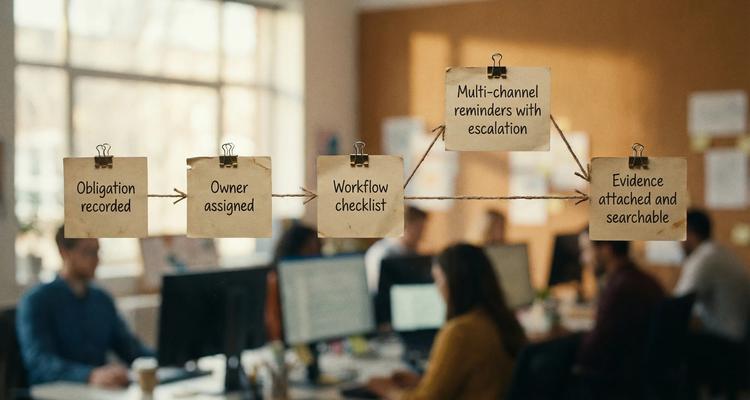
- The obligation is recorded in a shared system with expiration dates, owner, and vendor contact.
- A workflow checklist triggers 60 to 90 days ahead.
- The owner requests updated documents.
- Legal or compliance reviews the certificate and contract terms.
- Finance confirms budget and payment.
- The updated documents are attached to the obligation record.
- If the checklist is not progressing, reminders escalate to the backup owner or manager.
Notice what is missing: the team does not rely on “tribal knowledge,” a single inbox, or memory.
Adoption is part of compliance, train it like a process
Even the best collaboration software fails if people do not respond consistently.
Two high-impact practices:
Run “renewal drills” quarterly
Pick a sample of obligations and simulate a short-notice request:
- “Show the most recent proof for X.”
- “Who owns Y and what is the next action?”
- “Which items are at risk in the next 30 days?”
This quickly exposes gaps in ownership, evidence hygiene, and reminder effectiveness.
Train communication and handoffs explicitly
Many compliance failures are communication failures, not competence failures. Teams improve faster when they practice escalations, objections, and handoffs in realistic scenarios.
If you want a structured way to build confidence and consistency in these conversations, tools like Scenario IQ AI roleplay training can help teams rehearse vendor follow-ups, internal escalations, and customer compliance questionnaires without waiting for a real incident.
Where ExpiryEdge fits for compliance-heavy collaboration
ExpiryEdge is built around managing deadlines, renewals, and business-critical actions with automation and team visibility. For compliance-heavy teams, its value is in combining a shared system of record with execution support.
Key capabilities that map directly to compliance collaboration:
- Smart expiration tracking to keep obligations organized and visible
- Automated workflow checklists to standardize renewal steps across the team
- Multi-channel notifications to improve response rates and reduce “I missed the email” risk
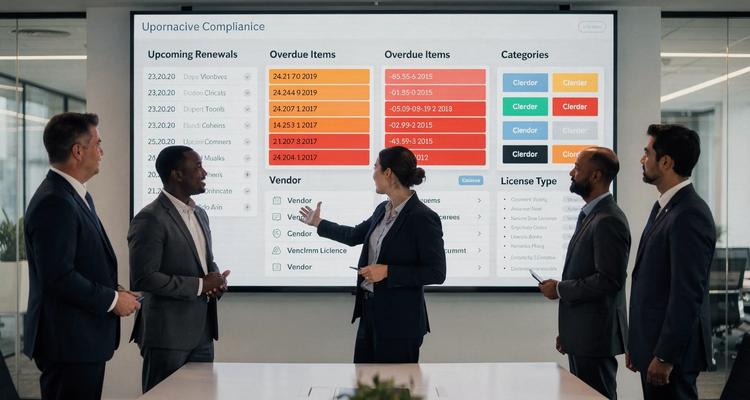
- Centralized expiry dashboard so everyone sees what is upcoming and what is overdue
- Advanced search to answer audit and customer questions quickly
- Document attachment to keep proof tied to the obligation
- Calendar view for planning workloads and renewals by week or month
- Bulk import expiries to migrate existing trackers with less friction
- Team collaboration features so ownership is shared, not trapped with one person
- Customizable expiry categories to align reminders and priorities to risk
If you are currently coordinating compliance via spreadsheets, shared mailboxes, and calendar events, the biggest operational shift is this: ExpiryEdge becomes the place where the team agrees what is true, what is due, who owns it, and what proof exists.
How to evaluate collaboration software for compliance (demo questions)
When you are comparing options, ask questions that reveal whether a tool supports real compliance operations, not just task tracking.
- Can we assign an owner and backup, and do escalations work when deadlines get close?
- Can we attach documents to the obligation record and retrieve them quickly by search?
- Can we standardize renewal steps with checklists so the process is consistent across teams?
- Can we separate high-risk obligations from low-risk ones with categories and views?
- Can we import our existing renewal register without weeks of manual work?
If a tool cannot answer these cleanly, you will end up recreating compliance operations in spreadsheets again.
Frequently Asked Questions
What is team collaboration software for compliance-heavy teams? It is software designed to coordinate owners, workflows, reminders, and evidence for regulated or audit-prone obligations, such as licenses, certifications, contracts, inspections, and renewals.
Why are general project management tools not enough for compliance collaboration? Many teams can make them work, but they often lack compliance-specific structures like obligation registers, renewal-centric workflows, escalation reminders, and evidence attachment tied directly to expiring items.
What features matter most for audit readiness? Centralized records, clear ownership (including backups), repeatable workflows, fast search, and evidence attachment are the core. Without them, proving compliance becomes slow and inconsistent.
How do you reduce alert fatigue while still preventing missed deadlines? Segment obligations by risk, use different reminder cadences, and escalate only when a task is not progressing. Multi-channel notifications help, but the bigger lever is using the right timing and ownership rules.
Can ExpiryEdge support cross-department collaboration (legal, ops, finance, HR)? ExpiryEdge is designed for team collaboration around expirations and deadlines, using shared dashboards, workflow checklists, notifications, and document attachments so multiple stakeholders can coordinate on the same obligation.
Make compliance collaboration predictable (instead of stressful)
If your compliance work depends on a few responsible people remembering the right dates, you are one absence, inbox overload, or vendor delay away from a preventable miss.
ExpiryEdge helps compliance-heavy teams centralize expiration tracking, standardize renewal workflows, and automate reminders so responsibilities are clear and evidence is easy to find.
Explore ExpiryEdge at expiryedge.com and see what your compliance workflow looks like when it is actually built for teams.