
Software to Manage Contracts: What to Track Besides Dates

Most teams buy software to manage contracts because they are tired of missing renewal dates. That is a real problem, but it is not the full problem.
In practice, contract risk and contract value live in the details you cannot see on a calendar: pricing terms, notice rules, obligations, required documents, service levels, and who actually owns the next action. If you only track “end date,” you will still get surprised.
This guide breaks down what to track besides dates so your contract system becomes operational, not just informational.
Why “just dates” fails (even with reminders)
A single expiration date does not tell you:
- Whether the contract auto-renews, and what notice window is required to stop it
- What you must deliver (reports, certificates, audits, minimum volumes) to stay compliant
- What proof you need to produce in an audit or customer review
- Who is responsible for action, and who should be escalated if they do not act
A useful contract record answers two questions at any moment:
- What must happen next?
- Can we prove we did it?
Dates support those outcomes, but they are only one field in a bigger record.
The contract “fields” that make software worth it
Think of your contract register like a structured profile for each agreement. Start with a minimum viable set of fields, then add detail for high-risk and high-spend contracts.
1) Parties, entities, and scope (so you know what the contract actually covers)
At minimum, capture:
- Legal entity names for each party (including DBA vs legal name)
- Contract type (MSA, SOW, subscription, lease, vendor, customer)
- Business function (Sales, HR, IT, Facilities)
- Scope summary (one sentence that a non-lawyer can understand)
Why it matters: entity mismatches and vague scope are common reasons contracts become hard to enforce, hard to renew cleanly, or hard to unwind.
2) Financial terms (so renewals are not a surprise invoice)
Dates tell you when something renews. Financial fields tell you whether you should let it.
Track:
- Current contract value (and currency)
- Billing cadence (monthly, annual, milestones)
- Price escalators (CPI, percentage increase, tier changes)
- Minimum commitments (seats, volume, spend)
- Payment terms (Net 15/30/45) and late-fee language
Even a lightweight view of spend and escalators helps finance and procurement prioritize renewals.
3) Auto-renewal logic and notice mechanics (the “deadline behind the deadline”)
This is the most common place teams get burned.
Besides the end date, record:
- Renewal type (auto-renew, evergreen, fixed-term, month-to-month)
- Notice period to terminate or opt out (for example, “60 days before renewal”)
- Notice method (email allowed, certified mail required, portal submission)
- Notice recipient and address (and whether it changes by amendment)
If you want a deeper operational breakdown, ExpiryEdge has a strong companion piece on the hidden deadlines embedded in standard clauses: Compliance contracts: deadlines hidden in standard clauses.
4) Obligations and deliverables (what you must do, not just when)
A contract is an obligation engine. Contract software becomes powerful when you turn obligations into trackable actions.
Common obligation categories to track:
- Deliverables (reports, performance metrics, quarterly business reviews)
- Compliance requirements (training, certifications, regulatory filings)
- Security and privacy commitments (incident notice timelines, access controls)
- Customer requirements (insurance limits, background checks, site rules)
To keep this manageable, store obligations as short, action-oriented statements, each with an owner and evidence.
| Obligation type | What to capture in your system | Why it matters | Typical owner |
|---|---|---|---|
| Insurance / COI | Required coverages, limits, certificate holder, renewal cadence | Lost deals and compliance gaps when COIs lapse | Risk, Ops, Vendor manager |
| Reporting | Frequency, format, recipient, acceptance criteria | “We never received it” disputes and SLA penalties | Account owner, Ops |
| Security / privacy | DPA status, incident notice window, subprocessor rules | Time-sensitive breach obligations | Security, Legal |
| Service levels | Uptime, response times, credits process | Missed credits and unmanaged vendor performance | IT, Procurement |
| Audit rights | Audit windows, response SLAs, data needed | Audit readiness and reduced scramble | Compliance, Legal |
5) Ownership, backups, and escalation paths (the difference between a system and a folder)
Contracts do not fail because people forget dates. They fail because ownership is unclear.
Track, at minimum:
- Business owner (accountable for outcomes)
- Operator (does the work)
- Approver (sign-off authority)
- Backup owner (coverage for vacations and turnover)
- Escalation target (who gets notified if the task is overdue)
If you want an operating model for this, see: Workflow management: set owners, backups, escalations.
6) Document set and “source of truth” attachments
If you have ever tried to answer “Which version did we sign?” during a renewal or dispute, you already know why attachments matter.
Attach (or link) the documents that actually govern the relationship:
- Fully executed agreement (final PDF)
- Amendments and change orders
- SOWs, exhibits, annexes, pricing schedules
- Certificates (insurance, compliance), renewal confirmations
- Notice letters that were actually sent (with proof)
This is especially important in operational industries where specifications change over time. For example, if you work with an apparel development and manufacturing partner like Arcus Apparel Group, your contract record is far more useful when it includes the latest tech packs, material specs, QA requirements, and any updated production addenda that modify what “acceptable delivery” means.
7) Risk and criticality (so you can prioritize the right renewals)
Not every contract deserves the same rigor. Add simple fields that help you triage:
- Business criticality (low, medium, high)
- Regulatory impact (none, internal policy, regulated)
- Data sensitivity (none, internal, confidential, personal data)
- Single point of failure (yes or no)
These fields drive smarter reminder cadences, escalation rules, and review depth.
8) Status and lifecycle checkpoints (so you can see progress, not just storage)
A date tells you when a contract ends. A status tells you where the work is.
Useful statuses include:
- Draft
- In review
- Signed
- Active
- Renewal review
- Termination in progress
- Terminated
You can pair status with a checklist so “Renewal review” is a controlled process, not a last-minute email thread.
ExpiryEdge is designed around this style of deadline-first workflow, combining smart expiration tracking with automated workflow checklists, multi-channel notifications, document attachment, and a centralized dashboard.
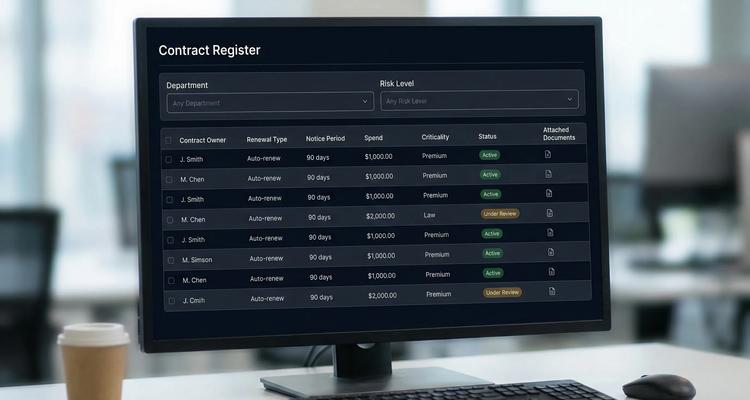
A practical “minimum viable contract record” you can implement this week
If you are building or cleaning up your contract system, start with a standard template that everyone must fill in. Keep it short enough that it actually gets used.
Here is a minimum set that usually works for small and mid-sized teams:
| Field | Example value | Why it is non-negotiable |
|---|---|---|
| Contract name | “CRM Subscription, US” | Human-readable reference |
| Counterparty | Legal entity name | Avoid disputes and confusion |
| Contract type | SaaS subscription | Enables filtering and reporting |
| Effective date | 2026-04-01 | Lifecycle accuracy |
| Term end date | 2027-03-31 | Renewal baseline |
| Renewal type | Auto-renews annually | Prevents surprise renewals |
| Notice period | 60 days prior | Drives internal renew-by date |
| Owner | Name/role | Accountability |
| Department | IT / Sales / HR | Routing and reporting |
| Spend | $X per year | Prioritization |
| Status | Active | Operational visibility |
| Executed agreement | Attachment | Source of truth |
Once that is stable, add obligation tracking for the categories that repeatedly bite you (insurance, SLAs, reporting, audit responses).
Turning tracked fields into action (where most tools fall short)
The difference between a repository and real contract operations is automation and workflow.
Convert key clauses into “renew-by” dates
A best practice is to store both:
- The legal renewal or expiration date
- An internal renew-by date that accounts for review time, approvals, procurement cycles, and counterparty processing
If you want a framework for reminder lead times and cadence, see: Expiration reminder setup: best timing for renewals.
Use checklists for repeatable renewals and obligations
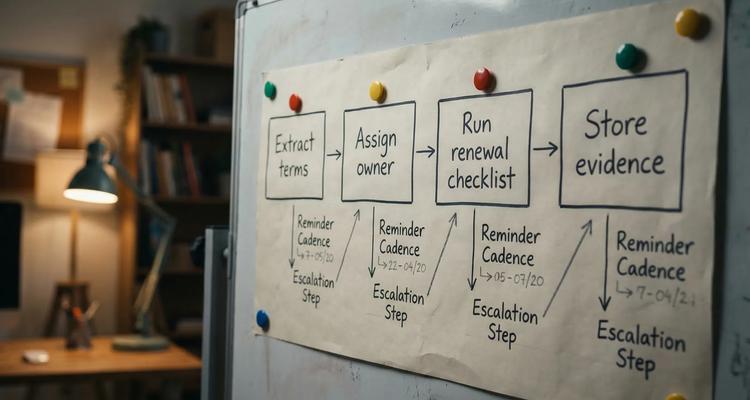
A renewal is rarely a single task. It is usually:
- Review performance and usage
- Validate pricing and terms
- Confirm required documents (COI, certifications)
- Route approvals
- Send notice (renew, renegotiate, or terminate)
- Store evidence
Software that supports workflow checklists helps ensure steps happen in the right order, with clear handoffs.
Design notifications around responsibility, not noise
Notifications should reflect roles:
- Owner gets early warnings and task prompts
- Backup gets included as the deadline approaches
- Escalation target gets notified only when the item is overdue or blocked
Multi-channel options matter because “saw the email” is not the same as “acted on the renewal.”
What to look for in software to manage contracts (based on the tracking model above)
If your goal is to prevent missed obligations and renewal waste, prioritize tools that can do more than store PDFs.
Look for:
- Custom fields (so you can track notice rules, spend, criticality)
- Strong search and filtering (so you can find “all auto-renew contracts with 60-day notice”)
- Document attachment that stays tied to the contract record
- Calendar view and centralized dashboard
- Bulk import (so cleanup is realistic)
- Collaboration features (comments, assignments, shared visibility)
- Automated reminders that support staged alerts and escalation
- Workflow checklists (so obligations are executable)
This approach aligns with ExpiryEdge’s focus on smart expiration tracking, centralized visibility, and workflow-driven execution.
Frequently Asked Questions
What is the most important thing to track besides a contract end date?
Auto-renewal terms and the notice period to opt out are usually the highest-impact fields because they create deadlines that come before the end date.
How do you track contract obligations without creating a huge admin burden?
Start with only recurring or high-risk obligations (insurance certificates, SLAs, required reports). Store each as a short task with an owner, due cadence, and an “evidence” attachment.
What documents should be attached to a contract record?
At minimum, the executed agreement and any amendments. For operational contracts, also attach exhibits (pricing, specs), certificates (COIs), and any notices sent with proof.
Who should “own” a contract in the system?
The best default is a business owner who is accountable for outcomes (value and risk), plus an operator who handles the workflow. Add a backup owner and an escalation target for reliability.
Is contract management software the same as renewal reminder software? Not always. Many contract tools store documents and dates. Renewal reminder software focuses on ensuring the right actions happen on time, with checklists, staged alerts, and audit-ready evidence.
Build a contract register your team can actually run
If you want software to manage contracts that goes beyond calendar reminders, build around a contract record that includes obligations, ownership, documents, notice rules, and workflow.
ExpiryEdge is designed for teams that need renewals and compliance deadlines to be predictable and auditable. You can centralize contract expiries, attach the executed paperwork, assign owners, and automate multi-channel reminders and workflow checklists so renewals do not depend on memory or scattered spreadsheets.
Explore ExpiryEdge at expiryedge.com.
Not legal advice
This article is for general informational purposes and does not constitute legal advice. Laws, regulations and contract requirements vary by jurisdiction and change over time. Consult a qualified attorney in your jurisdiction before making decisions that depend on the specific legal interpretation discussed here.


