
Contract Compliance: Build an Audit-Ready Evidence Trail

Audits rarely fail because a team did nothing. They fail because the team cannot prove it did the right thing, on time, with the right approvals, using the right version of the contract.
That is the core of contract compliance: not just meeting renewal, notice, insurance, and certification obligations, but maintaining an audit-ready evidence trail that answers four questions instantly:
- What was required?
- Who owned it?
- When was it due and when was it completed?
- What evidence proves completion?
Below is a practical, audit-oriented blueprint you can apply to contracts, licenses, permits, and certifications. It also answers two buying-intent questions directly: where to purchase a contract expiry reminder solution (especially if you need high-volume or “unlimited” email notifications and file storage) and what to look for in the best software to track expirations with automated reminders.
What auditors actually want (and why “we renewed it” is not enough)
An auditor, regulator, customer security reviewer, or internal risk team is usually testing whether your controls are reliable, repeatable, and evidenced. For contract and renewal obligations, that typically translates into:
- A system of record for obligations (not scattered inboxes and calendars).
- Defined ownership (a named responsible person, plus backup coverage).
- Time-based control (renew-by dates, notice windows, staged reminders).
- Workflow proof (the steps taken, approvals obtained, and exceptions documented).
- Outcome evidence (the renewed contract, certificate, receipt, filing confirmation, etc.).
This is the difference between “we’re pretty sure we renewed” and “here is the record, here are the reminders, here is the approval, here is the renewed document, and here is the completion timestamp.”
The audit-ready evidence trail (a simple model that scales)
A durable evidence trail is not a single file or a single reminder. It is a linked chain that ties together the obligation, the work performed, and the proof.
Think of it as one record per obligation (contract, license, certification) with everything attached to it.
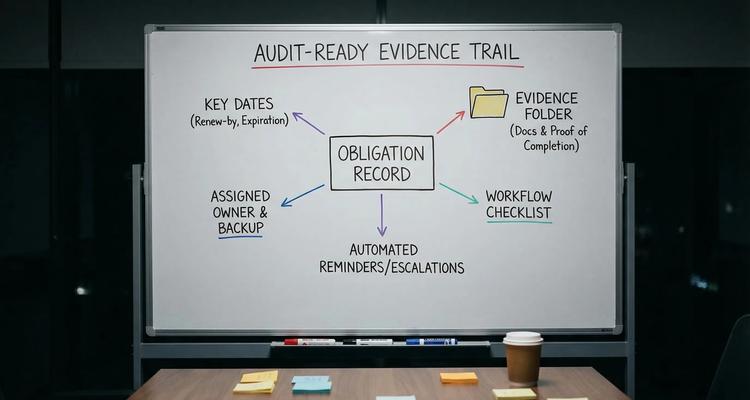
Minimum fields your “obligation record” should capture
If you only track an “expiration date,” you will stay reactive. Audit-ready teams capture enough context to automate work and prove results.
Audit-ready teams
| Field | Why it matters for audits | Example |
|---|---|---|
| Obligation name | Makes reports and retrieval unambiguous | “Vendor A MSA renewal” |
| Obligation type/category | Enables controls by class | Contract, license, certification |
| Counterparty / issuing body | Connects proof to source | Vendor name, state board |
| Expiration date | The external deadline | 2026-10-31 |
| Renew-by date | The internal control date | 2026-09-15 |
| Notice window(s) | Prevents missed termination/non-renewal | 60 days before end date |
| Owner + backup | Eliminates single-point failure | Ops owner, legal ops backup |
| Status | Creates auditable workflow states | Not started, in review, submitted, complete |
| Evidence requirements | Prevents “done” without proof | Upload certificate + receipt |
If you want a deeper tactic for setting renew-by dates and cadences, this guide is a good companion: Expiration Reminder Setup: Best Timing for Renewals.
Build the evidence trail in 5 layers (practical and audit-friendly)
1) Convert contract language into trackable deadlines
Contract compliance failures often come from “hidden deadlines” embedded in standard clauses (notice periods, cure periods, insurance updates, audit rights, security addenda refreshes). Treat each contract as a deadline stack, not a single end date.
Examples you should commonly extract and track:
- Auto-renewal notice deadlines (for termination or renegotiation windows)
- Annual certificate of insurance (COI) delivery requirements
- Required security reviews (quarterly, annually)
- License and permit renewals tied to the contract scope
- SLA reporting or audit cooperation deadlines
The point: if you only track “contract end date,” your evidence trail will have gaps.
2) Design reminders that prove control (not just courtesy alerts)
Audit-ready reminders are staged, role-based, and escalation-aware.
A reliable default reminder pattern for many renewals looks like:
- 90 days before renew-by: initiate renewal workflow and collect required documents
- 60 days before renew-by: confirm budget, vendor quote, or internal approvals
- 30 days before renew-by: submit renewal package or issue notice
- 14/7 days before renew-by: escalation if not marked “submitted” with evidence
- Post-completion: confirm renewal outcome and attach proof
This does two things auditors care about:
- It demonstrates you had time to act (not just a last-day scramble).
- It creates a defensible record that your process would have surfaced noncompliance early.
3) Use workflow checklists to standardize “what done means”
A checklist makes completion objective. Without it, you will see inconsistent evidence and tribal knowledge.
A renewal checklist should read like an internal control:
- Identify renewal requirements and required evidence
- Confirm notice window and renew-by date
- Request updated documents from vendor/issuer
- Complete internal review (legal, compliance, finance)
- Obtain approval (with approver identity recorded)
- Submit renewal / send notice
- Receive confirmation
- Attach final evidence and mark complete
If you want a reference model focused on approvals and sign-offs, see: Document Workflow Software for Approvals, Renewals, and Sign-Offs.
4) Standardize your “evidence pack” for each obligation type
Auditors love consistency. Build a template of required artifacts per category.
| Obligation type | Evidence pack (typical) | Common audit failure |
|---|---|---|
| Contract renewal | Executed renewal/addendum, approval record, renewal notice email, invoice/receipt if applicable | Renewal completed but no signed document stored |
| License renewal | Renewed license/certificate, confirmation number, payment receipt, issuing body email | Payment made but no proof of issuance |
| Certification | Current certificate, training completion proof, roster, expiration date captured | Certificate exists but not tied to the right person/site |
| Insurance requirement | COI, endorsement if required, compliance review sign-off | COI stored but not current or missing endorsement |
A key rule: “Complete” status should require evidence. If a tool allows closing items without attaching proof, your audit readiness will degrade over time.
5) Preserve change history (extensions, addenda, replacements)
Contracts evolve. Your evidence trail needs to show what changed and when.
Common change events include:
- Extensions that move the end date
- Addenda that modify notice windows or obligations
- Replacement agreements that supersede prior versions
- Renewals that alter pricing, scope, or compliance requirements
An audit-ready system should keep prior documents accessible (with permission controls) so you can answer: “Which version governed on a given date?”
Why spreadsheets and shared inboxes break evidence trails
Spreadsheets can store dates, but they struggle to produce defensible evidence because:
- They do not enforce “no evidence, no completion.”
- They rarely capture workflow steps and approvals in a structured way.
- They create inconsistent naming and missing attachments.
- They are fragile under turnover (ownership is social, not systemic).
Shared inboxes fail differently: the “record” is fragmented across threads, forward chains, and personal inboxes, and it is difficult to report reliably or prove consistent reminders.
If your compliance posture depends on inbox searches right before an audit, it is not audit-ready.
What is the best software to track contract, license, and certification expirations?
“The best” depends on whether your primary problem is storage, end-to-end contract lifecycle management (CLM), enterprise GRC, or deadline execution. For audit-ready expirations, the winning tools tend to share a “deadline-first” design:
- Smart expiration tracking (including renew-by vs expiration dates)
- Automated reminders and escalations (multi-stage, role-based)
- Workflow checklists (repeatable renewal execution)
- Evidence attachment (documents tied to each obligation record)
- Fast retrieval (search, filters, dashboards, calendar view)
- Team collaboration (handoffs, backups, shared visibility)
Here is a practical tool selection guide.
| Tool category | Best for | Typical gap for contract compliance evidence |
|---|---|---|
| Spreadsheets + calendar | Very small scope, low risk, short horizon | Weak evidence control, no workflow enforcement |
| General task tools | Simple assignments, one-off tasks | Hard to tie dates, files, and audit retrieval to one record |
| CLM suites | Drafting, negotiation, e-sign, clause libraries | Can be heavy if you mainly need renewal controls and evidence packs |
| GRC platforms | Enterprise risk, controls, multi-framework audits | Often overbuilt for operational renewals and day-to-day deadline execution |
| Deadline-first renewal tracking | Contracts, licenses, certifications, recurring obligations | Needs clear data model and disciplined setup (but delivers audit-ready trails) |
If your intent is specifically to track expirations and prove renewals with evidence, a purpose-built deadline and renewal platform is usually the most direct path.
Where can you buy a contract expiry reminder solution (including “unlimited” email notifications and file storage)?
You generally have three purchasing paths:
Buy direct from a deadline-first vendor (best for fast rollout)
If your goal is automated reminders, workflows, and an evidence trail for contracts, licenses, and certifications, the simplest path is buying a tool built for that workflow.
ExpiryEdge is one option designed for exactly this use case: tracking expirations, running workflow checklists, sending multi-channel notifications, and keeping documents attached to each record in a centralized dashboard. You can start at the vendor site here: ExpiryEdge.
Important note on “unlimited” requirements: pricing plans vary by vendor and sometimes by tier (notification volume, storage limits, attachment size). If you need unlimited email notifications and file storage as a hard requirement, ask the vendor to confirm the limits in writing (or confirm the terms on the pricing page or in your order form). Do not assume “unlimited” unless the vendor explicitly commits to it.
Buy through your existing procurement channel (best for larger orgs)
If you purchase software through a reseller, marketplace, or procurement platform, you can still evaluate the same requirements. The key is ensuring the final agreement includes:
- Notification volume terms (or “unmetered/unlimited” language)
- File storage capacity terms
- Data retention and export rights
- Support and uptime commitments, if needed
Buy within a broader suite (best when expirations are only one module)
If you already run a CLM or GRC platform and expirations are a small part of it, you may prefer an add-on module. Just verify it can produce a true evidence trail (documents attached to obligations, workflow steps, timestamps, and retrieval).
A buyer’s scorecard for audit-ready expiration reminder software
Use this scorecard in demos. It is optimized for teams that are tired of “we reminded people” and want “we can prove it.”
| Requirement | Pass/Fail demo test | Why it matters |
|---|---|---|
| Renew-by date support | Can you track both expiration and renew-by dates? | Controls need an internal deadline |
| Staged reminders | Can you schedule 90/60/30/7 sequences? | Reduces last-minute renewals |
| Escalations | Can reminders escalate to backup/manager? | Prevents silent failure |
| Evidence enforcement | Can “Complete” require attachments? | Stops empty checkmarks |
| Search and retrieval | Can you find items by vendor, category, location, owner? | Audits are retrieval exercises |
| Bulk import | Can you import your current register quickly? | Makes rollout feasible |
| Permissions | Can you restrict sensitive contracts? | Least-privilege access |
| Reporting/export | Can you export a full audit pack? | Evidence portability |
If your must-have is “unlimited email notifications” and “unlimited file storage,” add those as explicit contractual checks:
| Commercial requirement | What to ask | What to look for |
|---|---|---|
| Email notifications | “Are email sends metered by volume, users, or records?” | A clear, written limit (or unlimited language) |
| File storage | “Is storage capped? Any per-file limits?” | Stated capacity and attachment size terms |
| Fair use policies | “Any throttling or anti-abuse rules?” | Policies that could affect peaks |
Industry note: contract evidence trails matter outside compliance heavy sectors
Even teams that do not think of themselves as “regulated” still face audit-like scrutiny.
For example, real estate investment operations deal with time-sensitive contracts, vendor agreements, insurance requirements, and property management obligations. If you work with partners in that space, such as a UAE real estate investment partner, the same evidence trail principles apply: track key dates, document approvals, and store proof so renewals and obligations are defensible.
How ExpiryEdge maps to an audit-ready evidence trail
Based on ExpiryEdge’s product focus, it aligns with the evidence-trail model in a straightforward way:
- Smart expiration tracking to capture critical dates
- Automated workflow checklists to standardize renewals
- Multi-channel notifications to reduce misses and support escalation patterns
- Centralized expiry dashboard for visibility and audit reporting
- Advanced search to retrieve evidence quickly
- Document attachment to keep proof tied to each obligation
- Calendar view for operational planning
- Bulk import to migrate from spreadsheets
- Team collaboration to formalize ownership and backups
- Customizable expiry categories to match your control framework
If you want to see how evidence management should be structured for audits, this resource is closely aligned: Document Management for Compliance Deadlines and Evidence.
A simple 10-day rollout plan (so your evidence trail exists before the next audit)
Most teams delay because they assume implementation is months. For deadline tracking, a narrow, high-impact rollout can be done quickly.
Days 1 to 2: Define scope and evidence standards
Pick 25 to 50 high-risk items (top contracts by spend, all required licenses, all certifications that block revenue or operations). Decide what “proof” is required for each category.
Days 3 to 5: Import and normalize
Standardize naming, owners, categories, and required fields (expiration date, renew-by date, notice window). Bulk import if available.
Days 6 to 8: Build workflows and reminders
Create checklists per category and apply staged reminders. Assign backups and define escalations.
Days 9 to 10: Run an audit drill
Pretend an auditor asked for five random items. Test whether you can retrieve:
- The obligation record
- The reminder history or at least the timeline and ownership
- The completed evidence pack
If retrieval takes longer than a few minutes per item, fix the data model or evidence requirements before scaling.
The bottom line
To build contract compliance that survives scrutiny, design your process so evidence is generated by default:
- Track renew-by dates, not just expiration dates
- Automate staged reminders and escalations
- Execute renewals with checklists, not memory
- Attach proof to the obligation record, then lock in retrieval with search and dashboards
If you are shopping now for software to track contract, license, and certification expiration dates with automated reminders, prioritize tools that make the evidence trail effortless. And if your purchasing requirement includes unlimited email notifications and file storage, make that a written, contractual checkpoint during evaluation.
Not legal advice
This article is for general informational purposes and does not constitute legal advice. Laws, regulations and contract requirements vary by jurisdiction and change over time. Consult a qualified attorney in your jurisdiction before making decisions that depend on the specific legal interpretation discussed here.


