
Workflow Management Software for Renewals and Approvals

Renewals rarely fail because someone “forgot.” They fail because the work leading up to the renewal was never clearly owned, sequenced, approved, or tracked. If your process depends on a last-minute calendar reminder and a handful of inbox threads, you do not have a renewal system, you have a renewal hope.
That’s why workflow management software for renewals and approvals matters. It turns recurring, deadline-driven work (renewing licenses, contracts, certifications, subscriptions, permits, insurance, maintenance plans) into a repeatable workflow with accountable owners, checklist steps, and automated reminders.
Renewals and approvals are one process, not two
Most organizations treat renewals as “dates to remember” and approvals as “emails to chase.” In practice, they’re the same workflow.
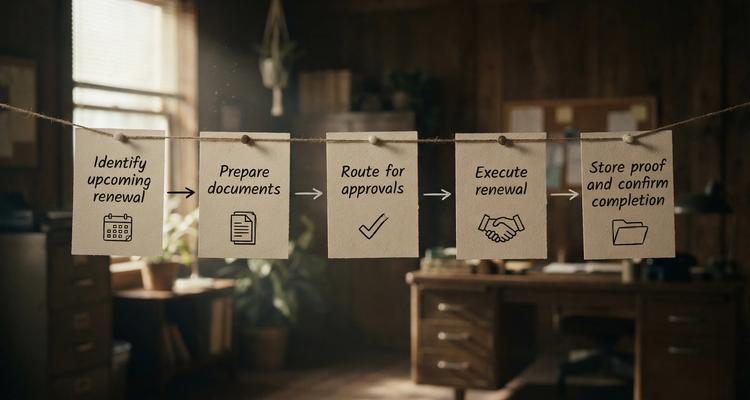
A typical renewal includes:
- A trigger date (expiration, notice period, auto-renewal cutoff)
- Preparation work (collect documents, validate vendor performance, check pricing)
- An approval decision (budget sign-off, legal review, risk acceptance)
- Execution (submit renewal, pay invoice, update certificate)
- Proof and storage (attach the renewed document, confirm coverage or status)
When these steps are informal, the renewal deadline becomes a fire drill. When they are structured, the deadline becomes just another operational cadence.
What a strong renewal workflow looks like in the real world
A good workflow is not complicated. It’s specific. You want clear ownership, lead times, and visible status.
Here is a practical pattern that works across most renewal types.
1) Define the lead time (not just the due date)
The expiration date is the finish line, not the start.
For each category (for example business licenses vs vendor contracts), decide:
- How early you must begin (90 days, 60 days, 30 days)
- What happens if the renewal is blocked (who escalates, how quickly)
- Which renewals require an approval vs “renew as-is”
The goal is to avoid compressing weeks of review into the final 48 hours.
2) Turn tribal knowledge into a checklist
Repeatable steps reduce errors, especially when staff changes. A renewal checklist typically includes:
- Confirm scope (sites, users, locations, equipment serial numbers)
- Gather required documents (COIs, certifications, invoices, renewal forms)
- Review performance and risk (incidents, service levels, audits)
- Review cost and terms (pricing changes, cancellation windows)
- Route for approval (budget, legal, compliance, leadership)
- Execute renewal and store proof
If your team cannot describe the renewal steps consistently, it’s a sign you need workflow standardization.
3) Make ownership unambiguous
Every renewal needs:
- One accountable owner (the person who drives completion)
- Supporting collaborators (finance, legal, ops, compliance)
- A back-up (coverage for vacations and turnover)
Ambiguous ownership is one of the most common causes of “we thought someone else had it.”
4) Centralize what matters for the approval
Approvals stall when reviewers cannot find what they need. Centralization should answer:
- What is expiring, when, and what’s the risk of lapse?
- What documents support the decision?
- What is the current status, and what step is blocking progress?
That is the difference between an approval that takes 2 days and one that takes 2 weeks.
Common approval points you should plan for
Renewal approvals vary by industry, but the bottlenecks are surprisingly consistent. Designing around them makes the workflow smoother.
Budget and spend approvals
Finance teams need context to approve quickly:
- What changed vs last term?
- Is this renewal optional or mandatory?
- What happens if you do not renew?
If you cannot answer those questions inside the workflow, the approval becomes a meeting request.
Legal and contractual approvals
Legal typically cares about:
- Renewal clauses (auto-renewal, termination windows)
- Liability and insurance requirements
- Changes to terms, data handling, or jurisdiction
Even when legal review is “rare,” the workflow should support it for the exceptions.
Compliance and operational approvals
Compliance and ops reviewers often need:
- Evidence (certificates, licenses, inspection records)
- Verification that prerequisites were completed
- Confirmation that responsibilities are assigned post-renewal
This is where attached documents and clear checklist steps pay off.
What to look for in workflow management software for renewals and approvals
Generic task tools can be fine for one-off projects. Renewals are different: they are recurring, time-sensitive, and audit-relevant. The right workflow management software should be built for that reality.
A centralized dashboard for “what’s coming due”
You need a single place to answer:
- What expires next?
- What is overdue?
- Who owns each item?
- Which items are blocked, and why?
A centralized view reduces status meetings because the system becomes the status.
Smart expiration tracking (including recurring renewals)
Renewals rarely happen once. The software should support recurring expirations and renewal cycles, so you are not rebuilding tasks every year.
Automated workflow checklists
Checklists let you standardize the renewal steps for each category, then apply them consistently. This is especially important for:
- Multi-location businesses
- Teams with frequent handoffs
- Regulated environments where “we did it” must be provable
Multi-channel notifications that match urgency
Approvals fail when notifications are easy to miss. Look for configurable reminders and multiple channels so you can use:
- Early-stage nudges for planning
- Higher-urgency alerts as the deadline approaches
(If you want a deeper comparison of channels and response behavior, ExpiryEdge also breaks down the differences in text reminders vs email reminders.)
Document attachment at the item level
Renewals and approvals are document-heavy. Storing relevant files with the renewal record reduces time spent searching and reduces errors caused by outdated versions.
Fast retrieval with advanced search
When an auditor, manager, or vendor asks “Do we have the current certificate?” you should be able to find it in seconds, not hours. Advanced search is a workflow feature, not a nice-to-have.
Calendar view for planning and load balancing
A calendar view helps you spot:
- End-of-quarter renewal spikes
- Seasonal compliance clusters
- Conflicts (multiple renewals hitting the same approver at once)
Bulk import for onboarding and cleanups
Most teams already have expirations scattered across spreadsheets, inboxes, shared drives, and calendars. Bulk import is critical for getting to value quickly.
Team collaboration and handoffs
Renewal work is cross-functional. Collaboration features reduce the “lost in translation” moments between operations, finance, compliance, and leadership.
Implementation: how to roll out renewal workflows without chaos
Buying software is easy. Getting consistent usage is the real work. A practical rollout focuses on scope and repeatability.
Start with a renewal inventory, not a perfect process
Do a first pass list of what you renew, even if it’s messy:
- Licenses and permits
- Contracts and vendor agreements
- Insurance policies and certificates
- Subscriptions and operational services
- Certifications and inspections
Then choose the top 20 percent that create 80 percent of risk or spend.
Standardize categories and owners
Define a small set of renewal categories (you can expand later), and assign a primary owner per category. This prevents the system from becoming a dumping ground.
Build one checklist template per category
Keep the first version simple. If your checklist is too detailed, teams stop using it. If it’s too vague, it doesn’t help.
Aim for a checklist that:
- Can be completed by someone new
- Captures the minimum evidence required
- Includes explicit approval steps when needed
Use layered reminders tied to the work, not the anxiety
A strong reminder pattern nudges the workflow forward:
- Early reminder to begin preparation
- Midpoint reminder to confirm approvals are in motion
- Final reminders that escalate urgency and visibility
This is how you avoid last-minute renewals without flooding everyone with alerts.
Pilot with one department, then expand
Pick a team that feels the pain (operations, facilities, compliance, vendor management). Run the workflow for 30 to 60 days, gather friction points, refine categories and checklists, then scale.
When dedicated renewal workflow software beats generic project tools
You can absolutely track a renewal in a task app. The problem is what happens at scale.
Dedicated renewal workflows tend to win when:
- You manage dozens or hundreds of recurring expirations
- The work involves approvals across teams
- You need consistent evidence and documentation for audits or vendors
- Staff changes make “ask Sarah” a risky strategy
If you are currently using spreadsheets, shared calendars, or to-do lists, you may also relate to why those tools break under compliance pressure, as discussed in why traditional todo lists fall short for managing business deadlines.
How ExpiryEdge supports renewals and approvals
ExpiryEdge is designed around the idea that expirations are operational workflows. It combines renewal tracking with workflow execution so teams can move from “we have a date” to “we completed the work and can prove it.”
With ExpiryEdge, teams can:
- Track upcoming renewals with smart expiration tracking
- Standardize steps using automated workflow checklists
- Keep stakeholders aligned with multi-channel notifications
- Manage work in a centralized expiry dashboard with calendar view
- Store supporting evidence via document attachment
- Find records quickly using advanced search
- Onboard faster using bulk import
- Coordinate across teams with team collaboration and customizable expiry categories
If you want an example of putting renewal automation into practice, see how to automate contract & subscription renewals, then map the same approach to your approvals and compliance checkpoints.

Turning renewals into a predictable operating rhythm
The goal is not to “remember more.” The goal is to make renewals and approvals boring, predictable, and visible.
When you implement workflow management software for renewals and approvals correctly, you get fewer fire drills, cleaner handoffs, faster decisions, and far less risk riding on one person’s inbox.
To see how ExpiryEdge can fit your renewal and approval workflows, explore the platform at ExpiryEdge.


