
Task Management Systems for Renewals and Approvals

Renewals and approvals are rarely “hard” work. What makes them fail is that they are repeatable, deadline-driven, and cross-functional, which is exactly where many task management systems start to bend. A renewal might require finance to confirm budget, legal to review terms, the business owner to sign off, and operations to store evidence for an audit. If that work lives in scattered tasks, inbox threads, and calendars, you get last-minute scrambles, accidental auto-renewals, and missing proof when someone asks, “Who approved this and when?”
This guide breaks down how to use task management systems for renewals and approvals without creating a fragile process, and when it’s time to move to a purpose-built expiry and compliance workflow.
Why renewals and approvals break inside general task management systems
Most teams already have a project or task tool. The problem is not that those tools are “bad,” it’s that renewals and approvals have requirements that standard project work often does not.
Common failure modes include:
- No single system of record: the task exists, but the source contract, renewal notice window, and final signed approval live somewhere else.
- Tasks don’t preserve audit-ready history: recurring tasks get edited, duplicated, or completed without capturing what changed year over year.
- Date logic is too simple: you need both an “expires on” date and an internal “renew by” date that accounts for notice periods, procurement cycles, and external processing time.
- Ownership is ambiguous: task assignees change, stakeholders are tagged, but no one is clearly accountable for closing the loop.
- Approvals happen in side channels: decisions are made in Slack or email, then the task is checked off with no durable evidence.
If you treat renewals like “just another to-do,” your process will depend on perfect human behavior. That’s not a system, it’s hope.
What a renewal-and-approval-ready task system needs (minimum viable capabilities)
To make a task management system reliable for renewals and approvals, you need to design around controls, traceability, and deadlines, not just completion.
Here’s a practical checklist of capabilities to implement, even if you stay in a general-purpose tool.
| Capability | Why it matters for renewals and approvals | What it looks like in practice |
|---|---|---|
| System of record for each item | People need one place to find “the truth” | One canonical record per contract/license/subscription with link to the task workflow |
| Renew-by date (not just expiry date) | Prevents last-minute rush and missed notice windows | A calculated internal deadline that triggers work early |
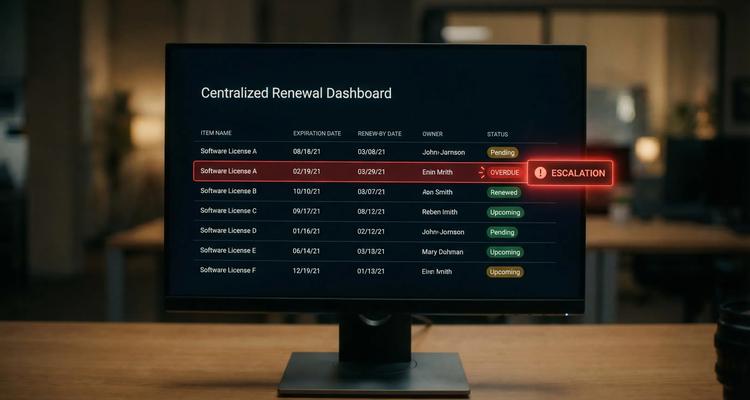
| Staged reminders and escalation | A single reminder is easy to miss | Multi-step notifications to owner, backup, then manager if overdue |
| Repeatable workflow checklist | Renewals follow patterns | A template with the same steps every cycle (collect quote, legal review, approve, pay, store proof) |
| Evidence attachment or durable linking | Audits ask for proof, not stories | Store renewal confirmations, approvals, and receipts next to the record |
| Clear roles: owner, approver, backup | Work crosses departments | One accountable owner, defined approver(s), and a trained backup |
| Searchable metadata | You can’t manage what you can’t retrieve | Vendor name, category, business unit, renewal frequency, risk tier |
A useful mental model is internal control: you are building a repeatable process that reduces the chance of failure when people are busy. Frameworks like the COSO Internal Control framework emphasize clarity of responsibility and reliable information flows, which maps directly to renewal and approval operations.
A simple workflow blueprint: renewals
A renewal workflow becomes predictable when you separate the record (what is being renewed) from the runbook (how you renew it).
The renewal record (what to standardize)
Even if you do this in a task management system, define a consistent set of fields for every renewal item:
- Item name (contract, license, subscription, permit)
- Counterparty or vendor
- Expiration date
- Renew-by date (internal deadline)
- Notice window (if applicable)
- Owner (accountable)
- Backup (trained)
- Approver (or approval group)
- Status (for example: Not started, In progress, Waiting on vendor, Waiting approval, Completed)
- Evidence link (where proof is stored)
When teams skip this, they end up rebuilding context every cycle.
The renewal runbook (how work should flow)
For most organizations, a renewal runbook needs to cover four phases:
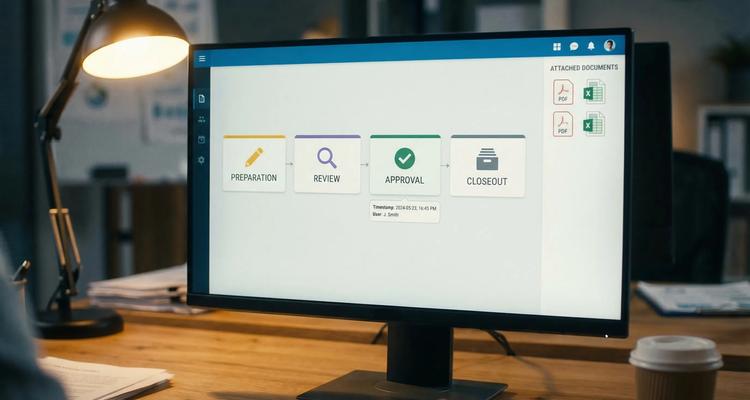
1) Preparation: confirm scope, pull current agreement, request pricing or renewal terms.
2) Review: legal and compliance review (if needed), budget confirmation, vendor due diligence.
3) Decision and execution: approve, renew, pay, update systems.
4) Close the loop: store proof, update dates, mark completed, and record any changes.
The key is that “completed” means evidence captured, not just “someone said it’s done.”
A simple workflow blueprint: approvals
Approvals fail for a different reason: they’re often treated as a single checkbox. In reality, approval is a decision that should be traceable.
Make approvals explicit: entry criteria and exit criteria
For any approval step, define:
- What must be true before approval is requested (entry criteria). Example: pricing quote attached, redlines summarized, vendor risk check complete.
- What artifact proves approval (exit criteria). Example: approval recorded in the tool with approver name and timestamp, or an attached approval email/PDF.
This prevents “approve this” messages with no context and reduces back-and-forth.
Avoid the approval bottleneck pattern
If every renewal requires the same executive approver, you create a predictable delay. A better pattern is to route approvals by risk tier:
- Low risk: owner + finance
- Medium risk: owner + finance + legal
- High risk: owner + finance + legal + leadership
You can implement this in many task management systems with templates and conditional rules (or at least separate templates by tier).
Notifications, automation, and integrations (where task tools usually fall short)
A renewal process needs automation that is boring and reliable.
Use multi-stage reminders, not one reminder
A robust reminder pattern is:
- Early reminder (for planning)
- Mid reminder (for execution)
- Late reminder (urgent)
- Escalation if overdue (to backup, then manager)
Many general task tools can send due date reminders, but fewer can handle escalation logic cleanly without heavy customization.
Connect renewals to the systems where work happens
Renewals touch finance and operations, not just a task list. In mid-market companies, that typically means connecting workflows to ERP, contract repositories, purchasing, and identity/access systems.
If you’re already running NetSuite or similar systems and want renewals and approvals to trigger downstream actions (or reconcile with vendor records), it can help to work with an integration partner that understands both automation and ERP realities. For example, AI & NetSuite consulting teams like DataOngoing focus on connecting disconnected systems so deadline-driven work doesn’t get trapped in manual steps.
Choosing between task management systems and purpose-built renewal tracking
Some teams can succeed inside their existing task management system, but only under specific conditions.
| If your reality looks like this | A general task management system can work if you… | You likely need a purpose-built system if… |
|---|---|---|
| Fewer items, low compliance exposure | Standardize fields and templates, enforce weekly review | Misses create fines, downtime, or audit findings |
| One department owns most renewals | Centralize records and keep evidence linked | Ownership crosses many teams and locations |
| Minimal proof requirements | Capture approvals with consistent artifacts | You need audit-ready evidence in one place |
| Few exceptions | Run the same checklist each cycle | Terms differ widely and notice windows matter |
| Low volume of reminders | Use staged reminders and clear escalation | You need multi-channel alerts and role-based dashboards |
A good forcing function: if you cannot answer “What renewals are at risk in the next 60 days, who owns them, and where is the evidence?” in under 5 minutes, your current setup is not operationally safe.
How ExpiryEdge fits: a deadline-first task system for renewals and approvals
ExpiryEdge is designed specifically for the renewal-and-approval use case: managing business-critical deadlines with workflows and proof.
Instead of forcing renewals into generic project structures, ExpiryEdge focuses on the building blocks that make deadline operations reliable:
- Smart expiration tracking so key dates are visible and actionable
- Automated workflow checklists for repeatable renewal and approval steps
- Multi-channel notifications to reduce missed reminders
- Centralized expiry dashboard for at-a-glance risk
- Advanced search to retrieve items fast during reviews or audits
- Document attachment to keep evidence tied to the record
- Calendar view for planning and workload visibility
- Bulk import expiries to get off spreadsheets quickly
- Team collaboration with shared visibility and accountability
- Customizable expiry categories so different departments can standardize without losing flexibility
If you want to see how a deadline-first approach differs from traditional to-do apps, you can also read ExpiryEdge’s guide on why traditional todo lists fall short for managing business deadlines.
Implementation tips: make it real in two weeks
Whether you implement in a task management system or move to a dedicated platform, success depends on rollout discipline.
A practical approach:
- Start with one high-impact category (for example: revenue contracts, insurance, or critical licenses)
- Define a minimum set of fields (including renew-by date and owner)
- Create two templates (low risk and high risk) instead of infinite variations
- Require evidence before “complete”
- Run a weekly 20-minute renewal review meeting until the system is stable
For a deeper operational pattern around accountability, ExpiryEdge also outlines how to set up owners, backups, and escalations in workflow management for deadline-driven work.
Frequently Asked Questions
Can I use Asana, Trello, or Jira as a renewal tracking system? Yes, but only if you standardize the renewal record (fields), use repeatable templates, and enforce evidence capture. Without that, renewals become scattered tasks that are hard to audit.
What’s the difference between an expiration date and a renew-by date? The expiration date is when a contract, license, or subscription ends (or renews). The renew-by date is your internal deadline to start and complete renewal steps early enough to avoid notice-window misses and last-minute approvals.
How do I prevent approvals from getting stuck? Define entry criteria (what must be attached before requesting approval), route approvals by risk tier, and set escalation rules when approvals sit too long.
What evidence should we store for renewals and approvals? Store the artifact that proves the action happened: signed agreement, renewal confirmation, receipt, approval record with timestamp, or formal approval email. The key is consistency and retrievability.
When should we switch from a task management system to a dedicated platform? When missed deadlines create meaningful risk (fines, downtime, audit findings), when ownership spans multiple teams, or when you repeatedly struggle to find proof of renewal and approval decisions.
Make renewals and approvals predictable with ExpiryEdge
If your team is tired of chasing renewals through inboxes, spreadsheets, and scattered tasks, ExpiryEdge gives you a deadline-first system to track expirations, run checklists, automate alerts, and keep evidence in one place.
Explore ExpiryEdge at expiryedge.com to centralize renewals and approvals before the next deadline becomes a fire drill.


