Healthcare Compliance Software: Track Policies, Licenses, Proof

Healthcare compliance breaks down in predictable ways: a policy review date sneaks past without re-approval, a clinician’s license lapses mid-schedule, or an auditor asks for “proof” and the document exists somewhere but nobody can find it fast enough.
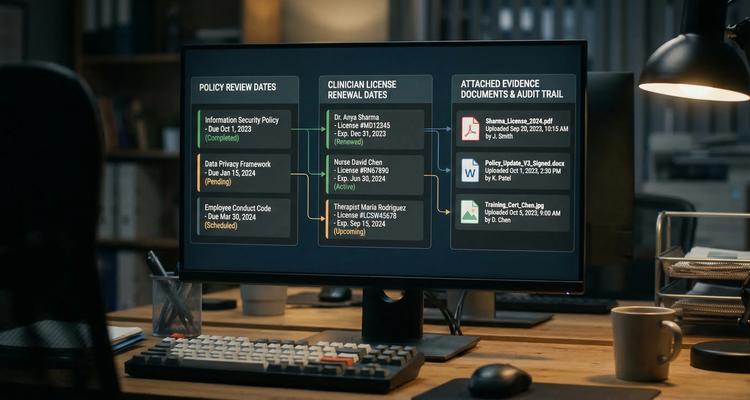
That’s why healthcare compliance software is less about “storing files” and more about running a reliable, auditable system for three things that must never drift apart:
- Policies (what the organization says it will do)
- Licenses and credentials (who is allowed to do it)
- Proof (evidence that it was actually done)
This guide explains what to track, how to structure your compliance records, and what capabilities matter if your goal is to reduce risk and make audits routine.
What healthcare compliance software should track (beyond “an expiration date”)
Most teams start with a simple concept: track the expiration date and send a reminder. In healthcare, that’s necessary but not sufficient.
A workable compliance record needs to reflect how real compliance happens: there’s lead time, internal review, external processing, approvals, and evidence collection. A modern system should handle at least these three compliance “objects.”
1) Policies: review cycles, approvals, and version control
Policies are not static PDFs. They have owners, review cadences, related procedures, and evidence of approval. Accreditation and regulatory requirements often expect organizations to maintain and periodically review policies and procedures relevant to patient safety and operations.
Useful policy tracking fields typically include:
- Policy name and category (e.g., infection prevention, medication management, HR)
- Effective date and next review date
- Owner and approver
- Location or facility applicability (if multi-site)
- Required attachments (current policy, revision history, approval memo or minutes)
When a surveyor asks “show me your current policy and how you know it’s current,” you want an answer in minutes, not a scavenger hunt across SharePoint folders and email threads.
2) Licenses and credentials: renewals with lead time and escalation
Licenses tend to fail for operational reasons, not because people forget the date. Common failure modes include missing CE documentation, unclear responsibility (provider vs credentialing), or “silent” changes like new state requirements or processing delays.
Depending on your setting, you may need to track:
- Professional licenses (state boards)
- DEA registration (for controlled substances)
- Board certifications and specialty credentials
- Facility licenses and permits
- Payer enrollment and revalidation windows
For reference, CMS maintains guidance on Medicare enrollment and revalidation, which is a frequent source of deadline-driven work for provider organizations (see CMS Medicare enrollment resources).
Good compliance software treats each license like a workflow, not a calendar event.
3) Proof: audit-ready evidence tied to the exact obligation
In audits, “we did it” is not the same as “we can prove it.” Proof is the combination of:
- The artifact (certificate, confirmation, signed policy, training completion report)
- The context (which requirement it satisfies)
- The timing (when it was valid, when it was renewed)
- The ownership trail (who completed and approved)
Healthcare compliance software should let you attach documents directly to the obligation record and retrieve them quickly via search and filters, ideally without relying on one person’s memory.
The core concept: build a “single record” for every obligation
If you take one idea from this article, make it this: every compliance item needs a single system-of-record entry that connects dates, people, steps, and evidence.
Whether the obligation is “Annual HIPAA training,” “CLIA certificate renewal,” or “Policy: incident reporting review,” the record should answer:
- What is required?
- Who owns it (and who is backup)?
- When is it due, and when must we start?
- What steps must happen?
- What evidence closes it out?
Use “renew-by” dates, not only expiration dates
Expiration dates are external facts. “Renew-by” dates are operational commitments.
A renew-by date is calculated by working backward from expiration using:
- External processing time (boards, agencies, payers)
- Internal cycle time (collect documents, CE, approvals)
- Risk buffers (holidays, staffing constraints)
This is how you prevent last-minute renewal scrambles that cause clinical scheduling risk or payer disruptions.
What to look for in healthcare compliance software (capabilities that actually prevent failures)
Plenty of tools can store documents or create tasks. Fewer tools are designed for deadline-driven, audit-sensitive operations.
Here are the capabilities that most directly support tracking policies, licenses, and proof.
Smart expiration tracking with repeatable recurrence
Healthcare compliance is recurring: annual trainings, biannual policy review cycles, license renewal periods.
Your system should support:
- Recurring expirations
- Statuses that reflect reality (e.g., not started, in progress, submitted, approved, complete)
- Visibility into what’s due soon and what’s already late
Automated workflow checklists (so completion is consistent)
A checklist turns “remember what to do” into a standard process. For example, a provider license renewal checklist might include:
- Verify required CE hours
- Collect updated insurance documents
- Submit renewal
- Confirm receipt
- Attach renewal confirmation
This reduces dependence on tribal knowledge and makes it easier to train new team members.
Multi-channel notifications with escalation (alerts that get acted on)
Email-only reminders often get buried. Multi-channel notifications let you match urgency to channel.
In healthcare operations, staged reminders and escalation are typically more effective than one reminder. A simple pattern:
| Obligation risk level | Suggested reminder cadence | Escalation trigger |
|---|---|---|
| High (license, facility permit, payer revalidation) | 90/60/30/14/7 days | Escalate if not “submitted” by renew-by minus 14 days |
| Medium (policy review, routine attestations) | 60/30/14/7 days | Escalate if not “in review” by minus 14 days |
| Low (optional certifications, low-impact subscriptions) | 30/14/7 days | Escalate only if past due |
The point is not more alerts, it is the right alerts to the right people at the right time.
Centralized dashboard + calendar view (for planning and leadership visibility)
Healthcare leaders need a quick view of:
- What is coming due by department or facility
- Which items are at risk (no owner, no evidence, not started)
- Workload forecasting (credentialing spikes, survey prep)
A centralized expiry dashboard plus calendar view helps turn compliance into a managed queue rather than a constant interruption.
Document attachment and advanced search (find proof fast)
Audits reward retrieval speed.
A compliance system should let you:
- Attach documents directly to the obligation record (policy PDF, license card, confirmation)
- Search by provider name, location, category, or status
- Filter down to “show me every item due in the next 30 days with missing proof”
This is where many spreadsheet-based processes collapse.
Bulk import and customizable categories (so you can start from reality)
Most healthcare organizations already have lists scattered across:
- Credentialing spreadsheets
- HR or LMS exports
- Shared drives with policy folders
Bulk import lets you get to a usable baseline quickly. Customizable expiry categories matter because healthcare is not one-size-fits-all: a surgery center’s compliance register is different from a home care agency’s.
A practical data model for policies, licenses, and proof
A surprisingly common implementation mistake is tracking too little metadata. The result is a system full of dates that still cannot answer basic audit questions.
Here’s a “minimum viable” set of fields that usually works well in healthcare compliance operations:
| Field | Why it matters | Example |
|---|---|---|
| Obligation type | Enables templates and reporting | Policy, license, training, permit |
| Category | Makes dashboards usable | Infection control, HR, credentialing |
| Owner + backup | Prevents single-point failure | Credentialing specialist + manager |
| Expiration date | External deadline | 2026-09-30 |
| Renew-by date | Operational deadline | 2026-08-15 |
| Status | Drives action | In progress, submitted, complete |
| Required proof | Defines “done” | Renewal confirmation PDF |
| Attached documents | Enables audit retrieval | License card + receipt |
| Location / facility | Essential for multi-site | Clinic A, Hospital B |
If your current system cannot represent “renew-by,” “required proof,” and “ownership,” you will keep seeing the same misses repeat.
Implementation roadmap: get value in 30 days (without boiling the ocean)
Most teams fail on rollout because they try to model the entire regulatory universe at once. A faster path is to go live with a high-risk slice, prove the workflow, then scale.
Week 1: inventory and scope
Start with the obligations that cause the biggest harm when missed:
- Provider licenses and critical credentials
- Facility licenses, permits, and inspections
- High-impact policy review cycles
Define what “proof” means for each item. If you cannot describe the closeout artifact, you cannot automate or audit it.
Week 2: standardize templates
Create a few standard categories and checklists, for example:
- Clinician license renewal (with CE capture)
- Policy review and approval
- Facility permit renewal
Keep templates simple at first. Consistency beats complexity.
Week 3: migrate and assign ownership
Use bulk import to load initial records, then assign owners and backups. Ownership clarity is a bigger predictor of success than reminder volume.
Week 4: run an “audit drill”
Pick 10 items at random and test retrieval:
- Can you find the current policy version?
- Can you show the last approval?
- Can you produce the current license and renewal proof?
If retrieval takes more than a few minutes per item, adjust metadata, categories, and required proof fields.
Where ExpiryEdge fits for healthcare teams
ExpiryEdge is built around tracking deadlines with automated reminders and workflow execution, which maps directly to the healthcare need to keep policies current, licenses active, and proof attached.
Teams typically use ExpiryEdge to:
- Centralize expiration tracking in a dashboard
- Run automated workflow checklists for renewals and policy reviews
- Send multi-channel notifications so critical reminders get seen
- Attach documents to each record for audit-ready proof
- Use calendar view, advanced search, and team collaboration to keep work moving
- Bulk import existing registers to accelerate rollout
If you are building a business case for switching from spreadsheets, it can help to quantify the operational cost of lapses (overtime, expedited processing, coverage gaps). For organizations with global finance operations, even simple payroll or cost planning can benefit from tools like free finance calculators when estimating incremental staffing costs.
The goal is straightforward: move from “we hope we don’t miss anything” to a system where every obligation has an owner, a renew-by date, a checklist, and attached proof.

The outcome to aim for: audits become retrieval, not reconstruction
When healthcare compliance software is set up well, you stop treating audits, renewals, and policy cycles as emergencies. You can answer the questions that matter:
- Which policies are coming up for review, and who owns them?
- Which licenses are at risk because renewals have not been submitted by the renew-by date?
- For any sampled item, can we produce proof in minutes?
That is the real promise of healthcare compliance software: not just reminders, but repeatable, provable compliance operations.
Not medical, clinical, or HIPAA compliance advice
This article is for general informational purposes and does not constitute clinical or HIPAA compliance advice. ExpiryEdge is not currently a HIPAA Business Associate. Healthcare organisations handling Protected Health Information should review the specifics of their compliance programme with a qualified privacy officer or HIPAA consultant.