Document Workflow Software for Approvals, Renewals, and Sign-Offs

Approvals, renewals, and sign-offs rarely fail because people do not care. They fail because the document that needs review is buried in email, the owner is unclear, and there is no reliable way to prove what happened later (especially during an audit).
That is exactly where document workflow software earns its keep: it connects the file (or evidence) to a repeatable process, assigns responsibility, and moves the work forward with reminders and escalation.
What “document workflow software” really means (in approval and renewal-heavy teams)
Traditional document management focuses on storage. Traditional task tools focus on checklists. But approvals and renewals sit in the middle, you need a system that can:
- Store or attach the right artifacts (contracts, certificates, quotes, forms, sign-off records).
- Route work through a defined process (review, approval, countersign, payment, filing).
- Enforce timing (notice periods, renewal windows, recurring compliance dates).
- Create an audit-friendly trail (who owned it, what changed, what was approved, and when).
In practice, the best tools behave like a “system of record” for time-sensitive obligations, where each obligation has:
- A deadline or renewal date
- A responsible owner (and backup)
- A workflow (steps to complete)
- Supporting documents
- A notification strategy
That combination is what prevents last-minute scrambles and “we thought someone else handled it” failures.
The three core workflows: approvals, renewals, and sign-offs
Even across very different industries, document-centric workflows tend to fall into these patterns.
1) Approvals (before you commit)
Common examples:
- Vendor onboarding (security review, legal review, finance approval)
- Contract approval (redlines, pricing approval, signature)
- Policy approvals (updated SOPs, employee handbook changes)
What makes approvals hard is not the decision, it is coordinating inputs and capturing the final approved version with proof.
2) Renewals (before you lapse or auto-renew)
Common examples:
- Business licenses and permits
- Insurance policies
- SaaS subscriptions and annual contracts
- Certifications and accreditations
Renewals require lead time, vendor coordination, and internal approvals. If the renewal window is missed, the result can be fines, downtime, or unwanted auto-renew pricing.
3) Sign-offs (to prove it was done)
Common examples:
- Safety inspections and corrective actions
- Compliance attestations
- Equipment maintenance sign-offs
- Quarterly access reviews or policy acknowledgements
Here the “document” might be a completed checklist, a certificate, a photo, or a signed form. The workflow must preserve evidence, not just mark a task complete.

Must-have capabilities in document workflow software (for deadline-driven work)
If your main pain is approvals, renewals, and sign-offs, evaluate tools against these capabilities.
Centralized record + document attachment (not scattered files)
Every obligation should have one “home” where you can attach:
- The current contract or certificate
- Renewal quotes and invoices
- Signed approvals or sign-off proof
- Notes about exceptions and decisions
The goal is simple: when someone asks, “Where is the latest version?” there is a single answer.
Workflow checklists that match how work actually happens
Approvals and renewals are multi-step. A usable system lets you define checklists that reflect reality:
- Collect documents
- Review terms
- Get approvals
- Execute payment
- Confirm renewal
- File evidence and set next date
If you cannot model the steps, the work will drift back to email and memory.
Ownership, collaboration, and handoffs
Workflows break at handoffs. Look for:
- Clear assignment (owner, collaborator)
- Visibility for the team (so coverage exists when someone is out)
- A way to comment or coordinate around the obligation
Multi-channel notifications and escalation
Email alone often fails for urgent items. Strong reminder systems support multiple channels and escalation so the right people get notified as risk increases.
Search that works like an audit tool
During an audit or review, you need to answer questions fast:
- “Show me all renewals due in the next 60 days.”
- “Where is the proof that this license was renewed?”
- “Which items are overdue and who owns them?”
Advanced search is not a “nice to have” in compliance-heavy environments.
Calendar view and bulk intake
Real adoption requires speed:
- Calendar view helps teams anticipate workload spikes.
- Bulk import prevents months of manual data entry when migrating from spreadsheets.
How to build an approvals workflow that actually gets signed
Many approval processes fail because the tool captures “status,” but not what reviewers need to decide quickly.
Start with the approval packet (the minimum complete bundle)
Define what “ready for approval” means. For example:
- Current contract draft
- Pricing sheet or quote
- Risk notes (security or compliance requirements)
- Renewal recommendation (renew, renegotiate, cancel)
When the packet is standardized, reviewers spend less time hunting and more time approving.
Define roles explicitly (and separate “review” from “approve”)
A common bottleneck is unclear authority. In your workflow, distinguish:
- Owner: responsible for moving the item forward
- Reviewer: provides input (legal, security, operations)
- Approver: final decision maker
This prevents “drive-by” comments from becoming blockers.
Put time boxes on each stage
Approvals tend to expand to fill time. Add stage expectations that match the risk:
- Low-risk renewals: short review windows
- High-risk contracts: longer review, with scheduled check-ins
The software should support reminders as each stage nears due.
Capture the decision and the artifact
For audit readiness, it is not enough to say “approved.” You want the approved version attached, with the date and responsible parties.
If you operate in regulated environments, audit logging is a recognized control area. For general guidance on security log management (useful when evaluating any system that claims auditability), see NIST SP 800-92.
Renewals: turning “remember to renew” into a repeatable runbook
Renewal work improves dramatically when you treat it like a runbook, not a reminder.
Work backward from the deadline
Build lead time into the workflow based on:
- Notice periods (for cancellation or renegotiation)
- Vendor processing times
- Internal review and purchasing cycles
- Required documentation (COIs, W-9s, compliance certificates)
A document workflow system should let you set the date, then run a checklist that begins far enough in advance to avoid urgency.
Keep renewal evidence attached to the renewal record
When renewals are handled in email threads, teams often lose:
- Proof of payment
- Updated policy documents
- The “final” signed version
Attaching these artifacts to the renewal record makes future audits and future renewals faster.
Use consistent categories so reporting is real
Renewals become manageable when they are grouped into categories such as:
- Regulatory and licensing
- Customer or vendor contracts
- Insurance
- Subscriptions
- Operations and maintenance
Consistent categorization is what enables meaningful dashboards and workload planning.
Sign-offs: how to make “done” provable
A sign-off workflow is only as strong as its evidence.
Treat evidence as a first-class deliverable
If your team must prove compliance, “checkbox complete” is not enough. Your workflow should require and retain:
- Signed forms
- Certificates
- Photos (where applicable)
- Completed inspection checklists
- Notes explaining exceptions or corrective actions
Make it easy to find proof later
Sign-off proof should be searchable by:
- Location, department, or asset
- Date range
- Category
- Responsible owner
If evidence is hard to retrieve, people will recreate it, or worse, assume it exists.
When you need customization or integrations
Some organizations can adopt document workflow software out of the box. Others need to integrate with identity systems, storage providers, accounting tools, or custom internal apps.
If you are exploring automation or AI to reduce manual admin (for example, routing, triage, or extracting structured data from messy operational inputs), a partner who can audit processes and implement custom solutions can accelerate the rollout. Teams often look to specialists like Impulse Lab for AI audits and custom automation solutions when the goal is to connect workflows across existing systems rather than replace everything.
Where ExpiryEdge fits for approvals, renewals, and sign-offs
ExpiryEdge is built around deadline-driven execution: keeping business-critical obligations from slipping through the cracks.
For document-heavy workflows, ExpiryEdge supports the core mechanics teams need:
- Smart expiration tracking to anchor work to a real date
- Automated workflow checklists to standardize approvals, renewal steps, and sign-off requirements
- Multi-channel notifications to prompt action and reduce “missed email” risk
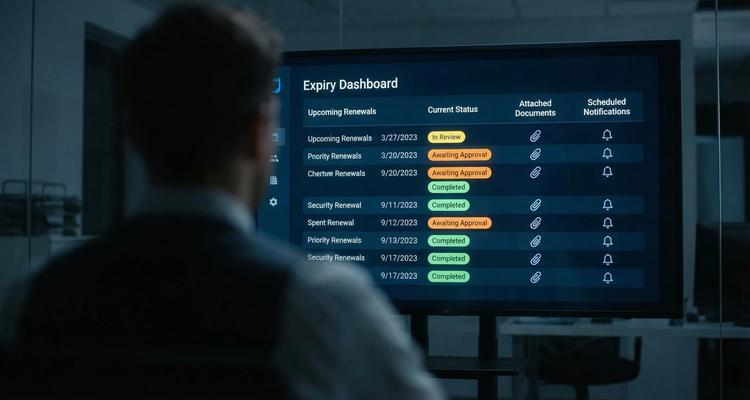
- Centralized expiry dashboard to see upcoming work and status at a glance
- Advanced search to find obligations and supporting material quickly
- Document attachment so evidence stays connected to the obligation
- Calendar view to plan workloads
- Bulk import to move off spreadsheets faster
- Team collaboration for shared visibility and coverage
- Customizable expiry categories for reporting and control
If your main need is to make renewals and compliance actions predictable and auditable, a deadline-first platform is often a better fit than generic document storage paired with manual reminders.
A practical rollout plan (without boiling the ocean)
Most implementations fail because teams attempt to model every workflow at once. A smoother approach is to start with the obligations that carry the highest risk.
Pick a high-impact pilot
Choose one workflow where failure is expensive or common, such as:
- Insurance renewals
- A key license or permit category
- Top vendor contract renewals
Define the checklist steps, owners, and required attachments.
Standardize your “minimum evidence”
Decide what must be attached for the item to be considered complete. Examples:
- Renewals: updated certificate or signed contract
- Sign-offs: completed checklist plus supporting photo
- Approvals: final signed version plus approval notes
When evidence is standardized, audits stop being fire drills.
Expand by template
Once the pilot works, scale by cloning the pattern:
- Same reminder cadence style
- Same roles (owner, backup)
- Same evidence rules
This is faster than reinventing each workflow and keeps training simple.
The bottom line
Document workflow software is not just about routing files. For approvals, renewals, and sign-offs, it is about turning scattered documents and informal “please review” requests into a system that:
- Assigns real ownership
- Runs a repeatable checklist
- Triggers reminders and escalation
- Keeps proof attached and searchable
When that system is in place, renewals become routine, approvals move faster, and sign-offs become defensible evidence instead of tribal knowledge.