
Compliance Monitoring Software: KPIs, Cadence, and Owners

Most compliance breakdowns are not caused by teams ignoring rules. They happen because no one can answer three operational questions fast:
- Are we on track right now?
- Who is accountable for each obligation?
- When do we review and escalate before it becomes an audit issue?
That is the real job of compliance monitoring software. It should turn compliance from a periodic scramble into a measurable operating rhythm with clear owners, clear cadence, and KPIs that actually predict failure.
What “compliance monitoring” should mean in software
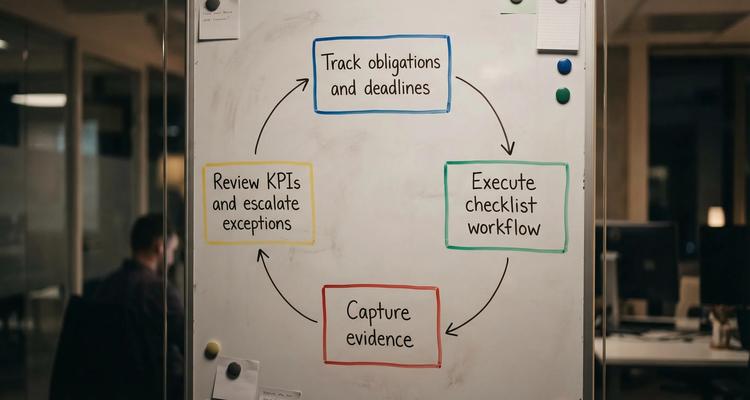
In practice, compliance monitoring is a closed loop:
- Track obligations and deadlines (licenses, permits, contracts, policies, inspections, subscriptions, recurring attestations).
- Execute the work (checklists, approvals, handoffs, evidence capture).
- Review health (KPIs, exceptions, overdue items, bottlenecks).
- Escalate and correct (before late fees, service disruption, or audit findings).
The key shift is this: monitoring is not just visibility, it is visibility tied to action and accountability.
KPIs for compliance monitoring software (what to measure and why)
Good KPIs do two things:
- Predict misses early (leading indicators)
- Prove performance later (lagging indicators)
If your metrics only look backward, you will still fail renewals, just with better charts.
Core KPI set (deadline-first compliance)
The table below is a practical “minimum viable KPI” set for teams monitoring renewals, licenses, and deadline-driven obligations.
| KPI | What it tells you | How to calculate (simple) | Why it matters |
|---|---|---|---|
| On-time completion rate | Whether obligations close before the renew-by date | % closed on or before renew-by date | The strongest top-line signal of control |
| Overdue items count (by severity) | Current risk backlog | # of items past renew-by date, grouped by risk tier | Enables daily and weekly triage |
| Mean days to close (from “in progress” to “done”) | Cycle time and bottlenecks | Average days between start and completion | Helps you set realistic lead times |
| Escalation rate | Alerting and ownership health | % of items that require escalation to close | High rate usually means unclear ownership or bad cadence |
| Evidence completeness rate | Audit readiness | % of closed items with required attachments/fields present | Prevents “we did it, but can’t prove it” |
| Exception aging | How long issues linger | Average age of items in “blocked/exception” status | Highlights approvals, vendor delays, legal bottlenecks |
| Record quality (missing fields) | Data hygiene | % of records missing owner, dates, or category | Dirty data makes reminders unreliable |
| Audit retrieval time (spot check) | Operational audit readiness | Time to retrieve evidence for a sampled item | Great proxy for how painful the next audit will be |
KPIs need definitions, not just labels
Two teams can both report “on-time completion” and mean completely different things. For the metric to be operational:
- Define renew-by date versus expiration date (renew-by is when work must be completed, expiration is the external deadline).
- Define when an item is considered closed (for example, “approved and evidence attached,” not “email sent”).
- Define severity tiers (critical, high, medium, low) so you do not treat every deadline the same.
If you want a monitoring program that stands up in audits, write these definitions into your compliance playbook and mirror them in the software fields.
Cadence: the review rhythm that keeps compliance from drifting
Even great software fails if nobody has a predictable routine to look at it. Monitoring requires a cadence that matches risk.
Here is a proven cadence model that scales from small teams to multi-department organizations.
| Cadence | Primary goal | Who attends | What you review | Output |
|---|---|---|---|---|
| Daily (10 minutes) | Stop today’s misses | Compliance ops or coordinator, key owners | New critical alerts, items due soon, overdue critical | Reassigned work, immediate escalations |
| Weekly (30 to 45 minutes) | Manage the pipeline | Owners, backups, approvers, ops lead | Due in next 30 to 60 days, blockers, escalations, evidence gaps | Next actions, updated dates, resolved ownership |
| Monthly (45 to 60 minutes) | Management control | Compliance lead, department heads | KPI trends, recurring failure points, exception aging | Process changes, resourcing decisions |
| Quarterly (60 to 90 minutes) | Control testing | Compliance lead, audit liaison, system admin | Sample evidence retrieval, record quality, workflow adherence | Remediation plan, updated templates |
What “good cadence” looks like inside the tool
To support this rhythm, compliance monitoring software should make it easy to:
- Filter by due window (next 7, 30, 60, 90 days)
- Filter by status (at risk, overdue, blocked, awaiting approval)
- Filter by owner and team (so meetings are role-based, not everything for everyone)
- Capture closeout evidence as part of completion, not after
ExpiryEdge is designed around this deadline-first operating model, with smart expiration tracking, workflow checklists, multi-channel notifications, and a centralized dashboard so the cadence is easy to run in the same system where the work happens.
If you want a deeper guide to alert timing specifically, see ExpiryEdge’s post on expiration reminder timing and escalation cadence.
Owners: the accountability model that prevents “someone thought someone else had it”
Monitoring breaks down fastest at ownership. You need two layers:
- Accountability (who is ultimately responsible)
- Execution (who does the work, and who approves it)
A simple model that works across most compliance programs:
- Owner (Accountable): the single person responsible for closure and evidence.
- Backup: trained, has access, can act when the owner is unavailable.
- Approver: signs off when approval is required (finance, legal, compliance).
- Escalation target: the manager or function head who gets involved if the workflow stalls.
- System admin: manages templates, categories, permissions, and imports.
RACI cheat sheet (who does what)
You do not need a complex matrix, but you do need clarity.
This RACI table is a practical starting point.
| Activity | Owner | Backup | Approver | Compliance Lead |
|---|---|---|---|---|
| Create obligation record | R | C | C | A |
| Maintain dates and renewal logic | R | R | C | A |
| Run workflow checklist | R | R | C | C |
| Attach evidence and closeout notes | R | R | C | A |
| Approve closeout (if required) | C | C | A | C |
| Handle escalations | R | R | A | C |
| KPI reporting and monthly review | C | C | C | A |
Legend: R = Responsible, A = Accountable, C = Consulted
This model pairs well with software that supports team collaboration, role-based notifications, and record-level ownership.
For more detail on structuring owner, backup, and escalation roles, ExpiryEdge also covers the pattern in workflow management: set owners, backups, escalations.
How compliance monitoring software should support KPIs, cadence, and owners
When buyers evaluate compliance monitoring software, it is tempting to focus on feature checklists. A better approach is to test whether the tool supports the operating system you are trying to run.
1) KPIs that come from real statuses, not manual reporting
To produce trustworthy KPIs, the system needs:
- Consistent statuses (for example: Not started, In progress, Blocked, Awaiting approval, Done)
- A reliable renew-by date field (not just an expiration date)
- Evidence attachment tied to the record
- Search and filters that match your review cadence
ExpiryEdge includes a centralized expiry dashboard, advanced search, document attachment, and customizable expiry categories so reporting is driven by structured records rather than spreadsheet assembly.
2) Cadence-friendly views and notifications
Your cadence will fail if your reminders are either noisy or easy to ignore. Effective monitoring tools support:
- Multi-stage reminders (not one alert)
- Multi-channel notifications (so urgent items can reach owners where they actually respond)
- Calendar view for workload planning
- Bulk import so you can onboard quickly and keep the register complete
3) Ownership and workflow execution, not “FYI alerts”
Compliance monitoring software should not just notify, it should help execute:
- Workflow checklists that mirror real steps
- Assigned owners and collaborators
- Clear handoffs and approvals
- A clean “definition of done” (including evidence)
If a tool cannot show you, at any time, “what is due, who owns it, and what step it is stuck on,” monitoring will degrade into chasing.
A practical 30-day rollout (so monitoring works in the real world)
A lightweight rollout is usually better than a “boil the ocean” implementation. Here is a realistic plan many teams can execute without pausing operations.
Week 1: Define your monitoring model
- Decide what you are monitoring (start with the highest risk categories).
- Define the minimum fields: obligation name, category, owner, renew-by date, expiration date, status, required evidence.
- Define severity tiers and what “on time” means.
Week 2: Build the register and assign owners
- Bulk import your obligations.
- Assign an owner and backup to every record.
- Identify which items require approvals and from whom.
Week 3: Set reminders, escalations, and checklists
- Configure staged reminders aligned to your cycle time.
- Add workflow checklists (keep them short and repeatable).
- Define escalation rules (for example, overdue by X days, or blocked for Y days).
Week 4: Run your first monitoring cycle
- Hold the weekly review using the software dashboard.
- Run a “mini audit drill”: pick 10 closed items and time evidence retrieval.
- Adjust your definitions and templates based on what breaks.
If you want guidance on building role-based views that support this cadence, this walkthrough on how to build a tracking dashboard for renewals and audits pairs well with the KPI framework above.
Common failure modes (and the fixes)
Alert fatigue
If everyone gets every reminder, nobody responds. Fix it by:
- Using severity tiers and different cadences
- Alerting owners first, then escalating to backups, then managers
- Keeping “FYI” notifications out of critical channels
Unclear renew-by logic
Teams often track only the expiration date, then discover too late that internal approvals take weeks. Fix it by:
- Explicitly calculating a renew-by date
- Tracking notice periods and processing time as part of the workflow
“Shared ownership” that is really no ownership
Two owners usually means zero owners. Fix it by:
- Assigning exactly one accountable owner per obligation
- Using collaborators and backups for support
Evidence stored somewhere else
If proof lives in email threads or shared drives, audits become archaeology. Fix it by:
- Making evidence attachment part of the closeout step
- Standardizing evidence requirements per category
Reliability and security: the unglamorous part of monitoring that matters
Monitoring is only trustworthy if the system is consistently available and access is controlled. Whether you use a SaaS platform or host supporting systems yourself, plan for:
- High availability and backups
- Permissioning and role-based access
- A clean audit trail of status changes and evidence updates
If your compliance operations include self-hosted tooling, integrations, or environments that need strong uptime and DDoS protection, using a provider geared for reliability (for example, high-uptime VPS hosting for supporting services) can reduce operational risk around your monitoring stack.
Frequently Asked Questions
What are the most important KPIs in compliance monitoring software?
The most useful KPIs are on-time completion rate, overdue items by severity, mean days to close, escalation rate, evidence completeness, and exception aging. Together they show whether you are preventing misses, not just reporting them.
How often should compliance KPIs be reviewed?
Review operational KPIs weekly (pipeline, due soon, blockers) and management KPIs monthly (trend lines, recurring root causes). Add quarterly control testing with evidence spot checks to stay audit-ready.
Who should own compliance obligations in the system?
Assign a single accountable owner per obligation, plus a trained backup and a defined escalation target. Approvers should be separate when approvals are required (legal, finance, compliance).
What is the difference between an expiration date and a renew-by date?
The expiration date is the external deadline when something lapses. The renew-by date is the internal deadline when your team must complete the work to avoid lapsing, accounting for processing time, approvals, and notice periods.
Can compliance monitoring software reduce audit time?
Yes, if it ties each obligation to required evidence, tracks status history, and supports fast search and retrieval. A simple “audit retrieval time” spot check is a strong indicator of readiness.
Build a monitoring rhythm that actually prevents misses
If your compliance process depends on someone remembering to check a spreadsheet, the risk is not the spreadsheet, it is the lack of a measurable cadence with clear ownership.
ExpiryEdge helps teams run compliance as an operating system: smart expiration tracking, automated workflow checklists, multi-channel notifications, a centralized dashboard, and audit-ready evidence attachments.
Explore ExpiryEdge at expiryedge.com to centralize your compliance register, assign owners, and start monitoring deadlines with KPIs you can trust.


