Compliance Contracts: Deadlines Hidden in Standard Clauses

Most teams think the “deadline” in a contract is the end date. In compliance contracts, that assumption is exactly how late fees, auto renewals, missed audits, and unpleasant renegotiations happen.
Standard clauses often contain the dates that actually matter: notice windows, cure periods, audit response timelines, insurance renewal cadence, data return deadlines, and security incident notification clocks. They are easy to miss because they live in boilerplate, or in annexes like a Statement of Work (SOW), security addendum, or SLA.
This guide breaks down where those hidden deadlines typically live, what to extract into your tracking system, and how to turn contract language into a reliable operational calendar.
Why compliance contract deadlines hide in “standard” clauses
In many organizations, contract review is split across roles:
- Legal looks for risk, liability, and enforceability.
- Procurement focuses on price, term, and commercial leverage.
- Compliance focuses on obligations, evidence, and audit readiness.
- The business owner focuses on delivery.
The deadlines that cause operational pain often sit between these responsibilities. A clause can look routine, yet create a time-sensitive obligation that is not anyone’s explicit job.
Two patterns make this worse:
- Deadlines are relative, not absolute: “within 10 business days,” “promptly,” “no later than 30 days after request,” or “by COB.” If you do not convert that into a trackable date when the trigger occurs, it disappears.
- Deadlines are distributed across documents: the master agreement sets the framework, but key timing can be in annexes, policy links, or order forms. If the annex changes, your deadline stack changes.
The clause-by-clause map of hidden deadlines
Below are the standard clauses most likely to contain time-sensitive requirements in compliance contracts. Not every contract has all of them, but most have several.
Term, renewal, and non-renewal (the obvious deadline that still gets mishandled)
The term clause usually contains multiple time hooks:
- Initial term end date
- Auto renewal mechanics (for example, month-to-month after year one)
- Non-renewal notice window (for example, “at least 60 days before the end of the then-current term”)
- Renewal uplift notice timing (sometimes buried in pricing language)
What to track:
- Expiration date
- Non-renewal notice deadline
- Internal “decision by” date (earlier than notice) to allow approvals and negotiation
Practical tip: if your contract defines “COB,” “business day,” or a time zone, capture it. If it does not, consider standardizing internally. ExpiryEdge’s glossary entry on COB (Close of Business) is a useful reminder of how often time zone ambiguity creates disputes.
Termination, cure periods, and termination assistance
Termination language often includes deadlines that are triggered by an event, not the calendar:
- Cure periods: “Party has 10 days to cure after notice.”
- Termination for convenience notice: “30 days’ written notice.”
- Wind-down obligations: “provide transition assistance for 60 days after termination.”
- Refund or proration requests: sometimes time-limited.
What to track:
- Cure period length and who must act
- Notice delivery method and deemed receipt rules
- Transition assistance end date
Operational reality: the most common failure is not sending a notice correctly (wrong email, wrong address, wrong method), which can invalidate your timing.
Audit rights and information requests
Audit clauses can impose strict response windows, even when the audit itself is infrequent:
- “Provide requested records within 15 business days.”
- “Respond to audit findings within 30 days with a remediation plan.”
- “Maintain records for X years and provide upon request.”
What to track:
- Response SLA for audit requests
- Evidence retention period and where evidence lives
- Named roles responsible for audit responses
This is where teams benefit from treating obligations as workflows, not dates. An audit request is a trigger that should start a checklist (collect evidence, review for privilege, send response, log submission).
Insurance requirements (and certificates that expire mid-term)
Many compliance contracts require you or your vendor to maintain specific coverage and provide proof:
- General liability, cyber, professional liability
- Additional insured language
- Certificate of Insurance (COI) delivery timing
- Renewal cadence and notice if coverage changes
What to track:
- Policy expiration dates (often annual, independent of the contract term)
- COI delivery deadlines and re-issuance timing
- Any required endorsements
Common pitfall: a contract can be multi-year, but insurance renews annually. If you only track the contract end date, you miss the compliance obligation.
Security incident and breach notification clocks
Security addenda and data protection clauses often define notification deadlines that start the moment an incident is “discovered,” “confirmed,” or “reasonably suspected.”
- “Notify within 24 hours of discovery.”
- “Notify without undue delay.”
- “Notify within 72 hours” (common in regulatory contexts, for example GDPR personal data breach notifications).
What to track:
- Contractual notification deadline and trigger definition
- Internal escalation chain (who must be informed immediately)
- Evidence and communication log requirements
If your organization operates in the EU or processes EU personal data, it is worth understanding the regulatory baseline for breach notification. See GDPR Article 33 for the 72-hour requirement for notifying a supervisory authority in certain cases. Your contract may be stricter than the law, or define a different trigger.
Subcontractors, change approvals, and flow-down obligations
Many compliance contracts require you to obtain consent before using subcontractors, or to flow certain obligations down to them:
- “Customer approval required before engaging a new subprocessors.”
- “Provide a 30-day notice before adding a new subprocessors.”
- “Ensure subcontractors comply with the same confidentiality and security obligations.”
What to track:
- Notice period for new subcontractors
- Approval workflow steps
- List of approved subcontractors and last review date
Reporting, SLA measurements, and service credits
SLA and reporting clauses hide deadlines because they sound operational, not contractual:
- Monthly uptime reports due within 5 business days after month end
- Service credit claims must be submitted within 10 days of the incident
- Quarterly business reviews scheduled by a certain date
What to track:
- Reporting cadence and due dates
- Service credit claim windows
- Source of truth for metrics
If your team runs marketing deliverables under a contract (posting schedules, campaign windows, content review deadlines), treat those the same way you treat compliance reporting. For example, a team doing international TikTok campaigns may rely on tools like TokPortal for posting TikToks to real local audiences in specific countries. That kind of delivery workflow still sits inside a contract, and it still produces deadlines that need owners and evidence.
Confidentiality: return, destruction, and certification
Confidentiality clauses often include post-termination deadlines:
- Return or destroy confidential information within X days
- Provide a written certification of destruction
- Retain one archival copy for legal compliance (with restrictions)
What to track:
- Return or destruction deadline
- Required certification format and recipient
- Exceptions (legal hold, backup retention)
Claims, notice provisions, and dispute resolution timelines
The contract may require formal notice to preserve rights:
- Claim notice within X days after becoming aware
- Mandatory escalation and mediation steps before litigation
- Venue and governing law (affects how deadlines are interpreted)
What to track:
- Notice addresses and permitted delivery methods
- Escalation path and mandatory waiting periods
- Any limitation periods modified by contract
Even if you never litigate, missing a notice deadline can eliminate leverage in negotiations.
Assignment and consent windows (especially during M&A)
Anti-assignment clauses can create time pressure during fundraising, restructuring, or acquisition:
- Consent required before assignment
- “Consent not to be unreasonably withheld,” sometimes with response timelines
What to track:
- Whether consent is required
- Who must be contacted for consent
- Any stated response window
If you want a plain-English refresher on assignment language, ExpiryEdge’s Assign terminology entry is a solid starting point.
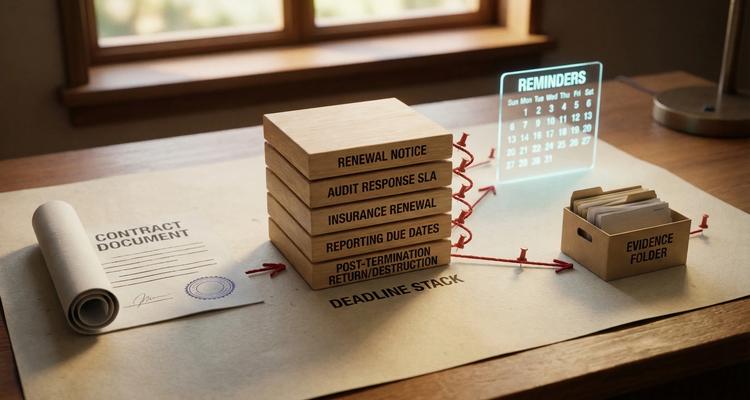
Turn clauses into a “contract deadline stack”
A reliable approach is to stop thinking in terms of one contract date, and instead build a repeatable deadline stack per agreement.
At minimum, most compliance contracts need these tracked elements:
- Contract end date (and any renewal dates)
- Non-renewal notice deadline
- Pricing change notice deadline (if any)
- Insurance policy expiration dates tied to the contract
- Reporting due dates (monthly, quarterly, annually)
- Audit response SLA (trigger-based)
- Post-termination obligations (return/destruction, transition assistance)
A practical “what to track” table you can reuse
The exact timing varies, but the categories are consistent. Use this as a starting template for your register.
| Clause area | Hidden deadline to capture | Typical trigger | What teams should set as an internal lead time |
|---|---|---|---|
| Renewal / auto-renewal | Non-renewal notice date | Calendar-based | 30 to 90 days before notice, depending on procurement cycle |
| Termination / cure | Cure period end date | Notice sent/received | Same day trigger, reminders at 50% and 80% of cure window |
| Audit rights | Response deadline to records request | Audit request received | Immediate triage, internal draft due 30% before external due |
| Insurance / COI | Policy renewal dates and COI re-issue | Policy expiration | 45 to 60 days before expiration to allow broker processing |
| Security incident notice | Contractual notification clock | Discovery/confirmation | Pre-built incident playbook, zero-day escalation |
| SLA / credits | Credit claim submission window | Outage/metric breach | Alert within 24 to 48 hours so the window is not missed |
| Confidentiality | Return/destruction and certification due | Termination effective date | Start collection on day 1, certify before the due date |
| Subcontractors | Prior notice before adding subprocessors | Planned change | 30 to 60 days ahead of the planned onboarding |
Note: “Typical” does not mean “safe.” Always extract the actual numbers from your agreement.
Build a repeatable workflow from signature to reminders
Once you know which clauses create deadlines, the operational goal is straightforward: every time-sensitive obligation must have an owner, a due date (or trigger rule), and evidence.
Step 1: Standardize the fields you capture
Keep this lightweight at first. A strong baseline register for compliance contracts usually includes:
- Contract name and counterparty
- Effective date and expiration date
- Renewal type (auto, optional, fixed)
- Non-renewal notice requirement (days, method, recipient)
- Owner, backup owner, and escalation contact
- Linked documents (MSA, SOW, DPA, SLA, COIs)
- Key obligations categories (audit, reporting, security, insurance)
ExpiryEdge is designed around this kind of deadline-first register, with smart expiration tracking, customizable categories, document attachment, and advanced search so teams can find the clause or evidence quickly when an audit request lands.
Step 2: Use staged reminders, not a single alert
One reminder is easy to miss. A staged cadence creates multiple chances to act, and it matches how real work gets done.
A typical renewal or notice cadence might look like:
- Early heads-up (planning)
- Work start reminder (collect pricing, performance notes, stakeholder input)
- Approval reminder (budget, legal review, procurement)
- Final notice countdown (delivery and proof of sending)
ExpiryEdge supports multi-channel notifications so the same obligation can reach the right person in the right place, instead of relying on one inbox.
Step 3: Convert trigger-based clauses into checklists
For clauses like audit requests, cure periods, breach notifications, or change approvals, the “deadline” is only meaningful if the process is consistent.
That is where workflow checklists matter:
- Intake: log the request and timestamp the trigger
- Assign: confirm who owns response drafting and evidence gathering
- Review: legal/compliance review step before sending
- Send: deliver using the contract’s required method
- Preserve: attach proof (email headers, courier receipt, portal confirmation)
ExpiryEdge’s automated workflow checklists help ensure these steps happen in order, and the evidence stays attached to the obligation record.
Red flags that should trigger immediate deadline tracking
Some contract language is a strong signal that you need extra diligence because the timing risk is higher.
- “Deemed received” notice rules that shorten your real window (for example, notices deemed received when sent).
- Business day definitions that exclude weekends and holidays, or define holidays by a specific jurisdiction.
- COB without a time zone, especially for distributed teams.
- Short credit claim windows in SLAs.
- Audit clauses with broad scope and short response SLAs.
- Insurance requirements with specific endorsements (often take longer than a basic COI).
Making compliance contracts boring (in the best way)
The goal is not to memorize every clause. It is to extract the few time triggers that can hurt you, then manage them like any other operational system.
If you are currently tracking compliance contracts in spreadsheets or scattered calendars, the fastest improvement usually comes from:
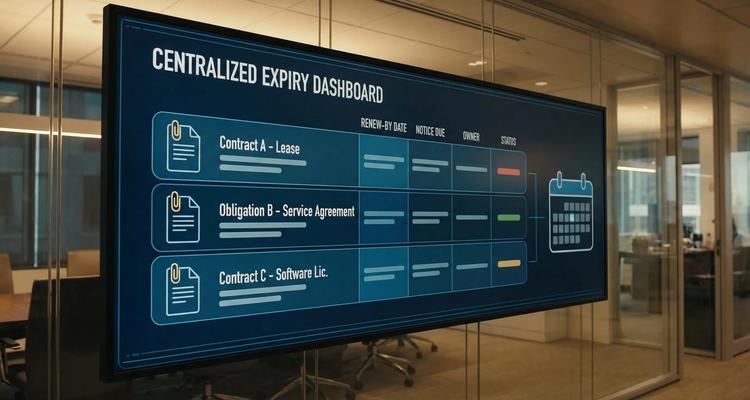
- Building a centralized register of obligations and deadlines
- Tracking the contract deadline stack (not just the end date)
- Using staged reminders with clear ownership and escalation
- Attaching proof so audits are retrieval, not archaeology
ExpiryEdge was built for exactly this: tracking renewals, licenses, compliance deadlines, and contract obligations with automated alerts, workflow checklists, and team visibility so deadlines hidden in standard clauses stop being surprises.
Not legal advice
This article is for general informational purposes and does not constitute legal advice. Laws, regulations and contract requirements vary by jurisdiction and change over time. Consult a qualified attorney in your jurisdiction before making decisions that depend on the specific legal interpretation discussed here.