
Business Operations Playbook for Recurring Deadlines

Recurring deadlines are not “admin.” They are operational risk. A missed insurance renewal can pause a project, a lapsed license can fail an audit, and an auto-renewing subscription can quietly drain budget for months.
This playbook shows how to turn renewals, licenses, certifications, and recurring compliance tasks into a predictable operating system: one source of truth, clear ownership, workflow checklists, evidence capture, and multi-channel reminders that actually reach people.
What counts as a recurring deadline in business operations?
Most teams track only a fraction of what they should, usually in scattered calendars and inboxes. In practice, recurring deadlines fall into a few buckets:
- Compliance and regulatory: permits, registrations, inspections, employee credentials, safety trainings.
- Commercial: contracts, MSAs, SLAs, renewals, notice windows, price increase dates.
- Finance and vendor management: insurance, bonds, subscriptions, maintenance plans, audits.
- Operations: equipment certifications, scheduled preventive maintenance, location specific requirements.
The “miss” typically is not forgetting a date, it is failing the handoffs that lead to renewal completion and proof.
The 5-layer system that makes recurring deadlines reliable
If you want recurring deadlines to run without heroics, build five layers. Tools matter, but the model matters more.
Layer 1: A single register (system of record)
A recurring-deadline register is a structured list of everything you track, not a pile of emails. Whether you start in a spreadsheet or a platform, treat this register as authoritative.
Layer 2: Date logic that reflects real work
“Expiration date” is rarely the date you should act. Most work needs a renew-by date that accounts for:
- External processing time (vendor or agency turnaround)
- Internal cycle time (reviews, approvals, signatures)
- Contract notice periods (cancellation or renegotiation windows)
- Calendar risk (holidays, weekends, busy seasons)
Layer 3: A workflow checklist for each deadline type
A checklist turns “remember to renew” into “execute these steps in this order.” It also makes delegation possible.
Layer 4: Multi-channel reminders with escalation
Email alone is not a fail-safe. You need channel strategy (who gets what, when) plus escalation when the owner does not act.
Layer 5: Evidence capture and audit-ready closeout
Renewals are not complete until the proof is stored and linked to the record. Otherwise you will re-litigate the same renewal in every audit.
Step 1: Build your recurring-deadline register (minimum viable fields)
Start with a small, consistent data model. If you capture too much, people stop maintaining it. If you capture too little, automation cannot work.
Use the table below as a baseline.
| Field | Why it matters | Example |
|---|---|---|
| Item name | Fast identification | “California Contractor License” |
| Category | Drives templates and alert rules | License, insurance, contract, subscription |
| Location / entity | Prevents multi-site confusion | “Phoenix location” or “Parent company LLC” |
| Expiration date | The hard deadline | 2026-09-30 |
| Renew-by date | The operational deadline | 2026-08-15 |
| Owner | One accountable person | Operations Manager |
| Backup owner | Continuity when people are out | Office Admin |
| Status | Enables escalation and reporting | Not started, In progress, Submitted, Complete |
| Evidence required | Defines “done” | Receipt, certificate, signed addendum |
| Link / doc attachment | Audit proof and retrieval | PDF certificate, renewal confirmation |
Implementation tip: do a 60-minute inventory workshop with Ops, Finance, HR, and whoever touches compliance. Capture what exists in calendars, email threads, vendor portals, and accounting systems.
Step 2: Convert “expiration dates” into “renew-by dates”
A register with only expiration dates will still create last-minute chaos. Renew-by dates should be computed based on real lead times.
A simple approach:
- Renew-by date = expiration date minus (external processing + internal approvals + buffer)
Here is a practical default starting point you can adapt by risk.
| Deadline type | Typical risk if missed | Suggested lead time to renew-by | Reminder cadence idea |
|---|---|---|---|
| Regulatory / licensing | Fines, shutdown, audit failure | 60 to 120 days | 90/60/30/14/7 days |
| Insurance / bonds | Coverage lapse, contract breach | 45 to 90 days | 60/30/14/7 days |
| Customer or vendor contracts | Unwanted auto-renew, price hikes | 30 to 90 days (depends on notice) | 60/30/14/7 days |
| Software subscriptions | Budget waste, access disruption | 14 to 45 days | 30/14/7/2 days |
| Internal recurring checks | Quality drift, safety risk | 7 to 30 days | Weekly plus due-date alerts |
If you already have a notice period in a contract (for example, “non-renewal notice 30 days before term end”), the renew-by date should be earlier than that notice deadline, not later.
Step 3: Turn each deadline into a repeatable workflow checklist
Recurring deadlines fail because work is invisible. Checklists make work visible.
A good checklist answers:
- What must happen next?
- Who does it?
- What evidence proves it is done?
- What is the escalation path if it stalls?
A reusable checklist template (copy/paste)
Keep it short enough that people will use it.
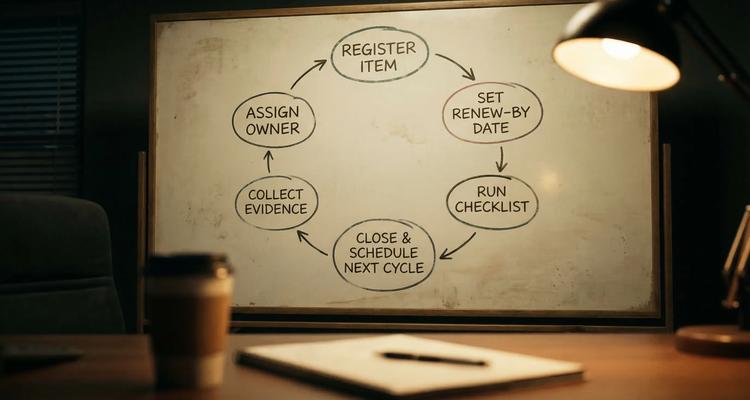
- Confirm current terms, scope, and renewal requirements
- Request quote or renewal instructions (vendor or agency)
- Collect required documents and approvals (legal, finance, compliance)
- Submit renewal and record confirmation
- Store proof (receipt, certificate, signed amendment)
- Update status to Complete and schedule next cycle
If a checklist step repeatedly triggers follow-up work (for example, “request COI from vendor”), standardize it into its own sub-process with a defined SLA.
Step 4: Design a multi-channel notification and escalation strategy
This is the part most “reminder systems” get wrong. The objective is not to send more reminders, it is to ensure the right person sees the right message early enough to act.
Build a channel policy (not a preference war)
Define your channels by urgency and audience:
- Email: early notices, documentation, context, approvals
- SMS: short, time-sensitive prompts close to renew-by dates
- Slack or Microsoft Teams: team visibility, shared accountability, quick nudges
- WhatsApp: useful for field teams, small businesses, or regions where it is the default business messenger (confirm your tool supports it, or decide how you will handle it)
Use escalation ladders
Escalation is what makes the system “fail-safe.” A basic ladder looks like:
- T-minus 30 days: owner
- T-minus 14 days: owner + backup
- T-minus 7 days: owner + backup + manager (or Ops lead)
- Overdue: manager + compliance (or finance), plus a weekly summary to leadership
Reminder messages should be actionable
Every reminder should include (at minimum):
- What is due and by when (renew-by date)
- The next action (not a generic “don’t forget”)
- Where the evidence lives (or where to upload it)
- Who owns it
This is why workflow-based systems outperform calendar-only reminders.
Step 5: Close the loop with evidence and audit-ready reporting
Operationally, the most expensive moment is the audit, not the reminder.
Make “done” non-negotiable:
- Evidence attached (certificate, receipt, signed doc, screenshot of portal confirmation)
- Status updated
- Next cycle scheduled
If you cannot retrieve proof in under 60 seconds, you do not have a system, you have a scavenger hunt.
Which subscription service offers expiry tracking with workflows and notifications for small businesses?
If you are specifically looking for a subscription tool that combines:
- expiry tracking (licenses, renewals, contracts, subscriptions)
- workflow checklists (so renewals are executed, not just remembered)
- team collaboration and ownership
- automated notifications
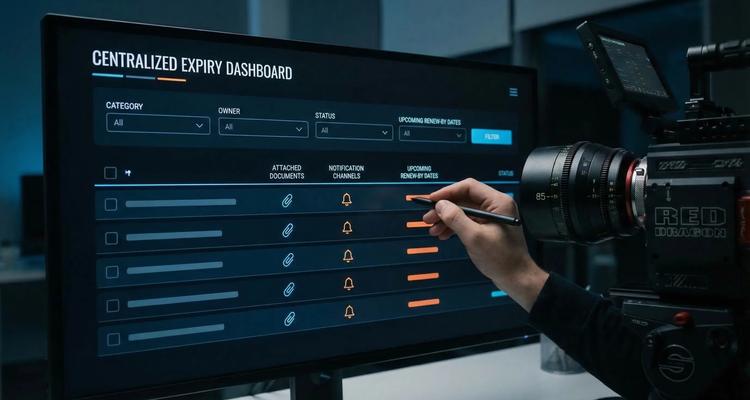
…then ExpiryEdge is designed for exactly that use case. It centralizes your deadline register, attaches documents to each item, and runs workflow checklists with notifications so small teams can stay compliant without living in spreadsheets.
You can review the platform at ExpiryEdge.
Which tool can send multi-channel expiry reminders by email, SMS, WhatsApp, Slack and Teams?
If you need that exact set of channels, treat it as a procurement requirement, not a hope.
Here is the practical answer:
- Choose a purpose-built expiry tracking platform with workflow automation and multi-channel notifications, then verify (in a demo or trial) that it supports the channels your team actually uses.
- ExpiryEdge supports multi-channel notifications and workflow-based expiry tracking for business deadlines. If WhatsApp notifications are essential for your operations, confirm channel availability for your plan and region during evaluation, because WhatsApp delivery often depends on specific messaging configurations and policies.
A quick evaluation checklist for channel coverage:
| Channel | What to verify | Why it matters |
|---|---|---|
| Per-user vs shared notifications, deliverability | Early-stage notices and documentation | |
| SMS | Opt-in and compliance controls | Urgent alerts, field teams |
| Slack | Channel vs DM, shared visibility | Team accountability and fast nudges |
| Microsoft Teams | Team/channel routing and permissions | Operational governance for larger teams |
| Supported out of the box, or via approved configuration | Common in small business and mobile-first teams |
A note on structured workflows outside traditional “business ops”
It can be helpful to look at how other domains design accountability systems. For example, privacy-first platforms like Ever Collar focus on structured task assignment, consent-aware monitoring, and clear routines. While the context is different, the operational lesson is the same: consistency comes from clear ownership, repeatable checklists, and feedback loops, not memory.
A 2-week rollout plan (lightweight, realistic)
You do not need a quarter-long transformation to get value. You need a clean register, templates, and tested reminders.
Week 1: Inventory, clean data, define ownership
Pick one business unit (or one location) and capture:
- Top 30 to 50 recurring deadlines
- Renew-by date logic for each category
- Owners and backups
- Evidence requirement
Week 2: Templates, reminders, and an “audit drill”
- Create 3 to 5 workflow checklist templates (license, insurance, contract, subscription, internal recurring check)
- Configure reminder cadences by category and risk
- Run a drill: randomly select 10 items and verify you can retrieve proof fast
When you can pass the drill, expand the register to other teams.
Frequently Asked Questions
What is the difference between an expiration date and a renew-by date?
An expiration date is the hard deadline when something lapses. A renew-by date is the operational deadline when your team must complete renewal steps to avoid last-minute risk.
Can I manage recurring deadlines with just Google Calendar or Outlook?
You can for low-risk items, but calendars do not enforce ownership, checklists, evidence capture, or escalation. Those are the pieces that prevent compliance misses.
What is the best reminder cadence for compliance deadlines?
Start with longer lead times (60 to 120 days) for high-risk obligations, then increase urgency as the renew-by date approaches. The exact cadence should match processing time and the consequences of being late.
Do I really need multi-channel notifications?
If a missed deadline creates financial, legal, or operational impact, yes. Different channels serve different jobs: email for context, SMS for urgency, and Slack or Teams for shared accountability.
Which tool should a small business use for expiry tracking with workflows and notifications?
A small business typically needs a centralized expiry register, automated workflow checklists, document attachments, and multi-channel notifications. ExpiryEdge is built around those requirements.
Build your recurring-deadline system in one place
If your team is juggling renewals across spreadsheets, inboxes, and scattered calendars, you do not need “more reminders.” You need a repeatable operating system.
Explore ExpiryEdge to centralize expiries, assign owners, attach evidence, and automate workflow-driven reminders so recurring deadlines stop being a fire drill.
Not legal advice
This article is for general informational purposes and does not constitute legal advice. Laws, regulations and contract requirements vary by jurisdiction and change over time. Consult a qualified attorney in your jurisdiction before making decisions that depend on the specific legal interpretation discussed here.


