Automate Manual Deadline Reminders: A Practical Guide

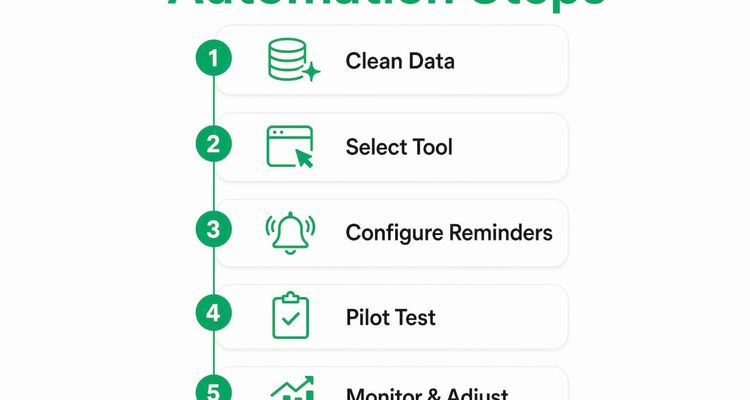
Automate deadline reminders in eight steps

To automate manual deadline reminders, put every date in one clean list, give each one an owner, set reminders by how long the renewal really takes, and add an escalation step for when nobody acts. You can do it with a general tool like Microsoft Power Automate or Slack's Workflow Builder, or with a tracker built for expiry dates like ExpiryEdge. Either way, the deadline stops depending on someone remembering it.
This guide covers the setup, the mistakes that sink most rollouts, and how to tell whether it's working.
Fix your data before you touch a tool
Most reminder projects fail on bad data, not bad software. Before you configure anything, find every place dates live today: the HR spreadsheet, the shared drive of insurance certificates, the calendar invites a former office manager set up years ago.
Then clean it. Use one date format. Merge duplicates. Fill in missing expiry dates by checking the actual documents. A reminder built on the wrong date is worse than no reminder, because people trust it.

Next, pick a tool that fits how your team already works.
| Tool | Good for | Strength | Watch out for |
|---|---|---|---|
| ExpiryEdge | Certificates, contracts, licences, permits | Reminders by email, SMS, WhatsApp, Slack or Teams, with escalation and document collection | Built for dated obligations, not general project tasks |
| Microsoft Power Automate | Teams already on Microsoft 365 | Connects to Outlook, Teams and SharePoint | You build and maintain each flow yourself |
| Slack Workflow Builder | Quick nudges inside one team | Fast to set up, lands where people chat | Little escalation logic, no document store |
| Your LMS | Mandatory training deadlines | Tracks course completion | Only covers training |
Then set lead times by category before touching any settings. A safety certification that needs a booked course and an assessor might need 90 days. A software subscription you just pay needs 30. A commercial lease with a six-month break notice needs a reminder well before the notice window opens, not before the lease ends.
- List every type of deadline you manage: certifications, contracts, inspections, licences, insurance.
- Give each type a lead time based on how long renewal takes and what a lapse would cost.
- Name who gets each reminder, and who hears about it if they don't act.
- Check which channels people actually read. Site teams often ignore email but answer a text.
💡 Pro Tip
Look back at last year's renewals. If most of them were done in the final two days, your reminders start too late. Add runway before you automate, or you'll just automate the panic.
Set up the reminders, one step at a time
Go in this order. Skipping ahead is how teams end up automating a broken process.
- Write down what happens today. Who notices the deadline, who chases, who confirms it's done? This tells you what to replace and what to keep.
- Pick a measurable goal. For example: no lapsed forklift certifications this year, or every supplier insurance certificate renewed before expiry. Measure where you are now so you can compare later.
- Import your cleaned data into one system. One record per item, with an expiry date, an owner and a category.
- Configure the reminder schedule. Send the first reminder at your lead time, a second about halfway, and a final one five to seven days before the date. If the owner hasn't acted by then, escalate to their manager.
- Respect time zones and holidays. A reminder at 3 a.m. or on a bank holiday gets buried. Send during working hours in the recipient's location.
- Pilot with one team. Run the new reminders alongside your old process for two to four weeks. Note anything that fires late, early or to the wrong person.
- Roll out team by team. Each department will need its own categories and lead times. Give it time; it goes faster once the first team's setup becomes your template.
- Check weekly for the first month. Look at what's overdue and why, then adjust timing, owners or channels.
💡 Pro Tip
Keep your old manual check running during the pilot. If the two disagree, you've found a data problem before it became a missed renewal.
Four mistakes that make people ignore reminders
Automation won't fix a bad process. These are the problems we see most often.
- Too many messages. Daily reminders from 90 days out teach people to ignore them. Space them out (say 90, 60 and 30 days, then weekly) and keep each cycle to a handful of messages.
- Dates nobody maintains. Records drift when a contract is extended or a certificate is reissued early. Make updating the date part of closing the task, and spot-check a sample every quarter.
- One schedule for everything. A nurse renewing a clinical licence and a buyer renewing a SaaS seat don't need the same timing. Set up each category on its own.
- No escalation. An unanswered reminder is just noise. If the owner hasn't acted within two or three working days of the final reminder, tell their manager.
All four come from treating reminders as a one-off setup. Put a short monthly review in the diary and treat it like any other operational check.
How to tell if it's working
Pick your measures on day one, and take a baseline before you switch anything on.
On-time completion rate is the main one. Of the deadlines that fell due last cycle, how many were done on or before the date? Record that, then measure again 90 days after go-live. Ignore any vendor's published average. Your own before-and-after is the only comparison that means anything.
Overdue items tell you what's still slipping. Split them by owner and by type. If they cluster on one team or one document, the cause is usually timing or an escalation that goes nowhere.
Admin time is the cost of the old way. Ask whoever chases renewals to log their hours for a month: checking the spreadsheet, sending follow-ups, confirming completion. Multiply by their hourly cost. Leadership will believe that number, because it's yours.
Lapses avoided are often the bigger return. If last year brought a late fee on a lapsed licence or a contractor sent home because their insurance had expired, write that down. Then count how many similar near misses the reminders caught this year.
💡 Pro Tip
Put on-time rate, overdue count and escalations on one screen and look at it in your weekly team meeting. People act faster when the list is visible.
What teams miss when they automate reminders
The teams that do best aren't the ones with the cleverest setup. They're the ones that told people what was changing. I've watched teams spend weeks configuring reminders perfectly, then see them ignored because nobody explained why the messages had started or what was expected.
So tell people before the first reminder lands. Explain that they'll be reminded once, then again, and that their manager hears about it after that. People act on the first message when they know the escalation is real.
And remember what automation replaces. It replaces memory, not judgement. A manager still has to read the escalation report and decide what to do when the same person ignores reminders month after month.
Kuldeep
Where ExpiryEdge fits

ExpiryEdge is built for dated obligations: certifications, contracts, licences, permits and inspections. It reminds the owner by email, SMS, WhatsApp, Slack or Teams, escalates to a manager when nothing happens, and can ask the supplier or employee for the renewed document and file it against the record. Every reminder and response goes into an audit trail you can export. You can try it free for 14 days without a credit card.
FAQ
What is an automated deadline reminder?
It's a notification a system sends on a schedule you set once, ahead of a due date, to the person who owns that task or document. Nobody has to check a spreadsheet or remember to send it. Good setups also send a follow-up to a manager when the first reminders get no response.
How do automated reminders help with compliance?
They take memory out of the chain. The reminder goes out whether or not anyone thought about the date, and an escalation flags an ignored item to a manager while there's still time to renew. That turns a missed licence or certificate from a surprise into a decision someone made, with a record of who was told and when.
How long does it take to set up automated deadline reminders?
Cleaning the data takes longest. If your dates sit in one tidy spreadsheet, a single team can be live within a week. Spreading it across several departments takes longer, mostly because each one needs its own lead times, owners and escalation contacts agreed before you switch anything on.
Why do automated reminders fail?
Usually because of wrong dates in the source data, reminders that land outside working hours, or so many messages that people stop reading them. Fix the data before you import it, send fewer and better-timed reminders, and add an escalation step so silence gets noticed instead of ignored.
Which teams get the most from automating expiry reminders?
Teams that own lots of recurring, dated obligations: HR with staff certifications, facilities with inspections, procurement with supplier contracts and insurance, compliance with licences and permits. They also feel a miss most directly, so it's easier for them to show what the change was worth.
Related reading
Frequently asked questions
They take memory out of the chain. The reminder goes out whether or not anyone thought about the date, and an escalation flags an ignored item to a manager while there's still time to renew. That turns a missed licence or certificate from a surprise into a decision someone made, with a record of who was told and when.
Cleaning the data takes longest. If your dates sit in one tidy spreadsheet, a single team can be live within a week. Spreading it across several departments takes longer, mostly because each one needs its own lead times, owners and escalation contacts agreed before you switch anything on.
Usually because of wrong dates in the source data, reminders that land outside working hours, or so many messages that people stop reading them. Fix the data before you import it, send fewer and better-timed reminders, and add an escalation step so silence gets noticed instead of ignored.
Teams that own lots of recurring, dated tasks. Think HR with staff certifications, facilities with inspections, procurement with supplier contracts and insurance, and compliance with licences and permits. These teams also feel a miss the most. So it's easier for them to show what the change was worth.