
Asset Tracking Software for Inspections and Warranty Dates

Inspections and warranty deadlines tend to fail for the same reason: the “asset record” lives in too many places. A spreadsheet has the serial number, email has the warranty PDF, a calendar has the inspection date, and the person who knows the service vendor is out on PTO.
That fragmentation is more than inconvenient. It creates preventable costs (out-of-warranty repairs, rushed service calls, repeat inspection failures) and compliance exposure (missing evidence during audits, expired certifications on equipment, incomplete maintenance logs).
The fix is not “more reminders.” It is asset tracking software that treats inspections and warranty dates as first-class, auditable deadlines, tied to owners, checklists, and proof.
What “asset tracking software for inspections and warranty dates” really means
Traditional asset tracking focuses on location, custody, depreciation, or inventory counts. That is valuable, but it does not automatically prevent:
- A forklift inspection from being missed
- A calibration certificate from expiring
- A warranty claim window from closing
- A safety check being completed but not documented
When buyers search for asset tracking software in this context, they usually need a system that can:
- Track time-bound obligations (inspection due dates, warranty end dates, service intervals)
- Trigger staged reminders and escalations
- Run repeatable workflows (checklists, sign-offs)
- Store evidence (inspection reports, photos, certificates, invoices)
- Make everything searchable and audit-ready
This is where deadline-first platforms like ExpiryEdge can complement or replace “inventory-only” tracking for teams whose biggest risk is missed dates.
The asset data model you need (so reminders actually work)
Inspection and warranty automation depends on having consistent fields. If every site records “Warranty Exp” differently, or inspections are described in free text, the system cannot reliably alert or report.
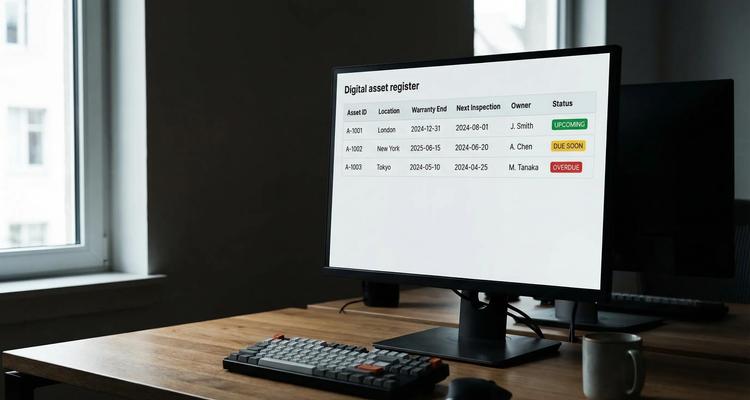
Here is a practical baseline register for inspection and warranty management:
| Asset field | Why it matters for inspections and warranties | Example values |
|---|---|---|
| Asset name + unique ID | Prevents ambiguity during audits and service calls | “Air Compressor AC-014” |
| Category | Drives templates (inspection cadence, checklist) | HVAC, forklift, fire safety, lab equipment |
| Location (site, area) | Enables site-level dashboards and local ownership | “Austin Warehouse, Bay 3” |
| Owner + backup | Eliminates “someone thought someone else had it” | Facilities lead + supervisor |
| Vendor/service provider | Speeds scheduling, standardizes evidence | “ABC Calibration Services” |
| Warranty start + end date | Determines claim window and replacement timing | Start: 2025-04-01, End: 2027-04-01 |
| Warranty type | Sets expectations and claim steps | Manufacturer, extended, parts-only |
| Inspection type | Defines what “done” means | Annual safety, quarterly PM, calibration |
| Next inspection due | The primary automation trigger | 2026-06-30 |
| Evidence attachments | Makes “prove it” easy | PDF certificate, invoice, photos |
| Status | Enables dashboards and escalation logic | Upcoming, due soon, overdue, completed |
If you already have an asset inventory tool, you can still use this structure for the inspection and warranty slice of your assets, which is typically where the deadline risk lives.
How inspections should run inside asset tracking software
Inspections fail in predictable ways: the due date is known, but the work is not defined, the evidence is not captured, or the completion is not verified.
A strong inspection workflow usually has four parts.
1) A repeatable checklist (not a vague reminder)
“Inspect generator” is not actionable. The system should attach a checklist that reflects how your team actually performs the inspection, for example:
- Pre-check safety steps
- Required measurements
- Pass/fail criteria
- Attachments required (photo, signed report)
- Escalation step if a defect is found
This is especially important when inspections are regulated or audited, because you are proving a process, not just a date.
2) Staged reminders and escalations
One reminder is easy to miss. Staged alerts create time to schedule vendors, order parts, and collect approvals.
A simple default cadence many teams start with:
| Deadline type | First alert | Follow-ups | Escalation |
|---|---|---|---|
| High-risk safety inspections | 60 days | 30, 14, 7 days | Escalate at 14 days |
| Calibration / QA inspections | 45 days | 21, 7 days | Escalate at 7 days |
| Routine PM checks | 30 days | 14, 3 days | Escalate at 3 days |
| Low-risk internal checks | 14 days | 3 days | Optional |
The exact timing depends on lead times and your internal approval cycle, but the key is consistency.
3) Evidence capture at the point of completion
If inspection proof is stored “somewhere else,” audits turn into scavenger hunts. Asset tracking software should allow you to attach the evidence directly to the asset record or the inspection task, so you can retrieve it by:
- asset ID
- site
- inspection type
- date range
- vendor
This also prevents the common problem of an inspection being completed but not recorded.
4) A single view for “what is due” across locations
Teams need a dashboard that answers:
- What inspections are due soon (and who owns them)?
- What is overdue right now?
- Which sites have the highest upcoming workload?
- What is missing evidence?
Without that visibility, issues only surface when something fails.
How warranty dates should be managed (so you do not miss claim windows)
Warranty tracking is often treated like a passive reference field. In practice, it should drive decisions and actions.
Track the dates that actually determine eligibility
Depending on the vendor, warranty eligibility might depend on:
- purchase date
- installation/commissioning date
- registration date
- last service date (for maintenance-required warranties)
If you only track “warranty end,” you may still lose coverage because you cannot prove the start condition.
Attach the proof you will need to file a claim
A warranty claim typically requires some combination of:
- proof of purchase
- serial number confirmation
- service logs
- inspection reports
- photos of failure
If those documents are attached to the asset record, you reduce both claim time and the risk of denial.
Use warranty alerts to prevent out-of-warranty spend
Warranty alerts are not just about filing claims. They support proactive choices:
- Schedule a final inspection before the warranty ends.
- Decide whether to renew an extended warranty (if available).
- Replace a high-failure asset before it becomes a cost center.
A practical approach is to alert at 90/60/30 days prior to warranty end for critical equipment, then require a short checklist decision: “inspect, claim, renew, or replace.”
When to use asset tracking vs expiry tracking, and why many teams need both
If your main requirement is knowing where assets are and who has them, you want classic asset tracking.
If your main risk is missing inspection and warranty deadlines, you want an expiry and workflow system that treats those dates as operational commitments.
Many organizations land in a hybrid:
- An inventory system for custody and counts
- A deadline-first system to manage inspections, certifications, warranties, renewals, and the evidence behind them
ExpiryEdge sits in that second category: it is designed to track time-bound obligations, automate reminders, and run checklists with documentation, which maps cleanly to inspection and warranty use cases.
A practical implementation plan (without boiling the ocean)
The fastest deployments focus on the assets that create the most risk or cost when missed.
Step 1: Choose a scope that matches your audit and downtime risk
Start with one slice such as:
- safety-critical equipment
- regulated inspections (fire safety, lifts, calibration)
- high-cost assets with meaningful warranties
- assets that frequently fail and generate emergency work orders
Step 2: Standardize categories and inspection types
Before you import, define a small set of categories and inspection types. Keep it simple at first. Consistency matters more than detail.
For example, “Annual safety inspection” should not also appear as “Yearly safety check” and “Safety annual.” Pick one.
Step 3: Import assets and attach the minimum viable evidence
Most teams can start with:
- asset name/ID
- location
- owner
- next inspection due
- warranty end
- one key document (warranty PDF or last inspection certificate)
Platforms like ExpiryEdge support bulk import and document attachment, which lets you get to a usable system quickly.
Step 4: Configure reminders and escalations, then run a 30-day test
Do not guess and hope. Run a short test window and verify:
- reminders reach the right people (and backups)
- the timing is workable given vendor lead times
- the checklist reflects reality
- evidence is easy to upload and retrieve
If your organization relies heavily on email-based intake (vendors emailing inspection reports, warranty confirmations, service invoices), it can be helpful to test those flows with programmable inboxes. For QA and automated verification, tools like Mailhook can generate disposable inboxes via API and return received emails as structured JSON, which is useful when validating notification and intake workflows in a controlled environment.
Step 5: Create an “audit-ready” retrieval habit
Audit readiness is mostly a retrieval problem. Set a rule such as:
“An inspection is not complete until the evidence is attached and searchable.”
Then test it with a quick drill: pick five random assets and try to produce proof of the last inspection in under two minutes.

What to look for when evaluating asset tracking software for inspections and warranties
If inspections and warranty dates are your priority, evaluate tools against these capabilities.
Deadline intelligence and visibility
You should be able to see, filter, and report on:
- upcoming inspection workload by site or category
- overdue items and who owns them
- warranty expirations in the next 30/60/90 days
- items missing required documents
ExpiryEdge supports a centralized expiry dashboard, calendar view, and advanced search, which are the core building blocks for this.
Workflow execution (not just notifications)
Reminders are necessary but not sufficient. Look for:
- automated workflow checklists
- clear ownership and collaboration
- a way to standardize what “done” means
Evidence management
Ask how the tool handles:
- document attachments per asset and per task
- retrieval during audits
- consistent naming or categorization
Scale and hygiene
As your register grows, small limitations become major costs. Confirm:
- bulk import and editing
- customizable categories
- role-based collaboration
How ExpiryEdge fits the inspections and warranty use case
ExpiryEdge is built for tracking business-critical deadlines and actions, which makes it a strong fit when “asset tracking” really means:
- inspection due dates that cannot slip
- warranty dates that drive financial decisions
- checklists that need consistent execution
- proof that must be attached for audits
In practice, teams use ExpiryEdge to centralize inspection and warranty records, set smart alerts (including multi-channel notifications), and run checklists that keep work consistent across sites and staff changes.
Frequently Asked Questions
Is asset tracking software the same as a CMMS?
A CMMS is typically focused on maintenance work orders, parts, and scheduling. Asset tracking software may focus on inventory and custody. For inspections and warranty dates, you specifically need deadline tracking, reminders, workflows, and evidence, whether that comes from a CMMS or a deadline-first platform.
What is the best way to track warranties for multiple locations?
Use a centralized register with consistent fields (asset ID, site, warranty start/end, vendor, documents) and role-based ownership at each site. Then run warranty alerts in advance so each location can decide whether to inspect, claim, renew, or replace.
How far in advance should inspection reminders be sent?
It depends on vendor lead times and internal approvals. Many teams start with 60/30/14/7-day reminders for high-risk inspections and tighten or expand after a 30-day test.
What documents should be attached for inspections and warranties?
At minimum, attach the latest inspection certificate or report (plus photos if relevant) and the warranty proof (invoice, warranty terms, registration confirmation). If a warranty requires maintenance logs, attach those too.
Can ExpiryEdge replace spreadsheets for tracking inspection due dates? Yes, especially when the goal is to automate reminders, assign ownership, run checklists, and store evidence in one searchable place. Spreadsheets can list dates, but they struggle with escalations, proof, and repeatable execution.
Make inspections and warranties predictable (not person-dependent)
If you are currently managing inspection due dates and warranty expirations across spreadsheets, calendars, and inboxes, you are relying on memory and manual follow-up. That is exactly where missed inspections, failed audits, and out-of-warranty repairs come from.
ExpiryEdge helps teams centralize asset-related deadlines, automate multi-channel alerts, run workflow checklists, and attach proof so inspections and warranty dates are tracked and completed on time.
Start by registering your most critical assets, importing deadlines in bulk, and testing a reminder cadence for 30 days. When you are ready, you can expand to additional categories and locations.
Explore ExpiryEdge to see how deadline-first tracking can keep inspections and warranties under control.


