
Workflow System Software vs Spreadsheets: Key Differences

Spreadsheets are the default tool for tracking renewals, licenses, and compliance deadlines, right up until they are the reason a deadline gets missed. The problem is not that Excel or Google Sheets are “bad”. It is that spreadsheets were built for analysis and reporting, not for enforcing time-sensitive workflows across a team.
If you are deciding whether to keep your current spreadsheet or move to workflow system software, this comparison will help you evaluate the real differences, including risk, audit readiness, ownership, and scalability.
What “workflow system software” means (in plain English)
Workflow system software is a structured system designed to move a task from “needs doing” to “done”, with:
- A defined record (each renewal, license, contract, inspection, subscription)
- Ownership (who is responsible, who is backup)
- Steps (checklists, approvals, required documents)
- Automation (reminders, escalations, status changes)
- Visibility (dashboards, calendars, filters, search)
- Evidence (attachments, notes, sometimes activity history)
In the context of renewals and compliance deadlines, workflow software acts like an operational control layer: it reduces the chance that a date is forgotten, misread, overwritten, or left unowned.
Spreadsheets, in contrast, act like a flexible list. They can store dates, but they do not reliably enforce what should happen next.
Where spreadsheets still make sense
It is worth saying clearly: spreadsheets can be the right answer in some situations.
Spreadsheets work well when:
- The volume is low (for example, under 20 to 30 items)
- Only one person owns the process end to end
- Deadlines are low-risk (no fines, no operational shutdown, no customer impact)
- The list is temporary (a one-time vendor cleanup or short project)
- You do not need proof, auditability, or standardized execution
If that is your reality, a well-designed sheet plus calendar reminders might be enough.
The issues show up when the sheet becomes business critical.
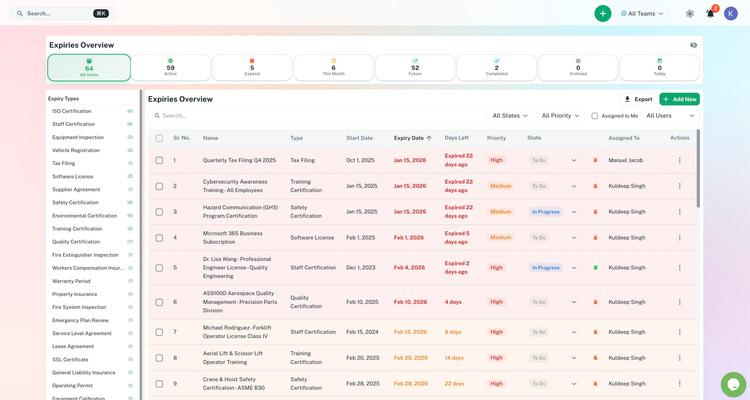
Workflow system software vs spreadsheets: key differences that matter in operations
Below are the differences that typically determine whether you keep spreadsheets or graduate to a workflow system.
1) System of record vs “the latest version” problem
A spreadsheet can be a source of truth, but only if everyone uses the same file, edits it correctly, and never duplicates it. In practice, teams end up with:
- “Final_v7.xlsx” versions in email threads
- Copies saved to desktops
- Multiple tabs for different departments
- Unclear ownership over edits
Workflow software is designed to be a centralized system of record. You do not track “a file”. You track the actual items (each expiry) in one place.
2) Ownership and accountability
In a spreadsheet, ownership is often implied. Someone assumes “Finance handles that” or “Operations will notice.” Even if you add an “Owner” column, you still have a gap: nothing enforces that the owner saw the task, accepted it, and completed it.
Workflow system software is built around responsibility. Assignments, shared visibility, and notifications make ownership operational, not aspirational.
3) Reminders, escalation, and timing logic
Most spreadsheet-based processes rely on one of these patterns:
- A human checks the sheet weekly
- A calendar event exists (sometimes for the wrong date)
- A manual email is sent around renewal time
Workflow systems can automate multi-stage reminders and escalation. That matters because renewals rarely happen on the expiration date. They happen on internal “renew by” dates based on:
- Vendor notice periods
- Internal approval time (budget, legal, compliance)
- Processing lead time (government agencies, insurers)
- Risk buffers (holidays, staff PTO)
If you need consistent 90/60/30 (or similar) reminders, spreadsheets can do it, but only with complex formulas and manual upkeep. Workflow software is typically designed for this.
4) Checklist execution (the part spreadsheets are not built for)
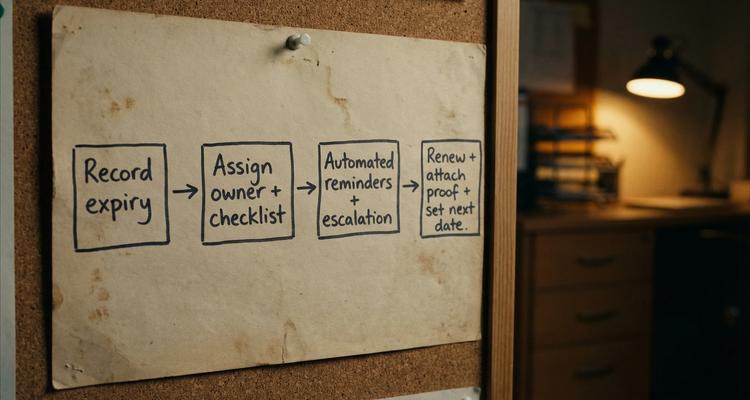
Renewals and compliance tasks are not just dates. They are sequences:
- Collect documents
- Confirm coverage or requirements
- Get internal approvals
- Submit renewal
- Store proof
- Update the next date
Spreadsheets can list steps, but they do not guide or verify completion. Workflow system software can attach a checklist to each item, helping teams execute consistently, especially when responsibilities change hands.
5) Audit readiness and evidence management
Audits rarely fail because a date existed. They fail because you cannot quickly prove:
- Who owned the requirement
- What actions were taken
- What documentation exists
- Whether you were compliant at the required times
Spreadsheets can store links, but they are not strong at evidence management. Links break. Files move. Permissions change.
Workflow systems often support attaching documents directly to the relevant item (for example, the renewed license, insurance certificate, inspection report), so evidence stays tied to the deadline.
If your industry is regulated, or you face customer vendor assessments, this difference alone can justify moving off spreadsheets.
6) Access control and operational security
With spreadsheets, teams often choose between:
- Keeping the sheet open to edits (higher risk of accidental changes)
- Locking it down (then people work around it with copies)
Workflow systems tend to offer more practical access control for real operations: shared visibility with controlled editing, collaboration without chaos, and fewer “shadow copies”.
7) Searchability and visibility at scale
Once you track dozens or hundreds of expiries, spreadsheets become hard to scan:
- Filtering works, but only if everyone remembers how to use it
- Sorting changes views and can confuse collaborators
- Comments and context get scattered
Workflow systems typically provide a dashboard, calendar views, and advanced search so you can answer questions fast, such as:
- “What is due in the next 30 days?”
- “Which items are missing documents?”
- “Which renewals are blocked waiting on approval?”
8) Error rate and data integrity
The risk with spreadsheets is not theoretical. Spreadsheet errors are well documented in research and real business incidents. Raymond Panko’s widely cited work on spreadsheet risk found that a large majority of real-world spreadsheets contain errors (often referenced as roughly 80 to 90 percent in studies). See resources compiled by the European Spreadsheet Risks Interest Group (EuSpRIG) for background.
For expiry tracking, one incorrect cell can mean:
- Wrong date
- Wrong reminder timing
- Wrong vendor contact
- Missed renewal window
Workflow systems reduce the surface area for silent errors by using structured fields, validations, and consistent processes.
Example: one renewal tracked in a spreadsheet vs in workflow software
Consider a business-critical insurance renewal.
In a spreadsheet process, the typical flow is:
- The renewal date is entered once
- A person is expected to check it
- If the person is out, the task slips
- Proof of renewal is stored in a folder (or emailed)
- The sheet is updated later (sometimes)
In workflow system software, the flow is closer to:
- The expiry is recorded with an owner
- Reminder rules notify the owner ahead of time
- A checklist ensures steps are not skipped
- Documents are attached to the record
- The team can see status in a dashboard
That is the core difference: spreadsheets store information, workflow systems drive execution.
The decision question most teams miss: what is your “cost of failure”?
The best way to decide is not “Which tool is nicer?” It is “What happens when this goes wrong?”
A missed deadline can create:
- Late fees, penalties, or lapsed coverage
- Operational downtime (equipment, permits, vendor access)
- Failed audits or lost contracts
- Emergency work that burns team time
If the cost of one miss is high, your tracking system should behave like a control, not a note.
A practical way to think about it:
- If a missed renewal is annoying, spreadsheets may be fine.
- If a missed renewal creates legal, compliance, safety, or revenue exposure, workflow system software is usually the safer choice.
How to choose between spreadsheets and workflow system software
Use these evaluation prompts to make the decision concrete.
Complexity signals that point to workflow software
- Multiple stakeholders touch each renewal (Ops, Finance, Legal, Compliance)
- You need recurring reminders, not just one calendar event
- You need standardized steps (checklists) per category
- You need evidence attached to each item
- You cannot afford single-person dependency
- You need a clear “what is due soon” view across the business
Signals that a spreadsheet is still adequate
- One person owns the entire process
- You rarely add new items
- Deadlines are low-risk and not audited
- No one else needs visibility
Moving off spreadsheets without chaos (a simple migration plan)
Most teams delay switching because they fear losing history or disrupting work. A clean migration is usually straightforward if you do it in phases.
- Inventory what you track today (tabs, owners, categories, renewal cadences)
- Clean the data (remove duplicates, confirm dates, standardize naming)
- Define categories that match how you operate (licenses, contracts, insurance, subscriptions, inspections)
- Import in bulk (start with the next 90 days of deadlines if you want a smaller pilot)
- Add owners and backup owners
- Attach critical documents where they belong
- Run a short dual period (keep the sheet read-only while the new system runs reminders)
- Hold a 30-minute weekly review for the first month to refine reminder timing and checklists
Where ExpiryEdge fits in this comparison
ExpiryEdge is designed for teams that have outgrown spreadsheets for tracking business-critical deadlines. Based on the platform description, it supports the workflow capabilities spreadsheets struggle with, including:
- Smart expiration tracking
- Automated workflow checklists
- Multi-channel notifications
- A centralized expiry dashboard with advanced search
- Document attachment
- Calendar view
- Bulk import of expiries
- Team collaboration and customizable expiry categories
If your spreadsheet is currently acting as a compliance control, renewal calendar, and team coordination hub, that is a strong signal it is time for purpose-built workflow system software.
Frequently Asked Questions
Is workflow system software only for big enterprises? No. The need is driven by risk and coordination, not company size. A small business with regulated deadlines can benefit as much as a large organization.
Can’t I just add automations to spreadsheets (scripts, formulas, calendar sync)? You can, but you are effectively building a custom system that depends on ongoing maintenance, permissions management, and someone who understands how it works. Dedicated workflow software is usually easier to standardize and scale.
What is the biggest hidden risk of using spreadsheets for compliance deadlines? Single-person dependency. If the person who “owns the sheet” is out, leaves, or gets overloaded, reminders and follow-through often break down.
How do I know if I need checklists, not just reminders? If renewals involve multiple steps, approvals, or documentation, reminders alone are not enough. Checklists help ensure the work is completed consistently and can be proven later.
What should I migrate first from my spreadsheet? Start with high-risk items due in the next 60 to 90 days. That creates immediate value and reduces the chance of missing something during the transition.
Make renewals predictable (not spreadsheet-dependent)
If you want to replace spreadsheet tracking with a system designed for real execution, ExpiryEdge is built to centralize expiries, assign ownership, automate reminders, and keep renewal evidence attached to the record.
Explore ExpiryEdge here: ExpiryEdge expiry reminder software (you can also request a demo or start a trial from the site).


