Governance Risk Management Compliance Software: Key Features

Governance, risk, and compliance (GRC) work used to be a binder, a spreadsheet, and a calendar reminder. In 2026, that approach breaks fast: obligations change, vendors multiply, audits get tighter, and renewals often have long lead times that require coordinated action across Legal, Finance, Ops, and IT.
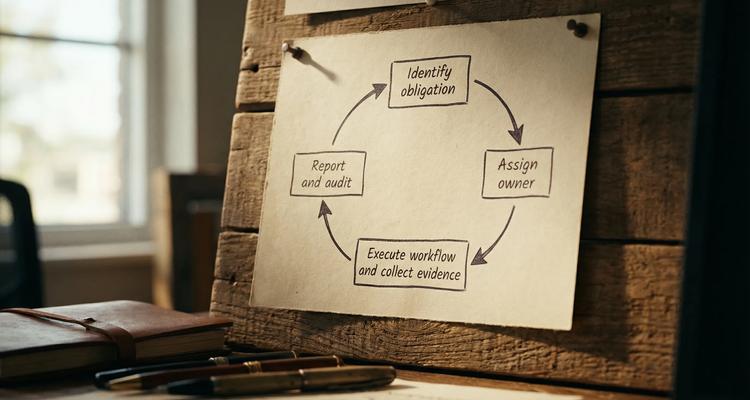
That is why governance risk management compliance software has become less about “tracking” and more about running a repeatable operating system: clear ownership, structured workflows, audit-ready evidence, and timely escalation.
Below are the key features that matter most when you are evaluating GRC software, plus practical “demo tests” you can use to separate real capability from slideware.
What “GRC software” should do (in plain language)
A useful GRC platform helps you answer three questions reliably:
- What are we accountable for? (governance and obligations)
- What could go wrong, and how do we reduce it? (risk and controls)
- How do we prove we did the right thing, on time? (compliance and evidence)
Some tools are designed for full enterprise GRC programs (risk registers, control testing, policy management, third-party risk, enterprise reporting). Others are “deadline-first” compliance systems that specialize in renewals, certifications, inspections, permits, contracts, and recurring operational obligations.
The best choice depends on your primary failure mode. If your biggest pain is missed renewals, scattered evidence, and unclear handoffs, you should prioritize workflow, alerts, and proof capture just as much as risk scoring.
Key features to look for in governance risk management compliance software
1) A single system of record (not “documents everywhere”)
If your obligations live across inboxes, shared drives, ticketing tools, and individual calendars, you do not have a system of record. You have a scavenger hunt.
A strong platform centralizes the “objects” that matter, typically:
- Obligations (laws, requirements, internal policies, contract clauses)
- Risks (what could fail, impact, likelihood)
- Controls (what you do to prevent or detect failure)
- Evidence (what proves the control happened)
- Owners and approvers (who is accountable)
Demo test: Ask the vendor to show one obligation record end-to-end: owner, due dates, linked documents, workflow steps, and the evidence that closes it.
2) Flexible taxonomy (because your compliance world is not generic)
Out-of-the-box templates help, but real compliance programs need customization:
- Categories by domain (safety, privacy, finance, vendor, legal)
- Categories by entity or location (multi-site operations)
- Categories by risk level or criticality (what requires escalations)
If the tool forces you into rigid fields, teams route around it.
Demo test: Can you add a category, custom fields, and filters without professional services?
3) Deadline intelligence that separates “expiration” from “renew-by”
Many compliance failures happen even when the expiration date is “known,” because the team did not account for:
- Notice periods in contracts
- Processing time (regulators, insurers, counterparties)
- Internal review and approval cycles
- Document collection lead times
Good governance risk management compliance software supports a practical model: an expiration date plus a renew-by date that triggers work early.
Demo test: Can the system drive workflows off renew-by dates (not only the final expiry), and can it support multi-stage reminders and escalation?
4) Workflow automation (checklists that reflect how work really gets done)
Compliance is not a single reminder. It is a chain of actions: request documents, review, approve, pay, file, store proof, confirm completion.
Look for:
- Workflow checklists tied to each obligation (not a separate task silo)
- Clear states (e.g., Not started, In progress, Blocked, Submitted, Approved, Closed)
- Repeatability (templates for common renewals)
This is where many “GRC suites” are strong, but also where some tools are surprisingly weak (beautiful dashboards, shallow execution).
Demo test: Ask to see how a checklist is created, assigned, reused as a template, and audited later.
5) Multi-channel notifications and escalation logic
Alerts are only useful if they reach the right people, at the right time, with the right urgency.
At minimum, you want:
- Multiple channels (commonly email, plus additional channels appropriate for urgent work)
- Owner and backup coverage
- Escalation rules when deadlines are at risk
- “Noise control” so teams do not ignore alerts
This feature matters even more when obligations span departments. Legal might draft, Finance might pay, Ops might execute, and someone has to close the loop.
Demo test: Ask for a live example: “What happens if the owner does nothing for 7 days?” You should see a defined escalation path.
6) Evidence management that is audit-ready (not “we can attach files”)
Audits are rarely failed because someone did nothing. They are failed because proof is incomplete, scattered, or not linked to the exact obligation and timeframe.
Strong evidence capabilities include:
- Document attachment at the obligation or control level
- Consistent metadata (what this file proves, for which period)
- Searchable retrieval
- Access controls (not everyone should see everything)
This is also where regulated processes intersect with vendor management and payments. For example, if you operate in travel, you may need to demonstrate payment security and privacy practices across systems and vendors. Tools such as Elia Pay highlight compliance requirements like PCI DSS and GDPR in the context of payment operations, which is a good reminder that evidence is often cross-functional (Finance, Security, Legal), not “owned by Compliance” alone.
Demo test: Ask: “Show me the evidence pack for last quarter for this obligation, and export it for an auditor.”
7) Role-based dashboards (executives, operators, audit)
A single dashboard is not enough. Different stakeholders need different views:
- Executives need “what is at risk” and “what is overdue”
- Operators need “what is due next” and “what is blocked”
- Audit needs traceability, evidence, and histories
Look for filtering by entity, location, category, owner, and risk level.
Demo test: Can you create a view that shows “high risk items due in 30 days, by owner,” without exporting to Excel?
8) Search that actually works (and supports audits)
When an audit request arrives, you need answers in minutes, not a week:
- Full-text search across records and key fields
- Filters and advanced queries
- Fast navigation from a record to its evidence
Search is an underappreciated feature until the first time you are asked, “Show me the last three renewals and the supporting documents.”
Demo test: Ask the vendor to find a record using partial info (a vendor name fragment, a license number, or a location).
9) Calendar view (useful, but not the source of truth)
Calendar views are valuable for planning and coordination, but they should be driven by structured records, not manual entries.
A good calendar view helps teams:
- See upcoming work by week or month
- Coordinate across departments (approvals, submissions)
- Avoid clustering critical renewals into the same week
Demo test: Can the calendar be filtered by category, owner, and location, and does it reflect renew-by dates?
10) Bulk import and clean onboarding
Most teams do not fail because they chose the wrong software. They fail because they never finish onboarding.
A practical GRC platform should support:
- Bulk import of existing registers
- Field mapping and validation
- A way to start small (pilot a subset) and scale
Demo test: Ask: “If I give you a messy spreadsheet, how do we get to a clean system in 30 days?” The answer should be concrete.
A feature checklist you can use in demos
Use this table as a scorecard. The “demo tests” are designed to be hard to fake.
| Feature | Why it matters | Demo test question |
|---|---|---|
| System of record for obligations, risks, controls | Prevents scattered ownership and inconsistent data | “Show one obligation from intake to closure with evidence.” |
| Flexible categories and fields | Fits your real structure (entities, locations, domains) | “Can we add a category and filter dashboards without services?” |
| Renew-by dates and multi-stage reminders | Moves work earlier, reduces last-minute failure | “Can you set renew-by logic and escalation?” |
| Workflow checklists and templates | Makes execution repeatable and auditable | “Show a checklist template reused across renewals.” |
| Multi-channel notifications | Improves response rate and accountability | “How do you handle owner, backup, escalation?” |
| Evidence attachment and retrieval | Turns audits into retrieval, not reconstruction | “Export an evidence pack for last quarter.” |
| Advanced search and filters | Speeds investigations and audit responses | “Find an item with partial info in under 10 seconds.” |
| Calendar view | Helps planning and cross-team coordination | “Filter calendar by location and criticality.” |
| Bulk import | Enables real adoption | “How do we import 500 records and validate fields?” |
| Permissions and role-based views | Protects sensitive info, supports real governance | “Show what a viewer vs admin can see and do.” |
Where ExpiryEdge fits (especially for deadline-driven compliance)
If your GRC pain is primarily about missed renewals, expiring licenses, contract notice windows, recurring inspections, and audit evidence scattered across tools, you should evaluate whether a deadline-first platform is a better fit than a broad, heavyweight suite.
ExpiryEdge is built around operational control of deadlines and renewals. Based on the platform capabilities, it focuses on:
- Smart expiration tracking
- Automated workflow checklists
- Multi-channel notifications
- A centralized expiry dashboard
- Advanced search
- Document attachment
- Calendar view
- Bulk import of expiries
- Team collaboration
- Customizable expiry categories
That combination maps well to teams that need compliance execution to be predictable and provable, especially when multiple departments touch the same renewal.

Frequently Asked Questions
What is governance risk management compliance software used for? Governance risk management compliance software is used to centralize obligations and risks, assign ownership, automate workflows and reminders, and store evidence so you can reduce risk and respond to audits quickly.
What is the difference between GRC software and compliance management software?
GRC software typically covers governance, risk registers, controls, and compliance reporting across the enterprise. Compliance management software may focus more narrowly on executing and proving specific obligations, often with stronger deadline and evidence workflows.
Which features matter most for passing audits?
Audit success usually depends on evidence quality and traceability: clear ownership, workflow history, attached proof, fast search, and a reliable system of record for each obligation.
How do you prevent missed renewals with GRC software?
Use renew-by dates (not just expiration dates), multi-stage reminders, clear owners and backups, escalation rules, and checklists that define the steps needed to complete a renewal.
Should we replace spreadsheets immediately?
Not necessarily. Many teams start with a pilot: import the top 50 to 200 highest-risk obligations, prove the workflow and evidence pack, then expand once adoption is stable.
Make compliance deadlines predictable (and auditable)
If your biggest compliance risk is not “we do not know what to do,” but “we miss dates, lose documents, and scramble during audits,” a deadline-first system can deliver value quickly.
Explore ExpiryEdge to centralize renewals and compliance deadlines, automate checklists and reminders, and keep evidence attached to the record where auditors expect it: https://expiryedge.com.