
Compliance Management Software: Core Features Checklist

Buying compliance management software is rarely about “more features.” It is about avoiding the two things that hurt most: preventable risk (missed renewals, failed audits, lapsed licenses) and preventable work (chasing updates, duplicating spreadsheets, digging through email threads).
This checklist is designed for teams evaluating compliance management software and wanting a clear, practical way to compare tools. Use it to confirm what is truly “core,” what is “nice to have,” and what will matter during your first audit after implementation.
What “compliance management software” should cover (at minimum)
Most organizations need a system that can reliably answer four questions at any time:
- What must we do (and by when)? (licenses, permits, certifications, contracts, policy reviews, subscriptions, inspections)
- Who owns it? (a person, role, or team with clear accountability)
- Where is the proof? (documents, renewal confirmations, certificates, emails)
- What happens if it is late? (escalations, approvals, contingency steps)
Some platforms focus on full GRC. Others focus on the most common point of failure: deadlines and renewals. In either case, the feature set below is the baseline you should validate.
Tip: If your highest-frequency compliance risk is expiring items (permits, insurance, certifications, contracts), prioritize deadline and renewal strength over complex risk registers.
Core features checklist for compliance management software
1) Centralized compliance register (single source of truth)
Your tool should replace scattered trackers by creating one system of record for compliance obligations.
Look for:
- A centralized dashboard showing upcoming and overdue items
- Customizable categories (by business unit, location, obligation type, regulator, vendor)
- Status tracking (on track, at risk, overdue, complete)
Why it matters: audits and renewals fail when obligations live in personal calendars and disconnected spreadsheets.
2) Deadline and expiration tracking that does not break
For many teams, compliance failure happens at the moment a date gets missed. Strong expiry tracking is not just “a due date field.”
Look for:
- Support for recurring renewals (annual, quarterly, biannual, variable cycles)
- Multiple dates per record when needed (notice date, submission date, expiration date, grace period)
- A clear way to distinguish “hard” deadlines (license expiry) vs “soft” deadlines (internal review)
If you align compliance to recognized management-system concepts (like planning, operation, performance evaluation, improvement), it helps to map obligations to these stages. Standards such as ISO 37301 (Compliance Management Systems) are often used as a reference point for building durable compliance processes.
3) Automated reminders with escalation paths
A single reminder is not a system. Real-world compliance needs layered alerts, plus a way to escalate when someone is out of office or a task stalls.
Look for:
- Multi-stage reminders (for example, 90/60/30/7 days, then daily)
- Escalations to a manager or secondary owner when overdue
- Multi-channel notifications (email, SMS, and in-app, depending on your operational reality)
Why it matters: email-only compliance reminders are easy to ignore, filter, or miss.
 Automated reminders with escalation paths
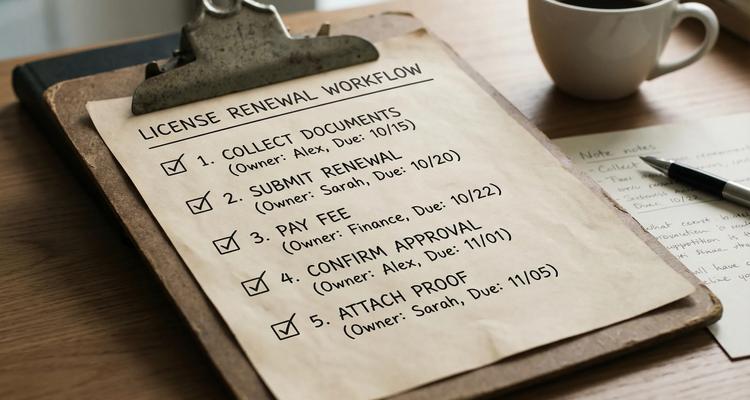
4) Workflow checklists (repeatable, audit-friendly execution)
Compliance work is rarely one step. It is collecting documents, submitting forms, confirming approvals, paying fees, and storing proof.
Look for:
- Checklist templates (renewal steps you can reuse)
- The ability to assign actions to owners
- Visibility into “what step are we on?” not just “is it due?”
This is also where many teams reduce last-minute panic. A checklist makes the work predictable.
5) Clear ownership, collaboration, and handoffs
If one person “owns the spreadsheet,” your process is fragile. Collaboration features help distribute responsibility without losing control.
Look for:
- Assigning records and tasks to individuals (and ideally teams)
- Shared visibility across stakeholders (operations, legal, finance, HR)
- Commenting or notes for context (why something changed, what a regulator asked for)
6) Document attachment and evidence management
Compliance is not only doing the work, it is proving it.
Look for:
- Document attachment per compliance item (certificates, receipts, renewal confirmations)
- A consistent structure for evidence (so auditors do not rely on “ask Jim”)
- Easy retrieval during audits
Note: Some organizations will also require retention policies and tighter access controls. If those are must-haves for your industry, validate them explicitly.
7) Fast search and filtering (because audits are time-boxed)
When an auditor or customer asks, “Show me proof of X,” you need an answer in minutes.
Look for:
- Advanced search (by vendor, location, category, owner, status)
- Filters for “expiring in 30 days,” “overdue,” “missing documents,” “high-risk category”
8) Calendar view (operational planning, not just tracking)
A calendar view helps teams plan workload and avoid bunching everything at month-end.
Look for:
- Calendar visualization by team, category, or location
- Ability to spot peak renewal weeks and distribute work
9) Bulk import and quick setup (time-to-value matters)
If implementation takes months, the business falls back to the spreadsheet.
Look for:
- Bulk import of existing obligations (CSV or similar)
- Simple mapping for categories, owners, and dates
- A repeatable process to add new compliance items as the business grows
10) Reporting that supports decision-making (not just activity)
Even lightweight reporting can help leadership answer: Are we at risk? Where are the bottlenecks? What is repeatedly late?
Look for:
- Overdue trends over time
- Workload by team or location
- Compliance completion rates
If you have formal compliance program expectations, it can also be useful to align reporting to regulator guidance relevant to your region or sector. For example, the U.S. DOJ’s Evaluation of Corporate Compliance Programs emphasizes whether compliance is well-designed, applied in good faith, and works in practice.
11) Security, permissions, and accountability (validate early)
Even if your primary goal is deadline control, compliance data often includes sensitive contracts, insurance docs, employee certifications, and vendor details.
At minimum, ask vendors:
- Can we restrict access by role or team?
- How is data protected (in transit and at rest)?
- What data export options exist if we ever leave?
If you require an audit trail, SSO, or advanced permissioning, treat that as a hard requirement and confirm it before procurement.
12) Fit for your compliance scope (industry and obligation types)
A tool can be excellent, but wrong for your specific compliance mix.
Validate that the system handles your reality, such as:
- Multi-location operations (permits and inspections by site)
- Vendor compliance (insurance certificates, W-9s, safety docs)
- Employee credential renewals (training, licenses, certifications)
- Contract renewals and notice periods
“Nice-to-have” features (useful, but not always necessary)
These features can be valuable, but should not distract you from the core reliability of tracking, alerts, ownership, and evidence.
- Integrations (calendar, email, chat tools, ticketing)
- Custom fields for specialized compliance metadata
- Automated data extraction from documents (if your volume is high)
- Approval workflows (if renewals require sign-off)
Vendor evaluation questions (copy/paste for demos)
Use these questions to get beyond marketing claims:
- How do reminders work across multiple stages, and how do escalations trigger?
- Can one compliance item store multiple critical dates (notice, due, expiry, grace period)?
- What happens when an owner changes roles or leaves the company?
- How do we prove compliance quickly (search, filters, attached evidence)?
- How fast can we import 500 to 5,000 existing obligations?
- What does “audit readiness” look like in your system (exports, evidence retrieval, reporting)?
Common implementation mistakes (and how to avoid them)
Treating compliance tracking as a “tool install”
You will get better results if you define a simple operating model first:
- Who creates new compliance items?
- Who verifies completion?
- What is the escalation path?
- Where is evidence stored, and what is considered acceptable proof?
Using generic reminders for everything
Not all compliance deadlines are equal. Create tiers (high impact vs routine) and set stricter alerts for the items that can shut down operations or trigger penalties.
Failing to standardize categories and naming
If the same obligation is labeled five different ways, search and reporting become unreliable. Define categories and naming conventions early.
Where ExpiryEdge fits in this checklist
ExpiryEdge is built to help teams manage time-sensitive compliance obligations, especially renewals and expirations, with a focus on execution and visibility. If your biggest compliance risk is missed deadlines, ExpiryEdge aligns well with the core capabilities above, including:
- Smart expiration tracking
- Automated workflow checklists
- Multi-channel notifications
- A centralized expiry dashboard
- Advanced search
- Document attachment
- Calendar view
- Bulk import
- Team collaboration
- Customizable expiry categories
If you are still building your internal process, you may also find it useful to review ExpiryEdge’s guidance on expiry date management best practices or the practical steps in how to automate contract and subscription renewals.
 Where ExpiryEdge fits in this checklist
Frequently Asked Questions
What is compliance management software? Compliance management software is a system used to track compliance obligations, assign ownership, automate reminders, store evidence, and support audit readiness across policies, licenses, contracts, and operational requirements.
What are the most important features in compliance management software? The core features are a centralized register, reliable deadline/expiry tracking, automated multi-stage reminders with escalation, workflow checklists, clear ownership and collaboration, evidence storage, and fast search and reporting.
Do small businesses need compliance management software, or is a spreadsheet enough? A spreadsheet can work temporarily, but it typically fails when deadlines scale, ownership changes, or audits require fast evidence retrieval. Software reduces dependence on memory, individuals, and manual follow-ups.
How do I evaluate compliance software during a demo? Bring real examples (a license renewal, a contract with a notice period, a vendor insurance certificate). Ask the vendor to show multi-date tracking, escalation reminders, evidence attachment, bulk import, and how quickly you can find proof in search.
Try a deadline-first approach to compliance
If your compliance issues are driven by renewals, expirations, and recurring obligations, a deadline-first system can eliminate a large share of preventable risk.
Explore ExpiryEdge to see how centralized tracking, automated reminders, workflow checklists, and document attachments can help your team stay compliant and audit-ready without relying on spreadsheets.


