
The person who tracked our renewals just left. Where do I start?
Start with money and mail: search the shared inbox and their mailbox for renewal and expiry notices, and pull 12 months of recurring payments from accounts payable and card statements. Then put every item in one shared register with an owner and reminders, so renewals stop depending on one person.
Last updated · ExpiryEdge editorial team
Quick answer
When the person who tracked renewals leaves, rebuild the list from evidence rather than memory: search email for renewal, expiry and invoice notices, review 12 months of recurring payments, and ask your insurance broker, key vendors and HR for their dates. Put every item in one shared register, give each an owner, and handle anything due in the next 60 days first.
What to do in the next 48 hours
1. Secure their mailbox, files and accounts
Before access is removed, make sure their mailbox, drives and calendar are kept and can be searched or delegated, following your IT and data-protection policies. Find out which vendor portals, registrar accounts and government logins used their email address, and move those to a shared address.
2. Search email for renewal notices
Search the shared inbox and their mailbox for: renewal, renews, expires, expiry, expiration, due, invoice, auto-renew, notice period, licence, license, certificate, policy, subscription. Sort by date and note every item with a date in the next 12 months.
3. Follow the money
Ask accounts payable for every recurring supplier over the last 12 months, and pull company card statements for the same period. Anything paid monthly or annually is a renewal. Look for annual charges in particular - they are the ones nobody remembers.
4. Ask the people who hold the other half of the date
Ask your insurance broker for a schedule of every policy and renewal date. Log in to vendor portals and your domain registrar to check renewal dates. Ask HR for expiry dates on staff certifications and visas, and facilities for inspections and service contracts.
5. Triage by date, then assign owners
Put everything in one list sorted by date. Anything due or past its cancellation notice deadline in the next 60 days gets an owner today. Everything else gets an owner this week. One name per item, not a team.
6. Accept that the first list will be incomplete
Some items will only surface when a renewal notice or invoice arrives. Tell finance, IT and site managers to forward anything that looks like a renewal to one shared address for the next few months, and add each item to the register as it appears.
Renewals depend on one person for a few common reasons
The list lived in a personal spreadsheet
The tracker was a file on someone's laptop or personal drive, updated by them alone. Nobody else knew where it was or whether it was current.
Reminders were in their calendar
Even a well-kept list relied on alerts in one person's calendar or inbox. When their account was closed, the reminders went with it.
Vendors emailed one address
Renewal notices, invoices and portal logins were tied to the individual's email, so warnings now land in a closed mailbox.
No handover was planned
The job was never written down as a responsibility, so offboarding covered their laptop and leave balance but not the renewals they were quietly managing.
A shared register where every renewal has an owner and a backup
Import whatever list you rebuild, in one pass
Bulk import the list you put together from email, payments and vendors into ExpiryEdge. Each item becomes a record with its expiry or renewal date, the cancellation notice date where there is one, the owner, and the contract or certificate attached.
Bulk import from Excel or CSV
Documents attached to each record
Calendar view of everything due
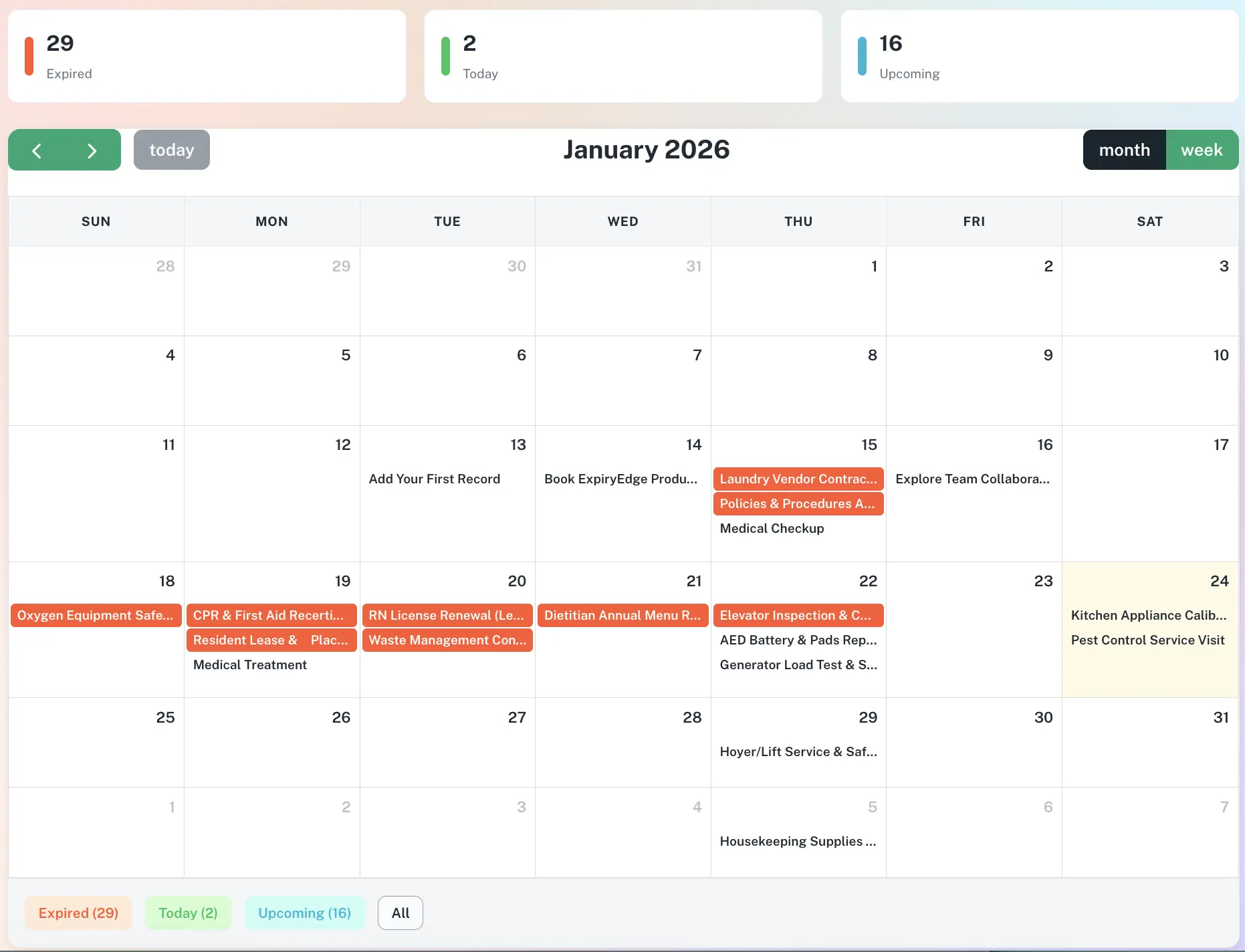
Reassign a whole portfolio in one click
Every record has an owner, and reminders go to that owner, not to whoever set up the list. When someone leaves or changes role, move all their records to a new owner in one action. Teams and departments give managers a view of everything their people own.
One owner per record, reassigned in one click
Teams and departments with role-based access
Escalation to a senior owner when a date passes
Multi-step reminders on the channels people check
Each record sends reminders at 90, 60, 30 and 7 days by default, by email, SMS, WhatsApp, Slack or Microsoft Teams. Set reminders against the cancellation notice date as well as the renewal date, so there is still time to cancel or renegotiate.
Default 90 / 60 / 30 / 7 cadence, configurable
Separate reminder for notice deadlines
Timestamped log of every reminder sent
Start with a list of every contract that renews or expires, then record for each one the renewal date, the cancellation notice period, the date notice must be given by, the value, the supplier and an owner. The notice date matters more than the renewal date, because it is your last chance to cancel or renegotiate. Put reminders on both. ExpiryEdge shows these in a calendar view and sends reminders to each owner at 90, 60, 30 and 7 days, or a cadence you set.
Work from evidence: search shared and personal inboxes for words like renewal, expires, invoice and certificate; pull 12 months of recurring payments from accounts payable and company card statements; ask your insurance broker for a policy schedule; check vendor portals and your domain registrar; and ask HR and facilities for staff certifications, visas, inspections and service contracts. Combine the results into one list sorted by date. Expect to add items over the next few months as notices arrive.
Keep the list in a shared system rather than a personal file, give every item a named owner, and send reminders from the system to that owner rather than from one person's calendar. Add a senior owner who is alerted when a date passes. Move vendor and portal logins to shared addresses. Review the register monthly in a team meeting. In ExpiryEdge, owners can be reassigned in one click, so a resignation is a short handover rather than a lost list.
Switch to a tool that sends reminders by itself, assigns an owner to each item, escalates when something is overdue, stores the document, and keeps a history of who did what. Excel can hold dates, but it cannot remind anyone unless someone opens it. Dedicated expiry tracking software such as ExpiryEdge imports your existing spreadsheet, so you do not start from scratch. If you also need contract drafting and negotiation, look at contract lifecycle management software instead.
You have three options. Conditional formatting highlights dates that are close, but only when someone opens the file. Power Automate or a script can send emails from a list held in SharePoint or OneDrive, but someone has to build and maintain it, and it can stop working when the person who built it leaves. Or import the spreadsheet into a reminder tool. ExpiryEdge bulk-imports Excel or CSV files and then sends reminders by email, SMS, WhatsApp, Slack or Teams.
Ask the leaver, before their last day, to list everything they manage on a recurring basis: renewals, reports, supplier relationships, logins. Have them walk their successor through each item. Keep their mailbox searchable for an agreed period, set up forwarding where your policies allow, and move every vendor account and registrar login to a shared address. Reassign their records in your tracking system to named people. Add 'recurring responsibilities' as a standard item on your offboarding checklist.
Contact the issuer or supplier straight away and ask what is needed to renew or reinstate, and whether you can keep operating in the meantime. For licences, permits and insurance, stopping the affected activity until it is resolved may be the safer choice, depending on the rules that apply. For contracts that auto-renewed, check the cancellation terms. Record what you did and when.
Rebuild the list once, then share it
Import your spreadsheet, assign an owner to every renewal, set the cadence. Free 14-day trial, no credit card.