
Assign, Track, and Prove Every Recurring Business Task Gets Done
ExpiryEdge is more than a reminder tool - it is a recurring task manager that auto-assigns checklists by role, captures proof of completion, and escalates when tasks are overdue. So you always know what happened, who did it, and when.
No credit card required • 14-day free trial • Cancel anytime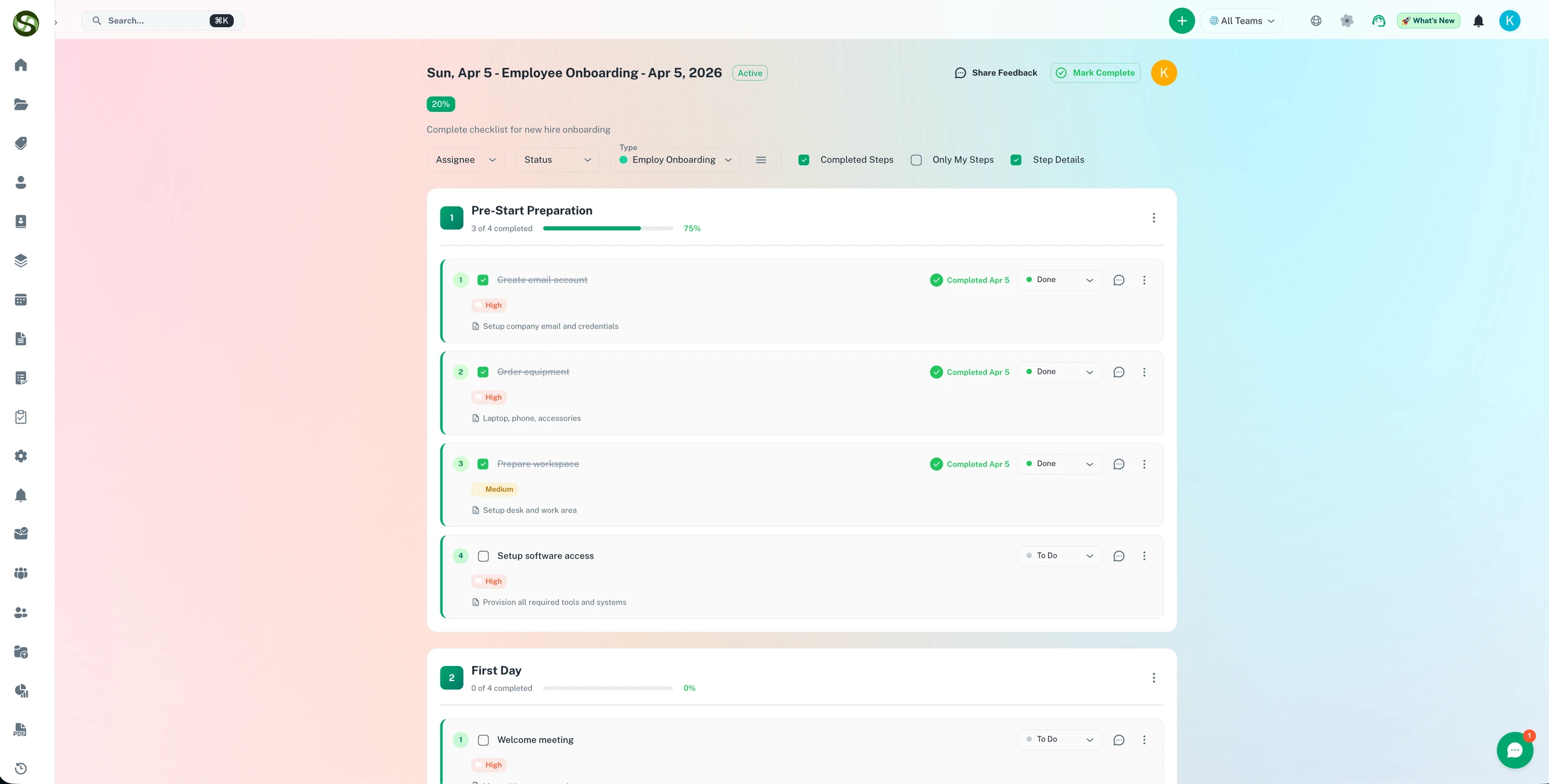
Recurring task manager that auto-assigns, tracks completion with proof, and escalates when your team misses a deadline
Auto-assign recurring tasks by role - no manual assignment needed
Proof of completion: timestamp, signature, and attachments
Escalation alerts when tasks are overdue or skipped
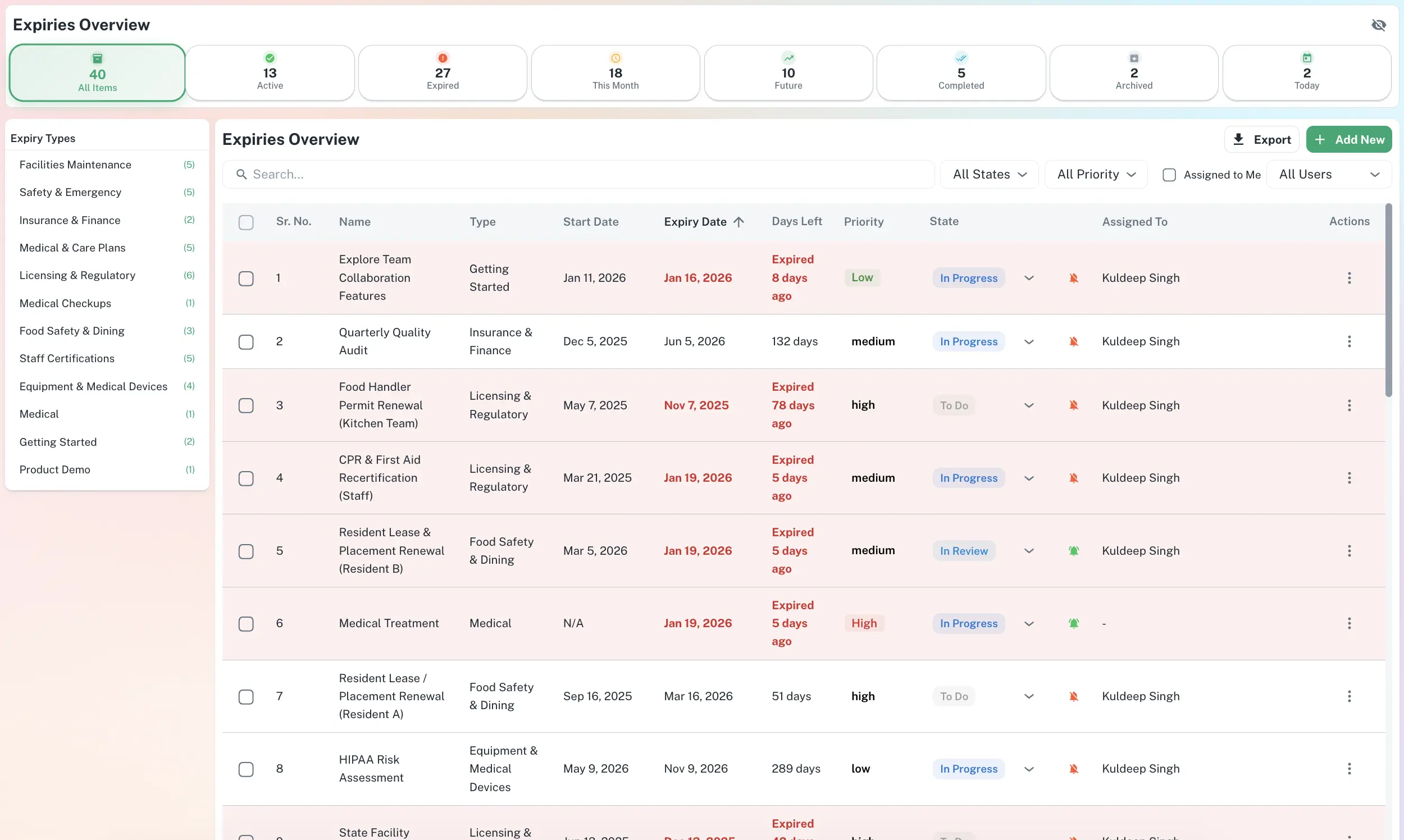
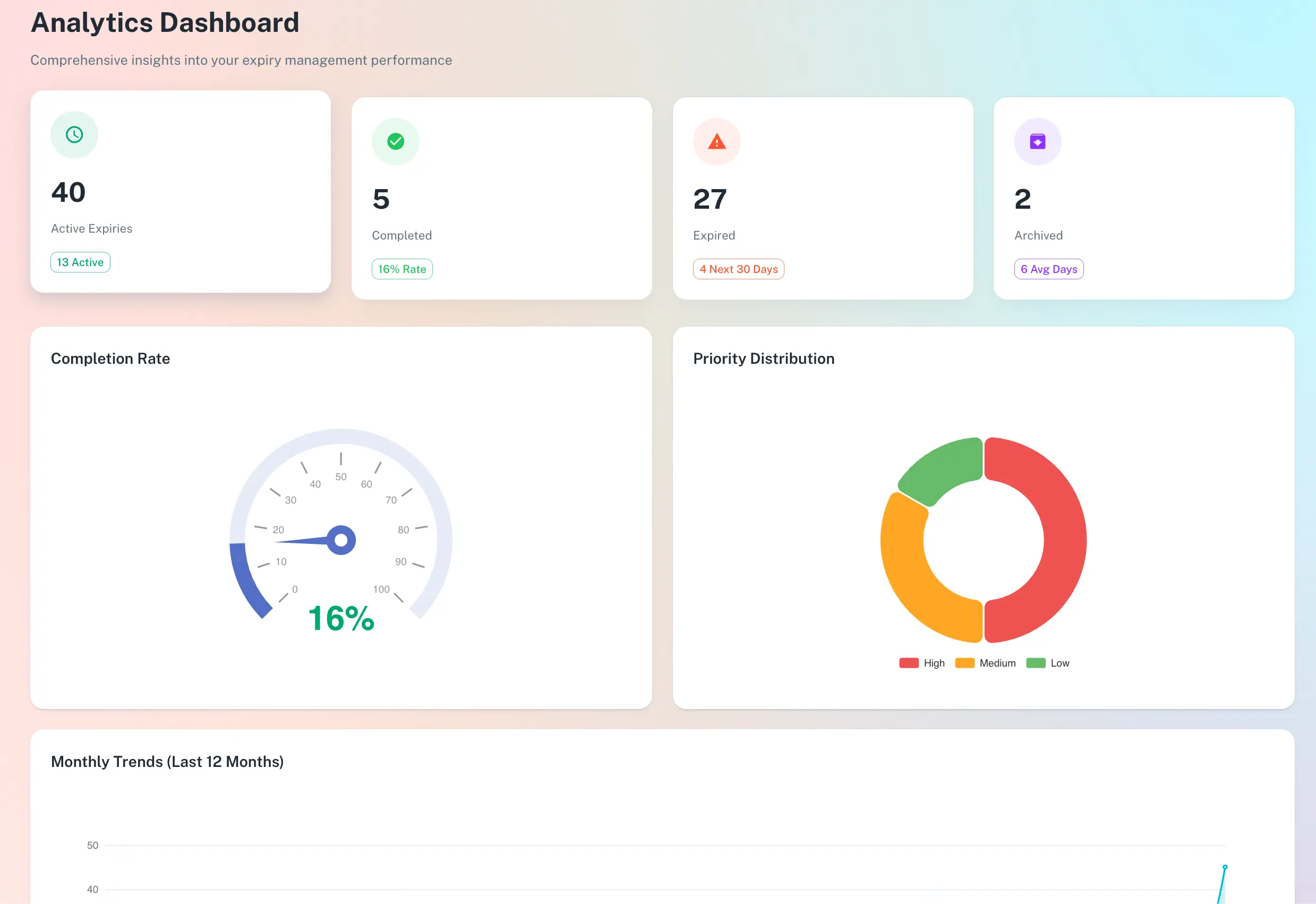
Central dashboard - see every task, owner, and status at a glance
Does this sound familiar?
Problems that organizations face without proper deadline management
Tasks Fall Through the Cracks Between Teams
Person A thinks Person B is doing it. Person B thinks it's someone else's job. The task never gets assigned clearly, so no one does it. Three months later you realize it's never been done.
Managers Spend Endless Hours Chasing Status Updates
Instead of doing productive work, managers send emails asking 'Did you finish that report?' and 'Has the inventory been counted?' They chase people down for updates, send reminders, and have no central view of what's actually been done.
No Proof That Recurring Tasks Were Actually Completed
Someone says they did the task, but you have no evidence. No timestamp, no sign-off, no notes. If there's a problem later, you can't prove whether the task was done or what the person saw when they did it.
No Escalation When Deadlines Are Missed
A task is due on Friday. Friday passes. No one notices. By the next Wednesday, the task is a week overdue but nobody has flagged it. Issues compound because the task was skipped.
How It Works
Simple to set up. Runs automatically from day one.
Create Recurring Task or Checklist
Define a task that repeats weekly, daily, or monthly. Make it a simple text task or a full checklist with multiple steps. Include instructions, attachments, or links so people know exactly what to do.
Auto-Assign by Role or Person on a Schedule
Set who gets assigned (all staff, a specific role, or named individuals) and when (every Monday, every 15th, daily, etc.). The system automatically creates the assignment - no manual work.
Track Completion with Proof - Escalate if Overdue
When a team member completes the task, they submit it with a timestamp and signature. You see proof of completion. If the task is overdue, escalation alerts notify managers or executives so nothing gets forgotten.
How ExpiryEdge Helps
Powerful features designed to address your specific challenges
Recurring Task Automation
Define a task once, and it repeats on schedule. No manual assignments, no forgotten reminders. The system handles the repetition automatically.
Assign Tasks by Role or Individual
Assign to 'all staff with role X,' 'rotate through this team,' or 'only Person A and B.' Flexible assignment rules mean the right people get the right tasks every time.
Completion Proof with Timestamp and Signature
When a task is completed, the person submitting it signs and timestamps it. Optionally, they can attach photos, documents, or notes. You have proof of when and how the task was done.
Escalation When Tasks Are Overdue
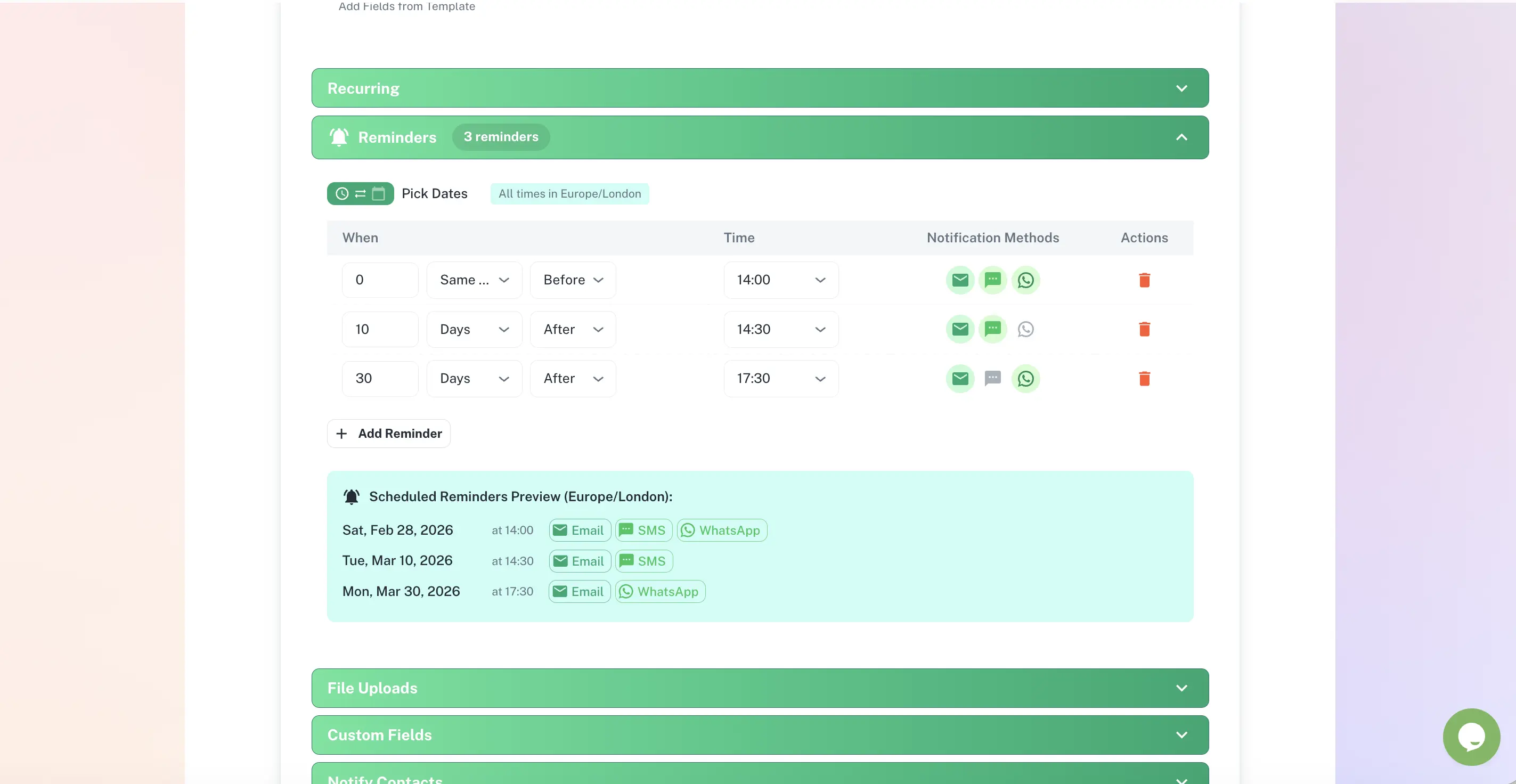
Set escalation rules: if a task isn't completed by the deadline, notify a manager, team lead, or executive. No more silent failures or forgotten tasks.
Central Dashboard of All Task Status
See all assigned tasks, who they're assigned to, their due dates, and completion status - all in one place. No more chasing people for updates.
Audit Trail of Every Task Completion
Full history of who completed what, when, and what notes/attachments were included. Perfect for compliance, investigations, or identifying patterns.
Use Case in action
ExpiryEdge puts every deadline, owner and status on one searchable screen - giving your team full visibility without the spreadsheet chaos.
Manage every deadline from one searchable dashboard - filtered by type, status, and assignee.
Key Benefits
Know exactly what tasks have been assigned and to whom - no confusion or duplication
End endless manager chasing - dashboard shows what's done, what's overdue, and who owns what
Have proof for every completed task - timestamp, signature, and any supporting documents
Catch overdue tasks before they cause problems - escalation alerts prevent delays
Reduce time spent on status meetings and email chasing - the system shows you everything
Hold teams accountable - every task has a named owner and completion record
Identify bottlenecks - see which tasks are consistently overdue or skipped
Ensure consistency - recurring tasks are always assigned at the right time to the right person
Prepare for audits - full proof of task completion and compliance
Expected Outcomes
100%
All recurring tasks visible in one dashboard - no lost or forgotten tasks
3 hrs
Saved weekly by eliminating time spent chasing task status updates
0
Goal outcome - recurring tasks missed or forgotten due to poor visibility
Full
Every task has a named owner and completion record with timestamp
Frequently Asked Questions
Everything you need to know before getting started.
How is ExpiryEdge different from Todoist, Asana, or other task management tools?
Todoist and Asana are great for project management and complex workflows. ExpiryEdge is purpose-built for recurring operational tasks - daily checklists, weekly reports, monthly inventory checks, etc. It's simpler, faster to set up, and focuses on auto-assignment, proof of completion, and escalation when tasks are overdue. Use ExpiryEdge for repeating operational work; use Asana for complex projects with dependencies.
What does proof of completion look like?
When a team member completes a task, they confirm each step (if it's a checklist) and submit. The system records their name, timestamp, and any notes or photos they attached. You can see exactly when the task was done and by whom. If your task requires evidence (e.g., a photo of inventory checked, a signed document), they can attach that too. That proof is visible in the audit trail.
How does escalation work? What happens if a task is overdue?
You set escalation rules when creating the task. For example: if the task isn't completed by the due date, notify the task owner's manager. If it's still not done 2 days later, notify the department head. You can also set escalation to multiple people at once. When the task is overdue, the designated people get an alert so nothing slips through the cracks.
How flexible are recurring schedules? Can I assign daily, weekly, or custom intervals?
Completely flexible. Choose daily, weekly, bi-weekly, monthly, or custom intervals (e.g., 'every 3rd Monday' or 'the 15th of each month'). You can also have one-time tasks if needed. For each schedule, you define who gets assigned - all staff with a role, specific people, or rotating assignments.
Can a task have subtasks or multiple checklist steps?
Yes. You can create a simple single task (e.g., 'File monthly report') or a full checklist with 10+ steps (e.g., 'Closing procedure: count register, reconcile sales, file receipts, update inventory, etc.'). Each step can have a description, attachment, or image. Team members check off each step as they go.
Can multiple teams or departments use ExpiryEdge together, or is it isolated to one team?
Multiple teams can use it together. You can create tasks for different teams, filter the dashboard by team or department, and set escalation rules that involve people from different teams. For example, an Operations task might be assigned to operations staff but escalate to a manager in Finance if there's an issue. You control who can see what.
How does pricing and scaling work? Is there a cost per task or user?
ExpiryEdge is typically priced per user per month, not per task. You can have as many recurring tasks as you need once you're on a plan. Pricing scales with the number of team members. Start with a small team and grow as needed. We recommend starting with a pilot - test it with one department, then expand once your team sees the value.