
Turn SOPs from PDFs Nobody Reads into Checklists Everyone Follows
ExpiryEdge converts your standard operating procedures into recurring digital checklists - automatically assigned, tracked, and proven complete. No more relying on staff memory or paper printouts.
No credit card required • 14-day free trial • Cancel anytime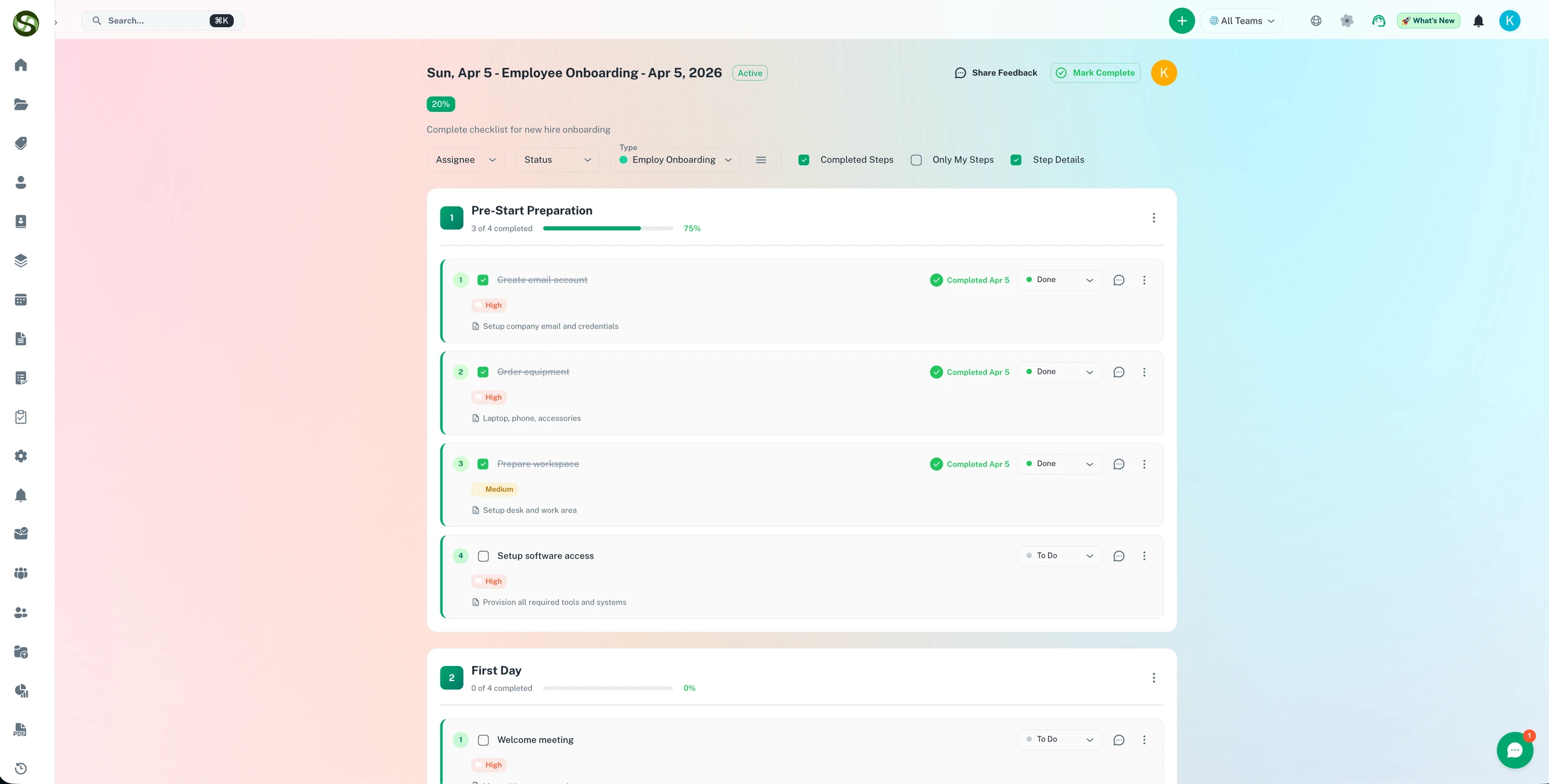
SOP management software that turns written procedures into enforced, trackable, recurring checklists
Convert any SOP into an assigned recurring checklist
Capture proof of completion - not just a tick box
Escalation alerts when SOPs are skipped or overdue
Full audit trail for compliance and quality reviews
Does this sound familiar?
Problems that organizations face without proper deadline management
use_case_sop_management.challenges.docs_nobody_opens.title
use_case_sop_management.challenges.docs_nobody_opens.description
use_case_sop_management.challenges.inconsistent_execution.title
use_case_sop_management.challenges.inconsistent_execution.description
New Staff Training Is Slow and Unreliable
New hires get a PDF to read and 'learn by shadowing'. Three weeks later they still don't know the full procedure. They keep asking questions or they skip steps because they don't remember them.
No Way to Prove Procedures Were Actually Followed
A customer complains. A regulator audits. You have no evidence that your team actually did the procedure. You hope they did. You can't prove it.
How It Works
Simple to set up. Runs automatically from day one.
Document Your SOP as a Checklist
Turn your process into a step-by-step checklist in ExpiryEdge. Simple, visual, no jargon. Every person understands what to do.
Assign It as a Recurring Task to Roles or People
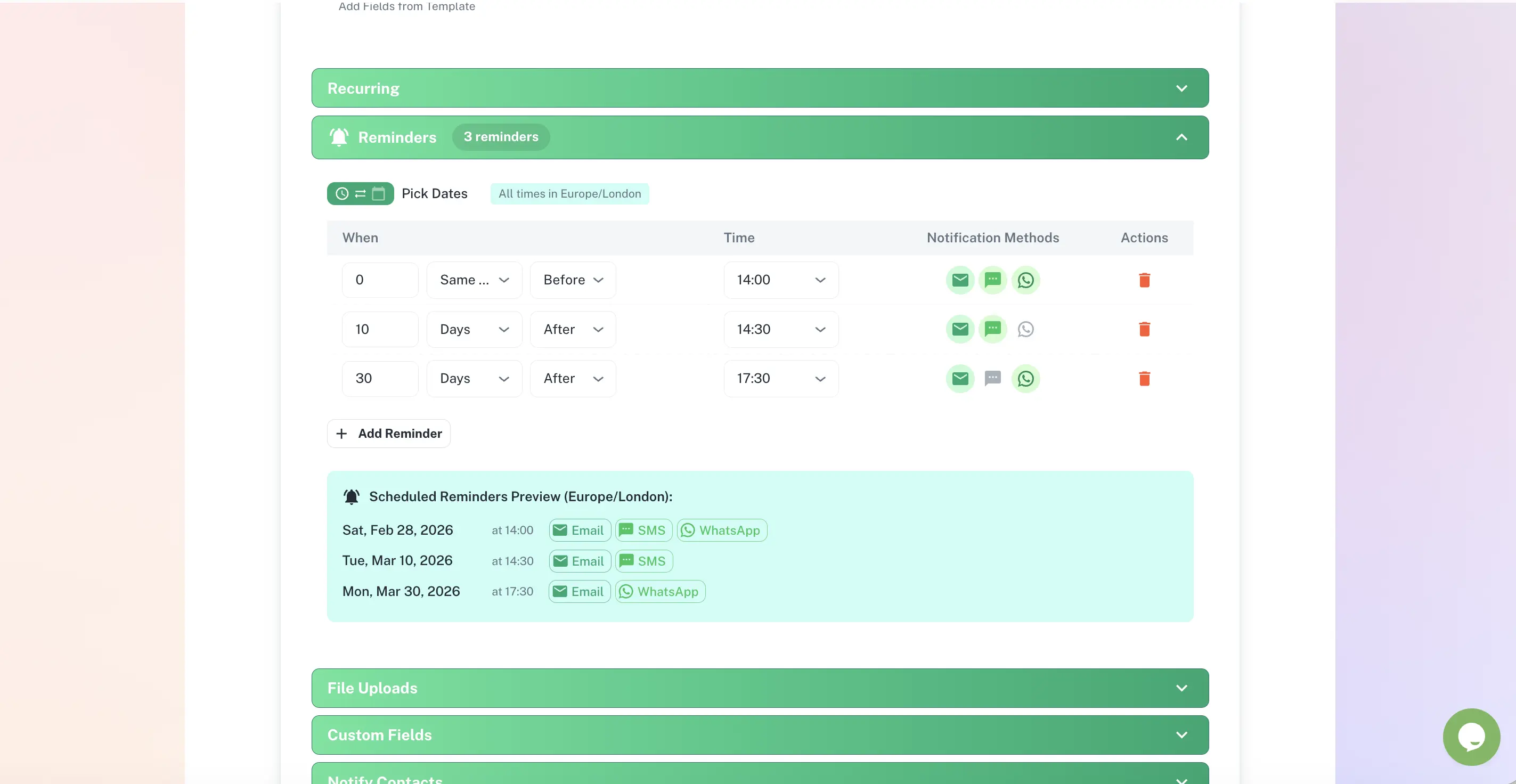
Set the frequency (daily, weekly, monthly, etc.). Choose who gets assigned (all staff, specific role, specific person). The checklist is automatically assigned at the right time.
Track Completion and Get Escalation Alerts if Skipped
When the checklist is due, team members get a notification, complete the steps, and submit. You see who completed it and when. If it's not done by the deadline, escalation alerts notify a manager.
How ExpiryEdge Helps
Powerful features designed to address your specific challenges
Build Checklists Without Code
Create a checklist with text steps, images, attachments, or links. No special training. Anyone can build a checklist in minutes.
Automatically Assign to the Right People on Schedule
Define who gets assigned (by role or name), how often, and at what time. The system handles the assignment. No manual reminders needed.
Capture Proof That the Procedure Was Completed
When a team member completes the checklist, they sign it, timestamp it, and optionally add photos or notes. You have proof of completion for audits and investigations.
Escalate if a Checklist Isn't Done by the Deadline
Set rules: if a checklist isn't completed by the deadline, notify a manager, team lead, or executive. No more silent failures.
Update Procedures and Track Changes
When a procedure changes, create a new version. Old versions stay in history. You can see when the procedure was updated and who did it.
Full Audit Trail of Every Completed Checklist
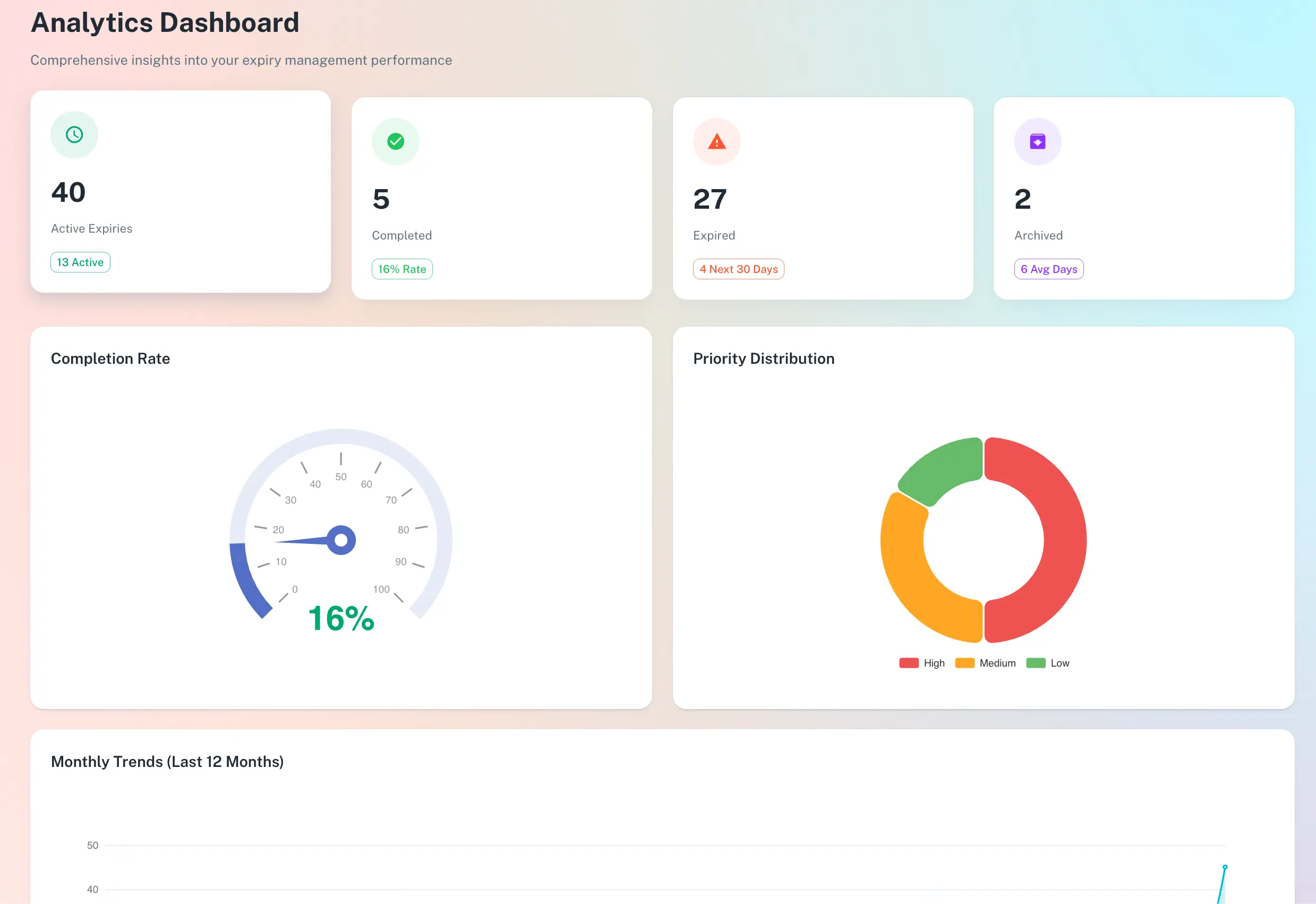
Regulators, insurers, or internal auditors can see who completed what, when, and what issues (if any) were flagged. Full transparency.
Use Case in action
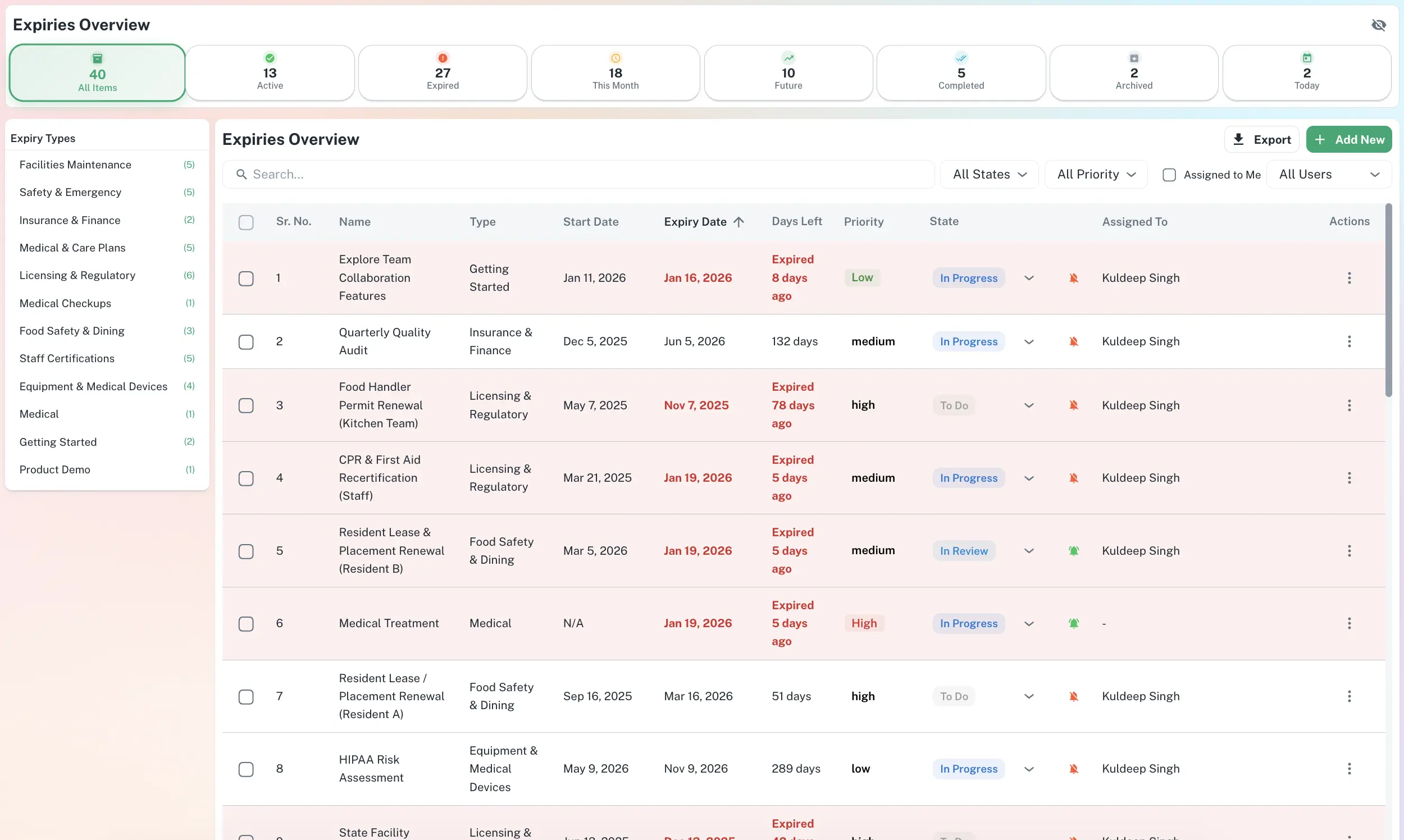
ExpiryEdge puts every deadline, owner and status on one searchable screen - giving your team full visibility without the spreadsheet chaos.
Manage every deadline from one searchable dashboard - filtered by type, status, and assignee.
Key Benefits
Ensure every staff member does the procedure the same way, every time
Reduce quality inconsistencies and errors caused by people doing things differently
Onboard new staff faster - they learn from the checklist, not just shadows
Have proof for audits that procedures were actually completed
Catch skipped or incomplete procedures before they become customer problems
Reduce time managers spend chasing status updates on whether procedures were done
Identify which procedures are being skipped or done incorrectly consistently
Update procedures once and ensure everyone uses the new version immediately
Build a culture of documented, consistent work
Expected Outcomes
100%
Procedures followed the same way every time across all staff and shifts
60%
Less time training new staff on procedures (industry benchmark estimate)
0
SOPs skipped unnoticed - escalation alerts catch them immediately
Full
Audit trail of every completed checklist with timestamp and signature
Frequently Asked Questions
Everything you need to know before getting started.
What is SOP (standard operating procedure) management software?
It's a system that replaces static PDFs with live, recurring checklists. Instead of hoping staff read and follow a manual, you build a checklist in the software, assign it to people automatically, and get proof when it's completed. It ensures consistency, creates accountability, and provides audit trails.
How is ExpiryEdge different from tools like Process Street or Monday.com?
Process Street and Monday are general workflow tools. ExpiryEdge is purpose-built for SOPs and recurring checklists in operations teams. It's simpler, faster to set up, and focuses on the core problem: assigning checklists, tracking completion, and escalating when they're skipped. For complex multi-step projects, Monday might be better. For repeating procedures, ExpiryEdge is lighter and faster.
Can I attach documents, images, or training videos to SOP checklist steps?
Yes. Each step can have text, images, PDFs, links, or embedded videos. If a step says 'Clean the espresso machine,' you can attach a photo guide or 3-minute video showing exactly how. Staff can follow the exact steps without guessing.
What does proof of completion look like for audits?
When a team member completes a checklist, they confirm each step and submit. You see their name, timestamp, and any notes they added. If your SOP requires photos of something (e.g., equipment cleaned, area inspected), they can attach those too. The audit trail shows exactly who did what and when. That's the proof auditors want to see.
How do recurring schedules work? Can I assign a checklist weekly to one person, or daily to different people?
Completely flexible. You set the frequency (daily, weekly, monthly, custom days). You choose who gets assigned: 'all staff with this role,' 'Person A and Person B only,' or 'rotate through this list of people.' The system handles the scheduling and assignments automatically.
Can multiple locations share the same SOP, or do we need separate checklists for each?
You can share one SOP checklist across all locations and assign it to staff at each site. You can also create location-specific versions if, say, a procedure is slightly different in your New York office versus your London office. You control the structure.
Is ExpiryEdge suitable for non-technical teams, or do staff need training to use it?
It's built for non-technical users. A team member just opens the checklist when assigned, reads the steps (including any attached images/videos), checks them off as they go, and submits. Minimal training needed. If your team can use email, they can use ExpiryEdge.