
Contracts Renew Automatically. Your Business Doesn't Have To Pay For That Mistake.
Most businesses have dozens - sometimes hundreds - of contracts running simultaneously. Vendor agreements, SaaS subscriptions, supplier contracts, leases, service agreements. Each one has a renewal date, a notice period, and a deadline. Miss the notice window and you're locked in for another year. Miss the expiry and you lose rights you needed. ExpiryEdge tracks every contract deadline and sends automated alerts before the critical dates - so you negotiate from a position of awareness, not surprise.
No credit card required · Setup in minutesSee every contract renewal date and notice period in one dashboard - nothing buried in email.
Automated reminders go out weeks before notice deadlines so you have time to review and act.
Document storage alongside each contract - terms, amendments, and renewal history in one place.
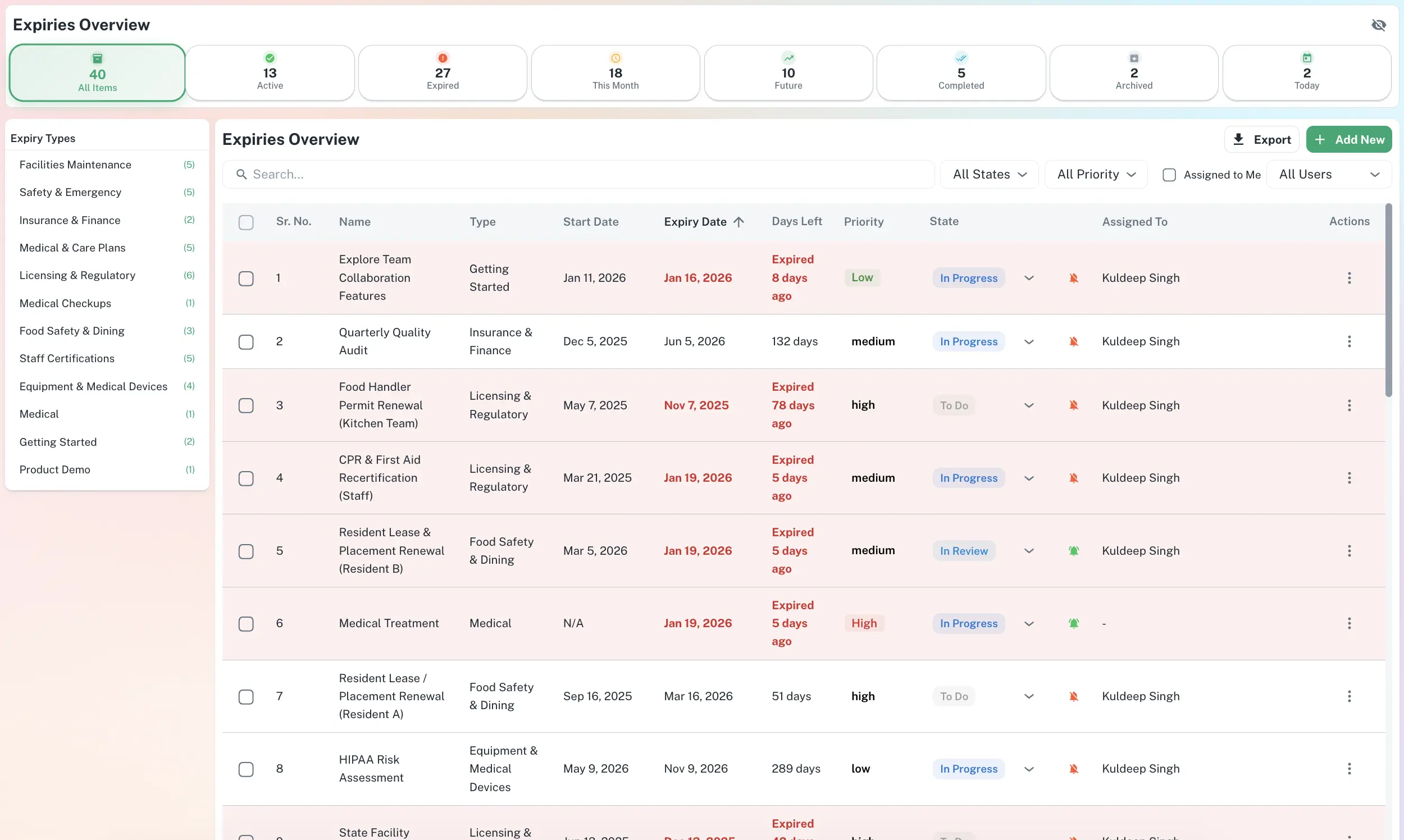
Your compliance hub, at a glance
ExpiryEdge puts every deadline, owner and status on one searchable screen - so your team spends less time chasing and more time renewing.
Manage every deadline from one searchable dashboard - filtered by type, status, and assignee.
What's included
Contract renewal date and notice period tracking
Log every contract with its end date and notice period. ExpiryEdge calculates when you need to act - not just when the contract expires - and sends reminders at the right time. Never miss a 90-day break clause or a 30-day cancellation window again.
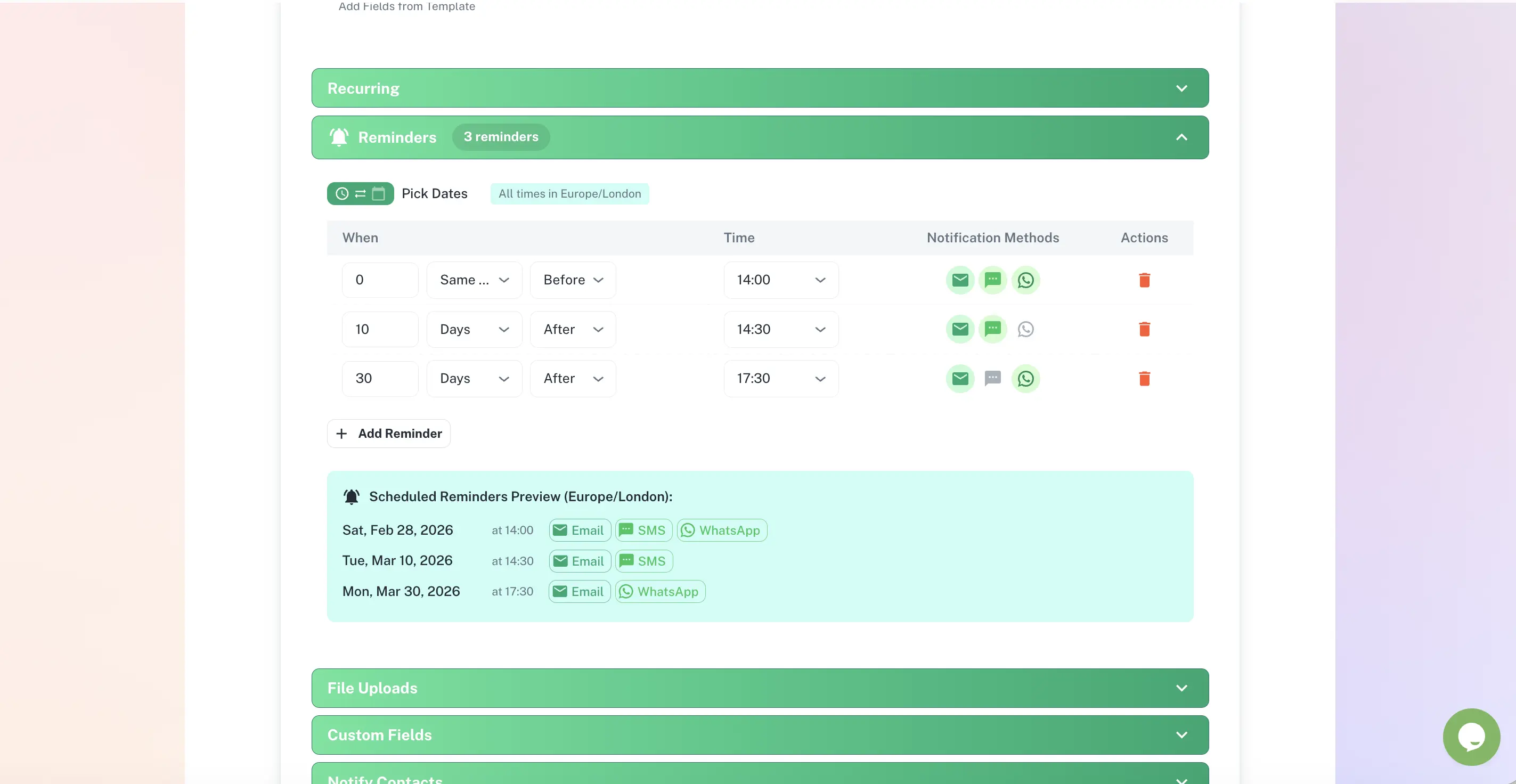
Automated reminders before every deadline
Set custom lead times per contract type. High-value vendor agreements might need 90 days notice; SaaS subscriptions might need 14 days. Each contract gets the right cadence. Reminders go to the right person - not just to a shared inbox that nobody watches.
Contract document storage and version control
Attach contracts, amendments, and correspondence directly to each record. No more hunting through email archives when renewal season arrives. Every document version is timestamped and accessible in seconds.
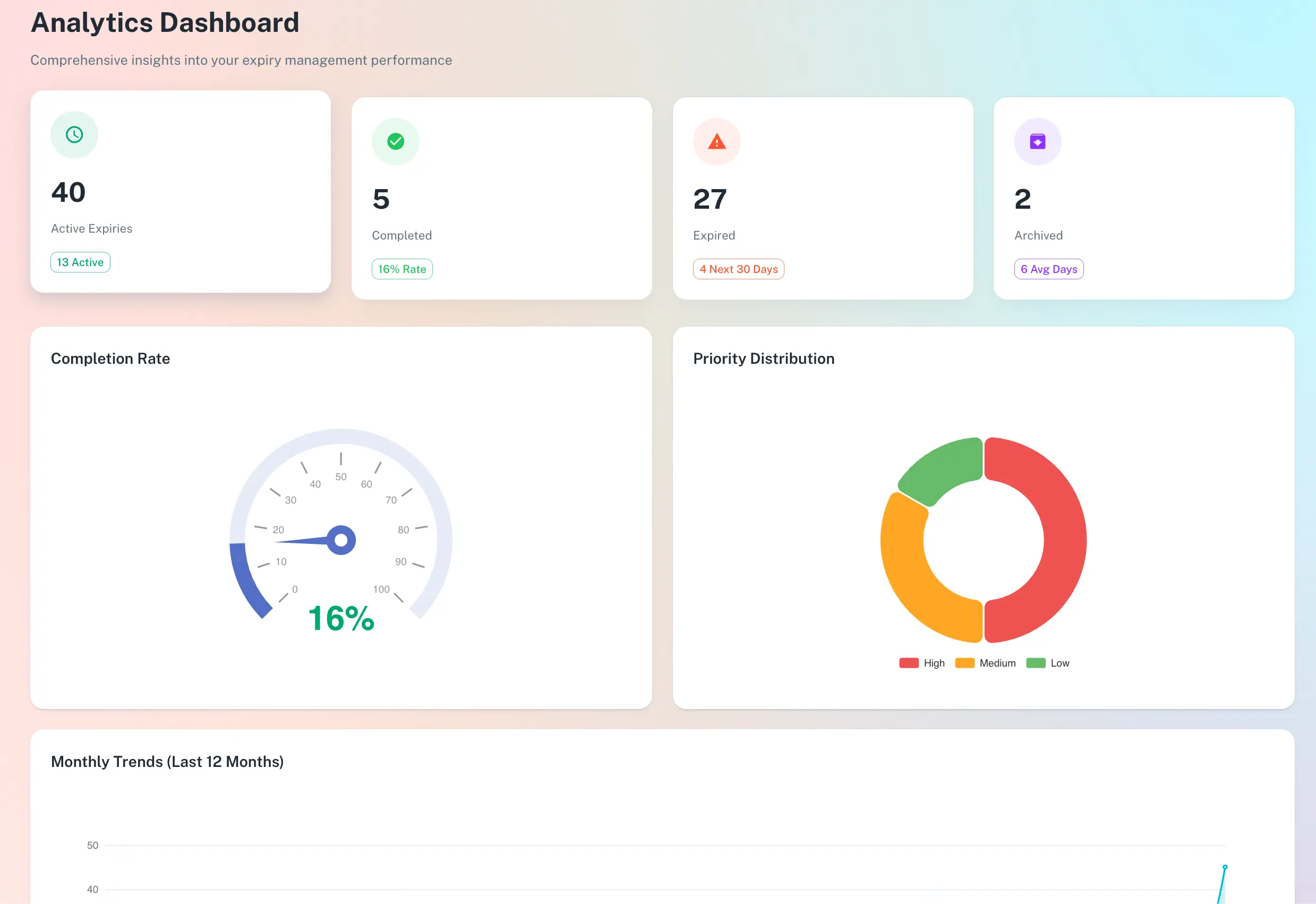
Portfolio-level contract dashboard
See all active contracts, their status, upcoming renewals, and total committed spend in a single view. Filter by supplier, contract type, owner, or department. Know exactly what is renewing in the next 30, 60, or 90 days.
Multi-stakeholder assignment
Different contracts are owned by different teams - procurement, legal, finance, ops. Assign each contract to the right owner. They receive the reminders. You get visibility across all of them. No more "I thought you were watching that one."
Renewal history and audit trail
Track every renewal decision, renegotiation, and amendment with a timestamped audit trail. When a supplier disputes the contract terms or a renewal date, you have the full history ready to produce - no scrambling.
How it works
Import your contracts
Add contracts individually or upload in bulk. Log the supplier, contract value, start date, end date, notice period, and responsible owner. Takes minutes per contract.
Set your alert cadence
Tell ExpiryEdge when you want to be reminded - 90, 60, 30, and 14 days before deadline, or any custom schedule. Different contract types can have different reminder rules.
Act on alerts, not surprises
When a deadline is approaching, the right person receives a clear alert with all the context they need: contract details, expiry date, notice window, and a link to the stored document. Decisions get made. Deadlines get met.
Who uses this
Operations Managers
Finance Controllers
Legal & Compliance Teams
Frequently asked questions
What types of contracts can I track in ExpiryEdge?
Any contract with a date that matters: vendor agreements, SaaS subscriptions, supplier contracts, leases, service agreements, NDAs, employment contracts, insurance renewals, software licences, and more. If it has an expiry date or a renewal window, ExpiryEdge can track it.
How does ExpiryEdge handle notice periods?
You set the notice period for each contract - for example, "30 days before expiry." ExpiryEdge calculates the exact date you need to act and sends reminders starting from that date. This means you get alerted at the right moment to cancel, renegotiate, or extend - not after the window has closed.
Can I track contracts across multiple departments or locations?
Yes. You can organise contracts by department, team, location, supplier type, or any custom category. Each contract has an assigned owner who receives the alerts. Managers and admins can see across the entire portfolio.
What happens when a contract renews? Does ExpiryEdge update automatically?
When a contract is renewed, you update the new end date in ExpiryEdge and the next cycle of reminders begins automatically. You can also set recurring contracts to roll forward on renewal so the tracking continues without manual setup each time.
How is this different from using a spreadsheet?
A spreadsheet is static - it does not alert you. Someone has to remember to check it. ExpiryEdge is active: it monitors every deadline and sends proactive reminders to the right person at the right time. When someone leaves the business, their contracts do not become invisible. When a contract is renegotiated, the full history is preserved.
Stop finding out about contract renewals after the window closes.
Free to try. No credit card required.
Start Free Trial