
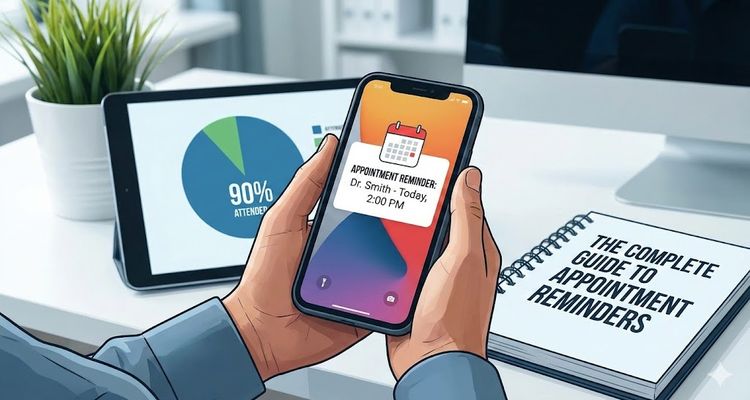
The Complete Guide to Appointment Reminders: Reduce No-Shows by 90%
The Complete Guide to Appointment Reminders: Reduce No-Shows by 90%
Every business owner knows the frustration: you've blocked time for a client meeting, prepared everything, and then... silence. Your client doesn't show up.
This scenario costs businesses billions annually. No-shows cost the US healthcare system alone over $150 billion per year. For small businesses, even a 20% no-show rate can devastate profitability.
The solution? Appointment reminders can reduce no-shows by up to 90%.
What Are Appointment Reminders and Why They Matter
An appointment reminder is a scheduled notification sent to clients before their upcoming appointment, delivered through text messages, emails, phone calls, or push notifications.
These reminders serve three critical functions:
1. They Combat Forgetfulness Research shows people forget approximately 50% of new information within an hour. When someone books an appointment weeks in advance, forgetting is inevitable without reminders.
2. They Demonstrate Professionalism Sending reminders shows clients you value their time and reinforces trust in your brand.
3. They Create Accountability Reminders prompt clients to confirm, reschedule, or cancel, giving you advance notice to fill otherwise empty slots.
The True Cost of No-Shows
Healthcare: Average no-show rates range from 5-30%. Each missed appointment costs $200-$400 in lost revenue. A single physician can lose $150,000 annually.
Beauty & Wellness: Salons experience 15-20% no-show rates. A stylist losing 3 appointments weekly at $75 each loses nearly $12,000 annually.
Professional Services: Legal consultations average 20% no-shows. Financial advisors report 10-25% no-show rates for initial meetings.
Restaurants: Fine dining establishments lose $40-100 per no-show, with large party cancellations devastating entire evenings.
5 Types of Appointment Reminders
1. SMS/Text Message Reminders
Open Rate: 98% (read within 3 minutes)
Best For: Time-sensitive appointments, younger demographics, quick confirmations, last-minute reminders.
Pros: Highest open rates, immediate delivery, two-way communication Cons: Character limits, higher cost than email, requires compliance
2. Email Reminders
Open Rate: 20-25%
Best For: Detailed information, professional services, B2B appointments, preparation requirements.
Pros: Rich formatting, detailed information, lower cost, professional appearance Cons: Lower open rates, spam folder risk, delayed responses
3. Phone Call Reminders
Connection Rate: 50-60%
Best For: High-value appointments, elderly clients, critical appointments, previous no-shows.
Pros: Personal touch, immediate questions answered Cons: Most expensive, time-consuming, can feel intrusive
4. Push Notifications
Open Rate: 50-60%
Best For: App users, last-minute updates, real-time status changes.
Pros: Instant, cost-effective, personalized Cons: Requires app installation, notification fatigue
5. In-App Reminders
Best For: Online booking platforms, healthcare portals, subscription services.
Pros: Integrated with booking system, secure, no per-message costs Cons: Requires app engagement, not suitable as sole method
How Automated Appointment Reminder Systems Work
Manual reminders are time-consuming and error-prone. Modern software automates everything:
- Appointment booked → System captures details
- Configure preferences → Set timing, channels, templates
- Auto-trigger → Software monitors calendar, sends reminders automatically
- Personalization → Inserts client name, date, time, location
- Track delivery → Monitors opens, clicks, confirmations
- Process responses → Handles confirmations, reschedules, cancellations
- Analytics → Reports on effectiveness and ROI
Best Practices: Timing, Tone, and Frequency
The Three-Reminder Strategy
First Reminder: 7 Days Before
- Channel: Email
- Purpose: Early awareness, time to reschedule
- Include: Full details, calendar invite, preparation instructions
Second Reminder: 24-48 Hours Before
- Channel: SMS or Email
- Purpose: Final confirmation
- Include: Confirm/reschedule options, directions
Third Reminder: 2-4 Hours Before
- Channel: SMS only
- Purpose: Last-minute confirmation
- Include: Simple details, location, phone number
Message Best Practices
Do:
- Keep messages concise and clear
- Include who, what, when, where
- Personalize with names
- Provide action options (confirm, reschedule, cancel)
- Add direct contact information
Don't:
- Send too many reminders (3 maximum)
- Use all caps or excessive exclamation points
- Include unnecessary marketing content
- Send reminders too early or too late
- Forget to include time zones
Example SMS: "Hi John, reminder: Haircut tomorrow 12/22 at 3 PM with Sarah at Downtown Salon. Reply Y to confirm or call (555) 123-4567 to reschedule."
Choosing the Right Appointment Reminder Software
Look for these essential features:
- Multi-channel delivery (SMS, email, voice)
- Two-way messaging for confirmations
- Calendar integration (Google, Outlook, Apple)
- Customizable templates with merge fields
- Automated scheduling based on appointment date
- Reporting and analytics dashboard
- Compliance management (TCPA, GDPR)
- Cancellation and rescheduling links
- Time zone detection
- Mobile app for on-the-go management
Real Results: Case Study
Before Automated Reminders:
- 28% no-show rate
- 15+ hours weekly spent on manual calls
- $3,200 monthly revenue loss
- Frustrated staff and clients
After Implementing Automated Reminders:
- 4% no-show rate (86% reduction)
- 2 hours weekly on reminder management
- $2,880 monthly revenue recovered
- Improved client satisfaction scores
ROI: The dental practice invested $79/month in reminder software and recovered $2,880 in revenue—a 3,544% return on investment.
Getting Started: Your 5-Step Action Plan
Step 1: Audit your current no-show rate and calculate monthly revenue loss.
Step 2: Choose your reminder channels based on your client demographics and appointment types.
Step 3: Select appointment reminder software that integrates with your existing systems.
Step 4: Create 2-3 message templates for different reminder timing.
Step 5: Monitor results for 30 days and adjust timing or messaging as needed.
Conclusion
Appointment reminders aren't just a nice-to-have—they're essential for any appointment-based business. With no-show rates averaging 15-30% across industries and automated reminder systems reducing that to under 5%, the ROI is undeniable.
The best part? Setting up automated reminders takes less than an hour, and the system runs itself afterward. Stop losing revenue to forgotten appointments and start protecting your schedule today.
Ready to eliminate no-shows? Explore appointment reminder solutions that fit your business needs and start recovering lost revenue this week.
Related Articles
Expiration Reminder System (Stop Wasting Money on Forgotten Dates)
The Complete Guide to Appointment Reminders: Reduce No-Shows by 90%
Software License Management Tools: The 2025 Buyer's Guide
Popular Topics
Stay Updated
Get the latest insights on compliance tracking and deadline management delivered to your inbox.