
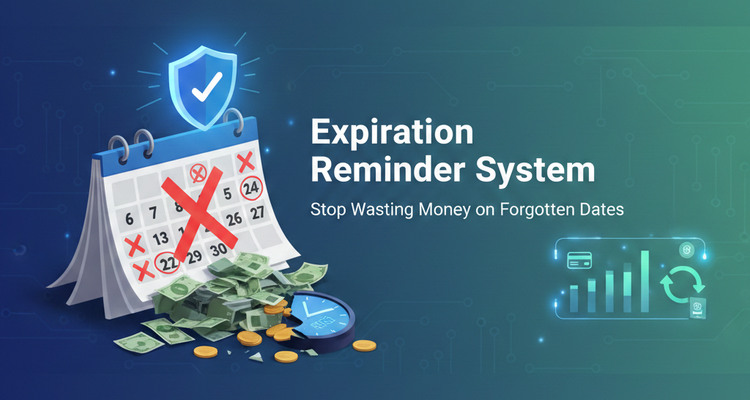
Expiration Reminder System (Stop Wasting Money on Forgotten Dates)
ou know that sinking feeling, the one that hits when you find fuzzy leftovers in the back of the fridge, or notice your car registration expired last month. Most of these problems aren’t “big” on their own, but they add up fast in money, time, and stress.
An expiration reminder is just a simple alert you set before a date so you can act while there’s still time. That’s it. No fancy tools required, no complicated plan, no guilt.
In the next few minutes, you’ll set up a small system you can keep for life. It’s the kind of setup that pays you back every month, with fewer last-minute fees, fewer wasted groceries, and fewer surprise renewals. You can do the basics in under 15 minutes.
What an expiration reminder is and why it saves you money
An expiration reminder is a heads-up that something is about to end, spoil, run out, or renew. People usually think of food, but it’s bigger than that. Expiration dates show up in your kitchen, bathroom, wallet, inbox, and even your browser tabs.
Common “expiration” categories most households deal with include:
- Food and leftovers
- Medicines and refills
- IDs and documents (passport, driver’s license)
- Subscriptions and free trials
- Warranties and return windows
- Memberships (gym, clubs)
- Gift cards and coupons (some have dates or rules)
The payoff is simple: less waste, fewer late fees, fewer rushed errands, and better timing. You stop paying for problems you could’ve avoided with one alert.
Common expiration dates people forget (and what it costs)
A forgotten date rarely feels expensive in the moment. Then you tally the damage.
Milk and leftovers are classic. A $6 carton doesn’t seem like much until it happens every week. Same with produce that gets buried in a drawer, or deli meat that “seems fine” until it isn’t.
Sunscreen is another sneaky one. Old sunscreen can lose strength, and a last-minute replacement at a resort shop costs more than it should.
Over-the-counter meds get ignored until you need them. Replacing a half-used bottle of pain reliever is annoying, but replacing several items at once adds up.
Then there are the costly paper-and-policy expirations:
- Passport: You can end up paying rush fees, or worse, rebooking travel.
- Driver’s license and car registration: Late fees, tickets, and lost time at the DMV.
- Credit card expiration: A failed payment can trigger a service interruption.
- Domain name renewal: Letting it lapse can cost you your site, your email, and your patience.
- Free trials and auto-renew memberships: One missed cancel date, and you’re paying for another month or year.
- Return windows: Miss it by a day, and that “easy refund” turns into a sunk cost.
If it feels like you’re paying a “forgetting tax,” you are. Expiration reminders remove that tax.
Choose the right lead time, 7, 30, and 90-day reminders
Most reminders fail for one reason: the timing is wrong. Set it too early and you ignore it. Set it too late and you panic.
Use this simple rule of thumb:
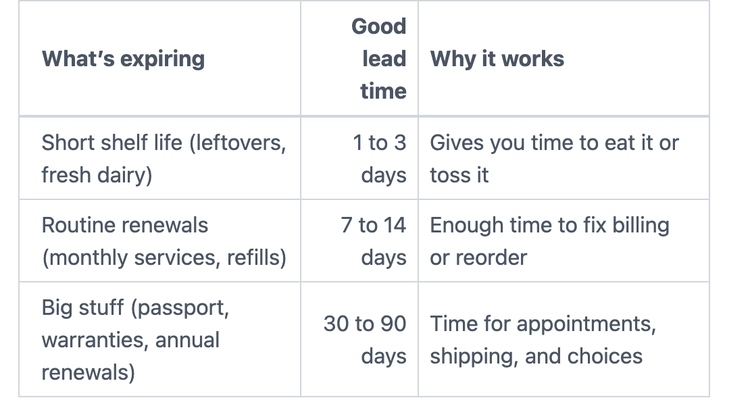
For high-stakes items, set two reminders: a first alert (plan it) and a last call (do it now). Example: “Passport renewal, 90 days” and “Passport renewal, 30 days.”
How to set up an expiration reminder system that actually works
A system only works if you’ll use it when you’re tired, busy, or distracted. Keep it light. The goal isn’t to track every single thing you own. The goal is to catch the expensive stuff and the daily annoyances.
Here’s the copy-today method:
- Pick one tool you already check.
- Add the next three expiration dates you can think of.
- Use clear reminder names with an action.
- Add a short monthly check-in so it stays current.
That’s the whole deal.
Pick one home base, calendar, reminders app, or a simple spreadsheet
Your “home base” is where reminders live. Choose based on how your brain works:
Calendar: Best if you think in dates and schedules. Great for renewals, appointments, and documents.
Reminders app: Best if you like checklists and tapping “complete.” Good for refills, returns, and “cancel trial” tasks.
Spreadsheet: Best if you track a lot (rental properties, business licenses, multiple warranties). It’s also great if you want everything in one view.
Start with one tool. You can always add more later, but you can’t stick with a system that feels like homework.
If you want a simple spreadsheet template, use columns like: Item, expiration date, reminder date(s), location, replacement notes.
Name reminders so you know what to do when the alert pops up
Vague reminders get ignored. Clear reminders get finished.
Use this naming formula: “Item, date, action.”
Examples:
- “Car registration, Feb 10, renew online”
- “Free trial, Jan 6, cancel in app”
- “Warranty, May 1, file claim if needed”
Add one detail line in the notes field. Keep it short: where the item is, the website, a customer service number, or a login hint you’ll recognize.
If your app allows it, attach a photo. A screenshot of the cancel steps, a picture of the receipt, or the label with the model number can save you 20 minutes later.
Use labels and storage to make the reminder match real life
A reminder works best when it points to the real-world item fast. That means quick labeling and clear locations.
Simple habits that take seconds:
- Write the open date on leftovers with a marker.
- Put a bright sticky note on the fridge for “eat first” items.
- Add a small sticker to a pill bottle for “replace by” dates.
- Label a folder “Warranties and receipts” (paper or digital).
Then match your reminder to the location: “Freezer, top bin” or “File cabinet, blue folder.” When the alert hits, you won’t waste time searching.
Build a 10-minute monthly check-in so reminders stay accurate
A reminder system breaks when you stop feeding it new dates. The fix is easy: a short check-in once a month.
Pick a repeating time, like the first weekend of the month. In 10 minutes:
- Review what expires in the next 60 days.
- Add any new purchases with return windows or warranties.
- Delete old reminders you no longer need.
If you share a home with someone, share the calendar or a list. One person might notice the fridge items, the other might handle subscriptions. Shared reminders prevent duplicate buys and missed renewals.
Expiration reminders for real life, food, medicine, and renewals
Once your base system is set, use it where it pays off fastest. These three areas catch most household waste and surprise charges.
Food expiration reminders that cut waste without overthinking it
Don’t track every spice jar. Focus on the big money and high waste: produce, dairy, deli meat, and leftovers.
Try this simple plan:
- Leftovers rule: Label with today’s date, set a 2-day reminder to “eat or freeze.”
- Dairy check: Set a reminder 3 days before the date on milk or yogurt, then plan breakfasts around it.
- Freezer reminder: When you freeze soup or bread, add a reminder 30 days out that says “use freezer items.”
Also use the “first in, first out” trick. Put newer items behind older ones. It’s the grocery store method, and it works at home.
Medicine and skincare expirations, what matters most
Medicine reminders can prevent a stressful scramble. Focus on two things: refill timing and critical expiration dates.
Good targets:
- Prescriptions: set a reminder 30 days before you run out (or based on your refill cycle).
- Inhalers, epinephrine, and other critical meds: set a reminder 60 days before the printed expiration date so you have time to replace them.
For over-the-counter items, replace what you actually use, not everything at once. If you have safety questions, ask a pharmacist. It’s a quick conversation that can prevent a bad decision.
Skincare is similar. Sunscreen expires, and many products have a small “period after opening” symbol (like 12M). If you open a new sunscreen, set a reminder for the end of the season, or a year after opening if you won’t finish it.
Subscriptions, warranties, and memberships, stop surprise renewals
This is where expiration reminders feel like getting a raise. You stop paying for things you don’t want.
Use timing that matches the stakes:
- Free trials: reminder 2 days before (“cancel if not worth it”)
- Annual renewals: reminders 30 days and 7 days before
- Warranty end dates: reminders 90 days and 30 days before
Add a note that tells you how to cancel. Better yet, screenshot the cancel steps and attach it to the reminder. When the alert pops up, you won’t have to hunt through settings or emails.
For warranties, save proof of purchase and the serial number in the same place. Your reminder should point you to it.
Conclusion
Forgetting dates is normal. Paying for it over and over doesn’t have to be.
A solid expiration reminder setup comes down to four moves: pick one tool you’ll actually check, choose a lead time that fits the item, name reminders with a clear action, and do a 10-minute monthly review to keep it fresh. Small effort, steady payoff.
Your next step is simple: choose three things that expire soon (leftovers, a free trial, and a document renewal are great picks) and set those reminders right now. Once you feel that first “saved it in time” win, you’ll want to add more. Peace of mind is nice, saving money feels even better. Use ExpiryEdge for everything.
Related Articles
Expiration Reminder System (Stop Wasting Money on Forgotten Dates)
The Complete Guide to Appointment Reminders: Reduce No-Shows by 90%
Software License Management Tools: The 2025 Buyer's Guide
Popular Topics
Stay Updated
Get the latest insights on compliance tracking and deadline management delivered to your inbox.